© Microhard Systems Inc. Confidential 56
3.0 Mesh Configuration
Hop Zones
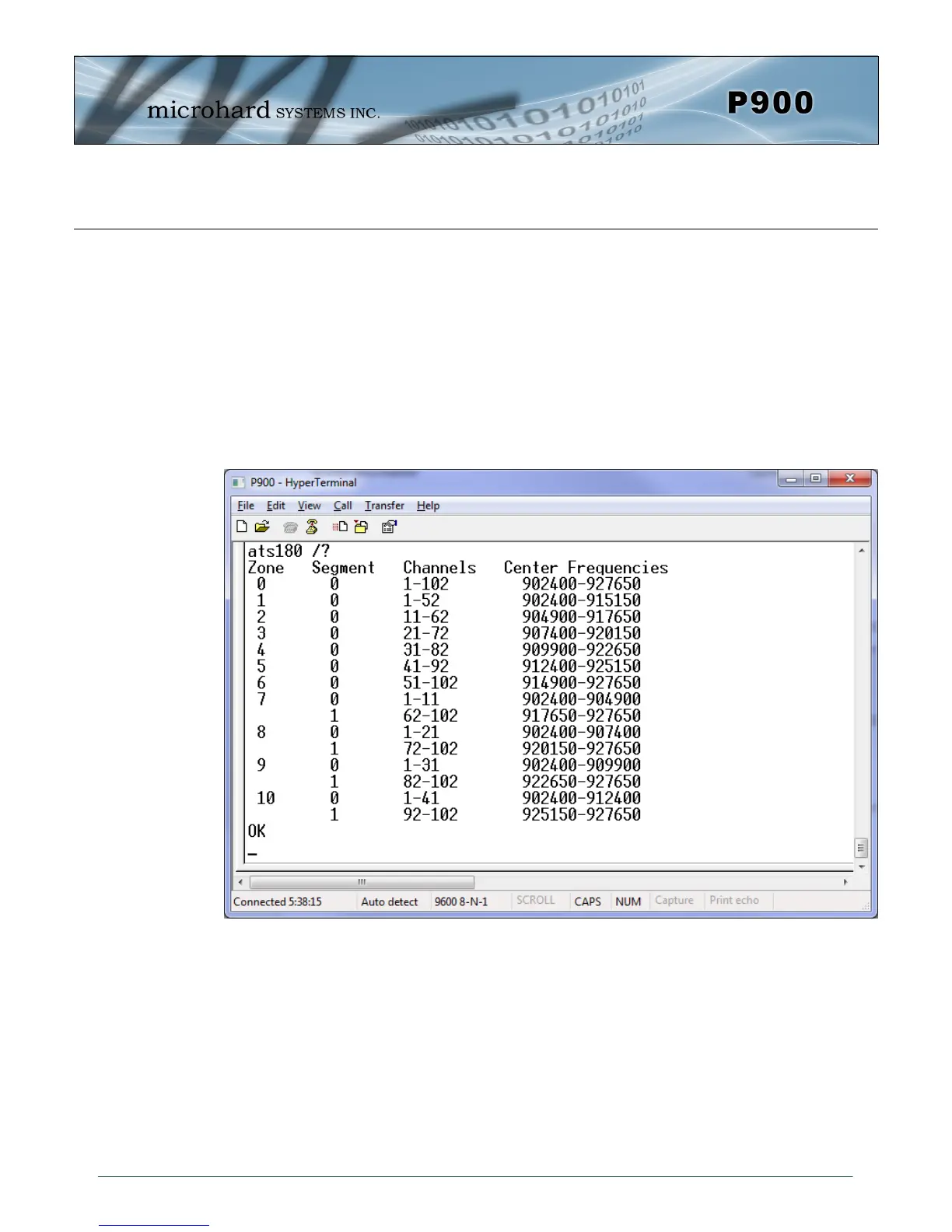
Register S180: Hop Zone selects the available frequency zones used by the Pico Series, as there may
be times when multiple systems are deployed within close proximity, or there may be outside interfer-
ence or noise that requires sections of the available spectrum to not be included in the Hop Pattern gen-
eration.
S180 = 0 - Use Entire 902-928 MHz ISM Band
Several Hop Zones are predefined by querying the S180 Register as seen below. The ranges listed are
the frequency ranges that are available to create the hop table. Using Hop Zones several frequency
Bands can be excluded. Also if multiple systems are being deployed within close proximity, Hop Zones
can be used to minimize overlap in the frequencies used to populate the Hopping Pattern.
Image 3-11: Hop Zones


 To Next Page