English - 22
003-2707-99
© Midmark Corporation 2015 TP202 20-42-FO-00014 Rev A1 C2169
Cycle Operation - continued
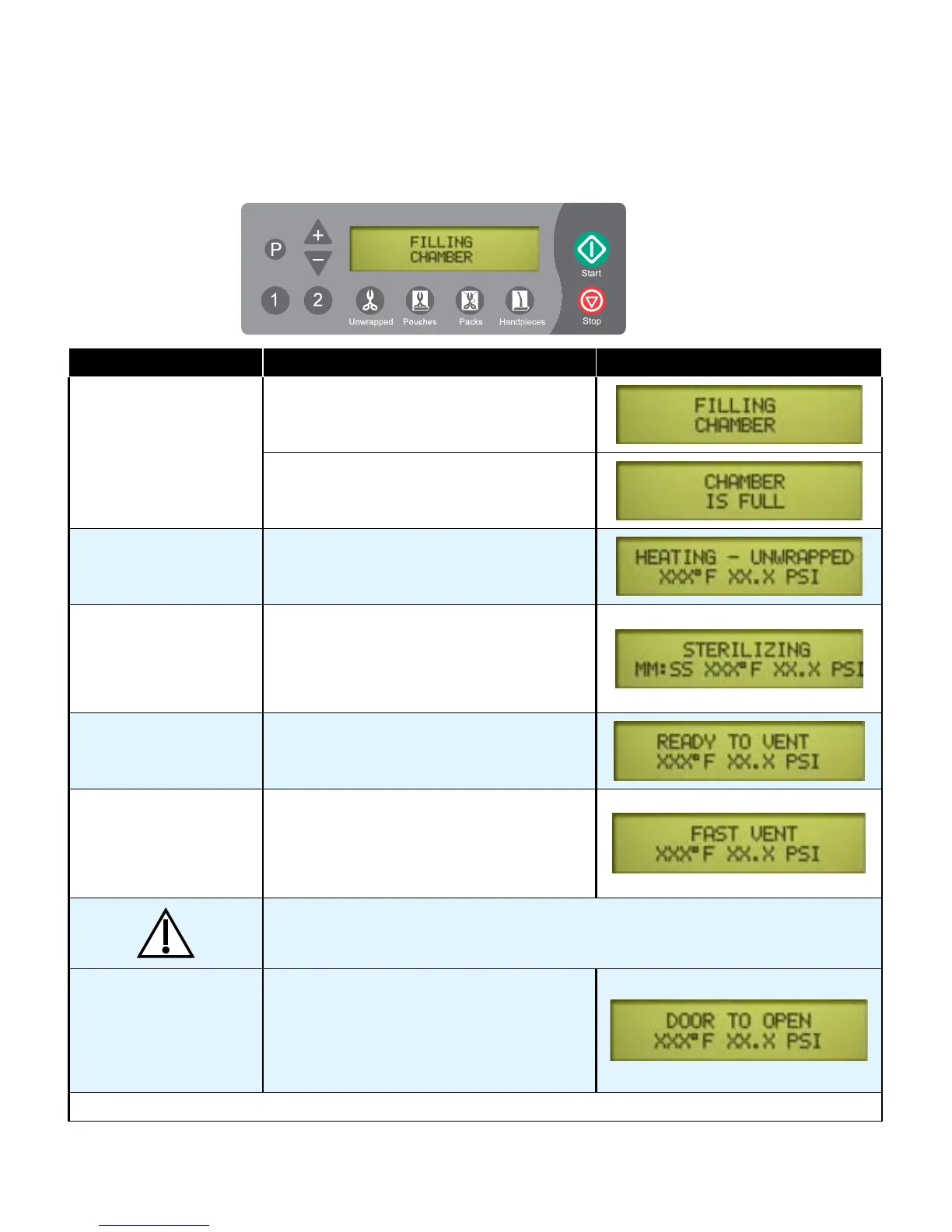
Afterthe‘Start’buttonispressed,thestage/statusofthecurrentcyclewillappearonthedisplay.
The chart below illustrates the display messages that will appear during each stage of the cycle.
Stage of Cycle Description Display
Filling Chamberbeginsllingwithwater.
When water reaches the proper level...
Heating Display changes as temperature and
pressure in chamber changes.
(Metric units may be displayed if desired).
Sterilizing Sterilizing begins when correct
temperature / pressure is reached.
Time remaining in cycle counts down
while current temperature / pressure in
chamber is continuously updated.
Ready to Vent ‘READY TO VENT’ is displayed when
10 seconds remain in sterilization cycle.
Fast Vent Whentimerunsoutinsterilizingmode,
the vent valve opens. Steam / water are
released back into the reservoir.
The display changes as temperature and
pressure in chamber changes.
Caution
Keep clear when M9/M11 door is ready to open!
Failure to do so could result in severe burns from steam being released.
Door To Open
(automatic)
Pertains only to
M9/M11 UltraClave™
An audible signal is emitted to indicate
that the door is about to open.
Whenpressureinchamberreacheszero,
the door actuates to partially open (drying
mode) position.
This chart continues on the following page...



 To Next Page