EasyManua.ls Logo

Miele G2000 - Page 159

Miele G2000
221 pages
Print Icon
To Next Page IconTo Next Page
To Previous Page IconTo Previous Page
Loading...
Technical Information
G1000 / G2000 Dishwashers
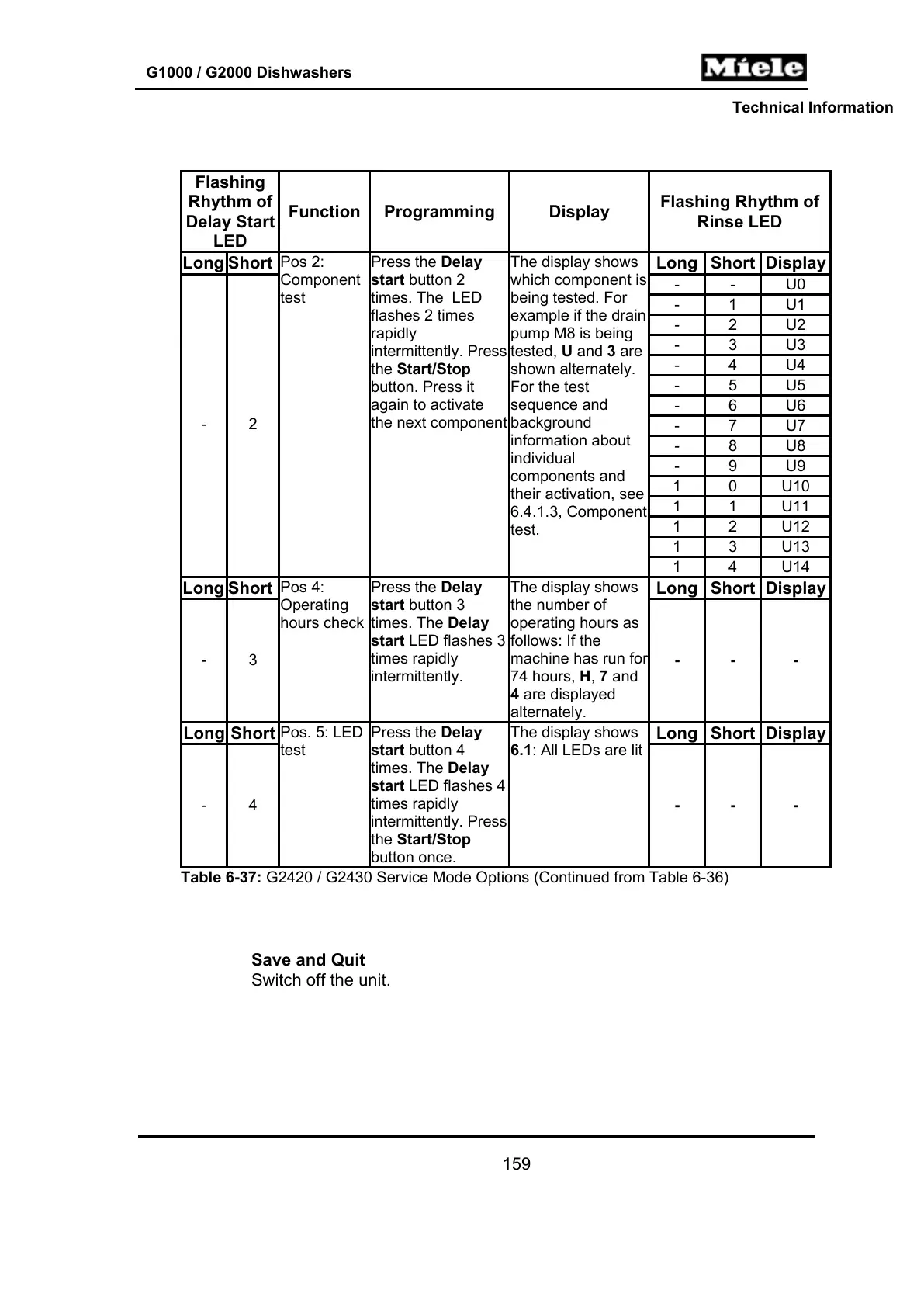
Flashing
Rhythm of
Delay Start
LED
Function Programming Display
Flashing Rhythm of
Rinse LED
Long Short Long Short Display
- - U0
- 1 U1
- 2 U2
- 3 U3
- 4 U4
- 5 U5
- 6 U6
- 7 U7
- 8 U8
- 9 U9
1 0 U10
1 1 U11
1 2 U12
1 3 U13
- 2
Pos 2:
Component
test
Press the Delay
start button 2
times. The LED
flashes 2 times
rapidly
intermittently. Press
the Start/Stop
button. Press it
again to activate
the next component
The display shows
which component is
being tested. For
example if the drain
pump M8 is being
tested, U and 3 are
shown alternately.
For the test
sequence and
background
information about
individual
components and
their activation, see
6.4.1.3, Component
test.
1 4 U14
Long Short Long Short Display
- 3
Pos 4:
Operating
hours check
Press the Delay
start button 3
times. The Delay
start LED flashes 3
times rapidly
intermittently.
The display shows
the number of
operating hours as
follows: If the
machine has run fo
r
74 hours, H, 7 and
4 are displayed
alternately.
- - -
Long Short Long Short Display
- 4
Pos. 5: LED
test
Press the Delay
start button 4
times. The Delay
start LED flashes 4
times rapidly
intermittently. Press
the Start/Stop
button once.
The display shows
6.1: All LEDs are lit
- - -
Table 6-37: G2420 / G2430 Service Mode Options (Continued from Table 6-36)
Save and Quit
Switch off the unit.
159

Table of Contents

Related product manuals