MacroPATH and MacroPATH Basic QX Series
MM161-001 – Operator Manual
66
4.2. PC settings for MacroPATH Viewer
MacroPATH Viewer can access files acquired by the laboratory-installed MacroPATH only if both have the
same saving folder set in Setting storage, as per these instructions:
1. Launch MacroPATH viewer
2. Click the “Settings” icon on the screen
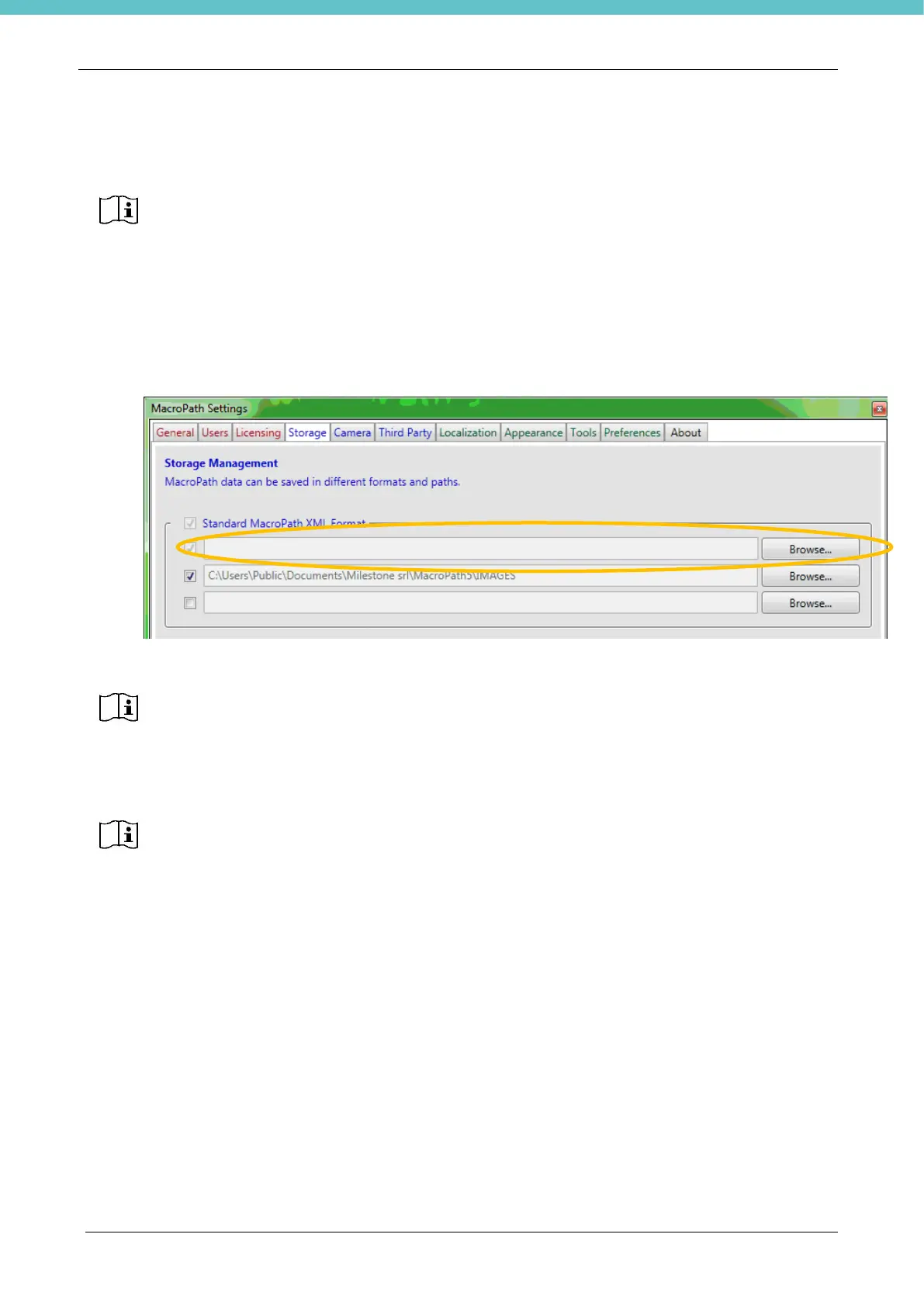
3. In the Storage window click on the first Browse button as shown:
4. Set the same address contained in Setting storage of the laboratory’s MacroPATH.
It is now possible to work from two (or more) work stations. When a new case is added from the histological
laboratory, every additional work station is able to view and print the same images.
Milestone strongly recommends that the following procedures be carried out by your local
Network/IT Manager.
Before proceeding with the following instructions, it is required to connect the PC with the
licensed MacroPATH software installed and the PC with MacroPATH Viewer to the local
network, setting it with appropriate parameters (see chapter 3.6.4)
For correct installation it is essential to enter the server folder shared by the MacroPATHs
in the first address, as shown in the figure
Milestone strongly recommends storing the files on a server with an automated backup
procedure. Contact your local Network/IT Manager.
\\SERVER\Pathological Anatomy\Laboratory\MacroPath\IMAGES



 To Next Page