OM-277115 Page 58
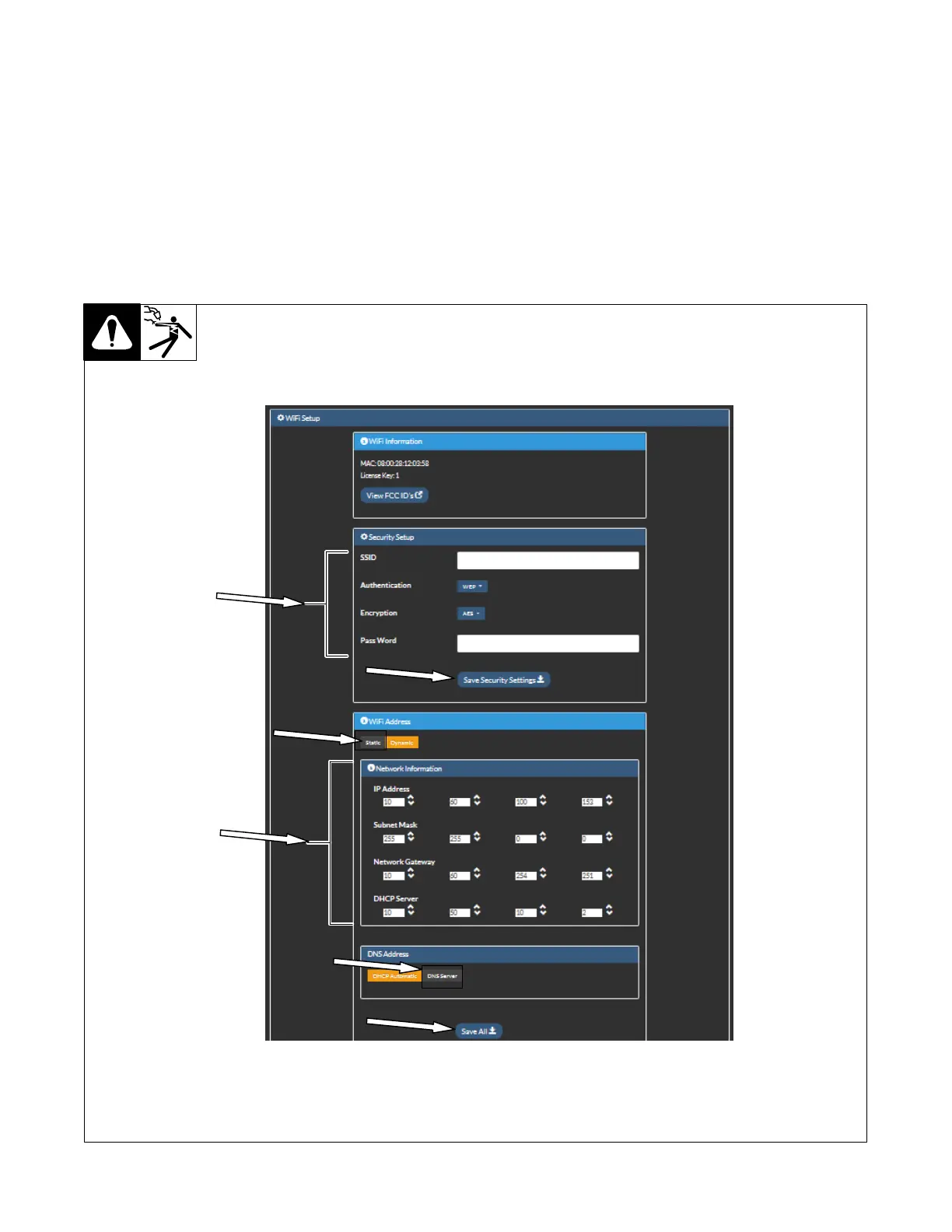
B. WiFi Connection Using Static Addressing
1. On the Setup page, under WiFi Settings, click Edit (see Figure 10-6).
2. On the screen that appears, under Security Setup, enter your network name (SSID), security type, and security key. This information is found on
the Network Connectivity Survey completed by your IT Department (see Section 10-2).
3. Click Save Security Settings to save your wireless network settings.
4. Under WiFi Address, select Static.
5. Under Network Information, enter your IP address, subnet mask, and network gateway. This information is found on the Network Connectivity
Survey completed by your IT Department (see Section 10-2).
6. Under DNS Address, select DNS Server. Enter DNS address from the Network Connectivity Survey completed by your IT Department (see
Section 10-2).
7. When finished, click Save All.
8. Cycle the machine power by turning the machine off, waiting until the Power On light goes off, and turning power on again.
Figure 10-8. Configuring WiFi Connection Using Static Addressing











 To Next Page