USE AND MAINTENANCE MANUAL
6.7. PROGRAM BACKUP/RESTORE
Before starting a program backup or restore procedure, make sure the Enable HMI update
machine parameter is set at OFF and that the machine is not working or is paused.
If necessary, press the icon to return to the main page.
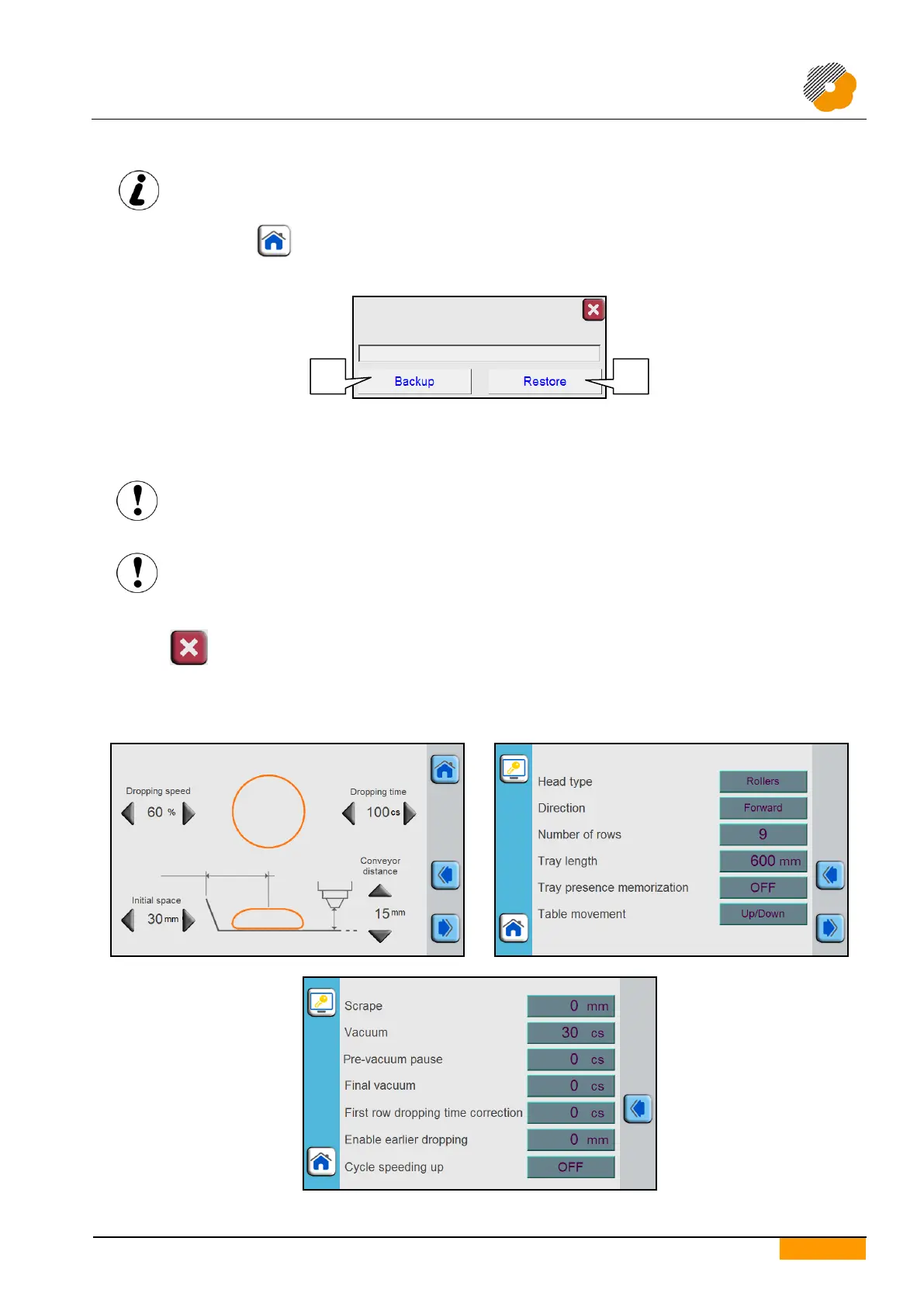
Insert the flash drive into the USB port on the control panel (optional) to make the pop-up shown below appear.
Press the Backup push-button to save all the programs that are present in the list on the flash drive.
Press the Reset push-button to reset the previously saved programs from the flash drive.
If the user password is enabled, insert the user password that is set.
Backing up the program on the flash drive overwrites any saved data that are already present.
The overwritten data will be lost and will not be recoverable.
Restoring the programs from the flash drive returns the Programs list to when the data on the
flash drive was last saved.
All modifications made after this will be lost and will not be recoverable.
At the end of the procedure, remove the flash drive to close the pop-up.
Press the icon to exit without starting the procedure.
6.8. PROGRAMMING EXAMPLES
6.8.1. FIXED PRODUCT


 To Next Page