USE AND MAINTENANCE MANUAL
6.4. COPYING A PROGRAM
Access the Programs list, select the position where the already-created program to be copied is, and confirm the
choice by pressing the icon
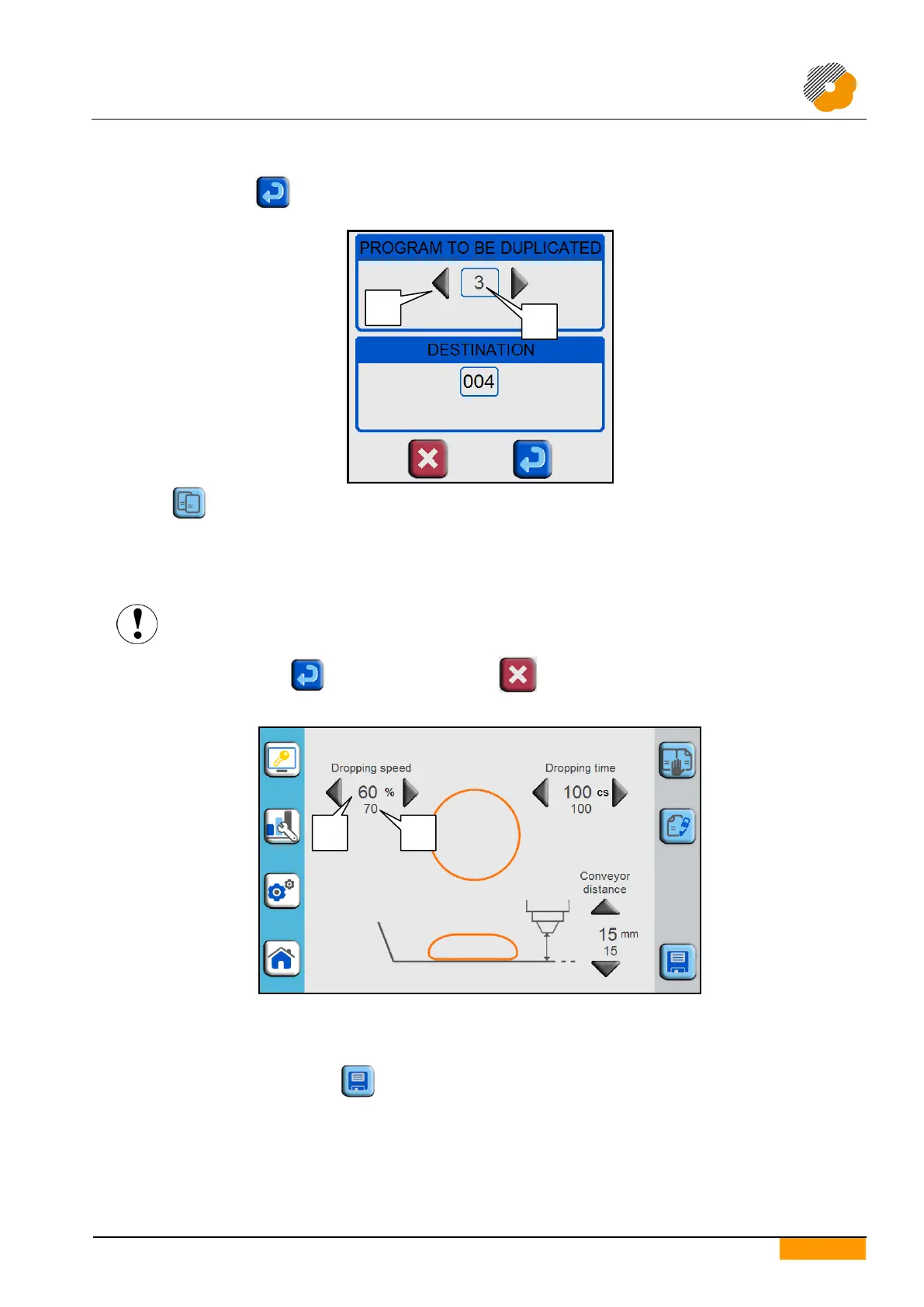
Press the icon to make the window appear from which to select the program to be copied. Make your choice
using the arrows (part 1) or by entering the required position number using the numeric keypad that appears when
the displayed number is pressed (part 2).
The underlying field shows the number and name (if present) of the destination position previously chosen as the
destination program (which will be overwritten).
Copying a program will overwrite the program name and all the parameters in the destination
position. The overwritten data are lost and cannot be recovered.
To begin copying, press the icon, otherwise press the icon to exit without making any modification.
6.5. MODIFYING PARAMETERS DURING OPERATION
During working, the display shows the work page of the selected program that gives the main product parameters.
The current value (part 1) is shown for each parameter together with the value saved in the program (part 2).
Temporarily increasing or decreasing the values does not modify the data saved in the program being used.
To save the modifications press the icon.


 To Next Page