USE AND MAINTENANCE MANUAL
Press the icon to set or modify the program name, using the keyboard that appears on the display.
Key in the required name and confirm the operation with
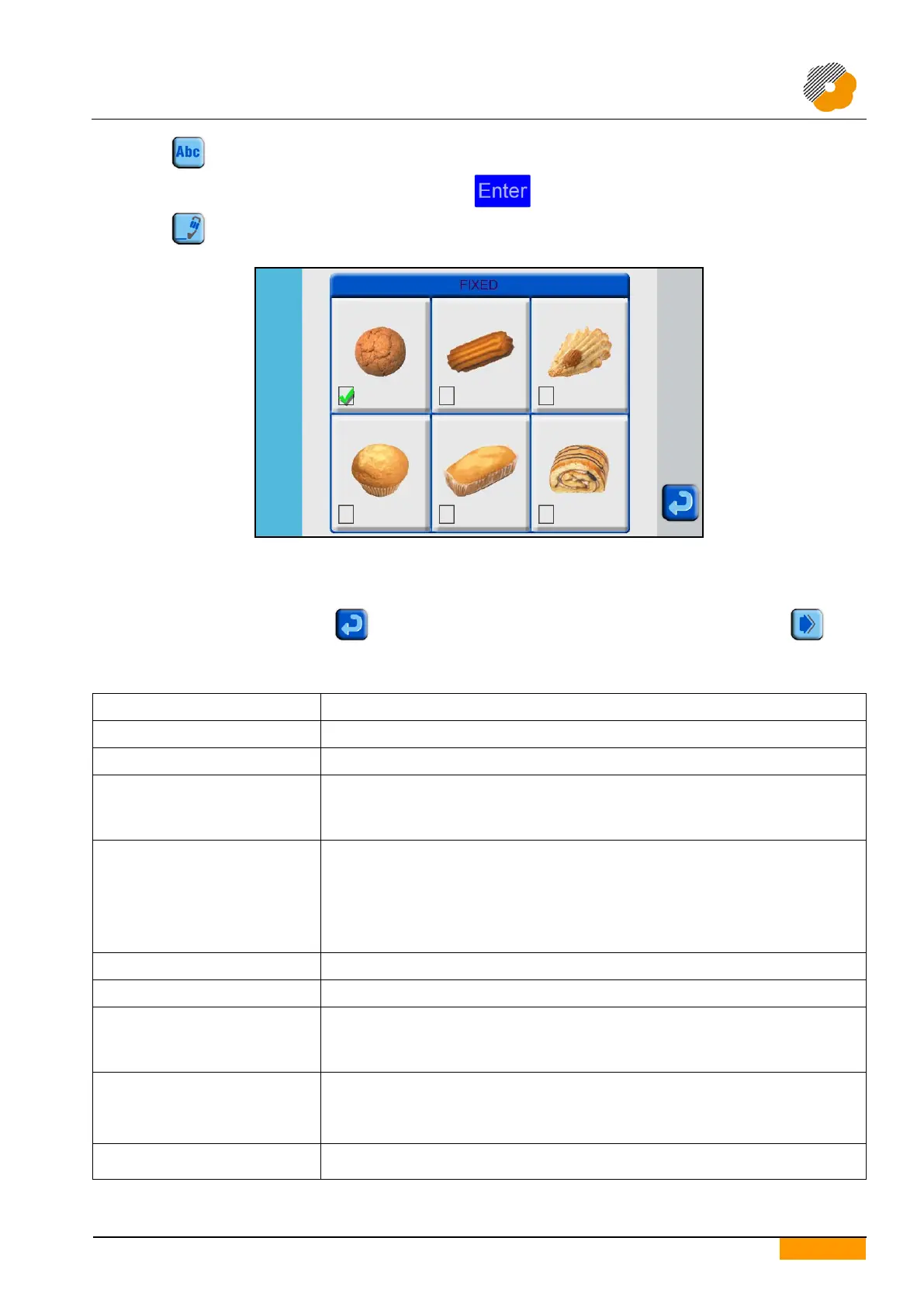
Press the icon to select or modify the type of product to be made.
Select from among the proposed alternatives by pressing directly on the image of the product itself. A tick appears
on the selected product to confirm the choice made.
End the operation by pressing the icon to return to the first programming display, then press the icon
to return to continue defining or modifying the product parameters.
6.3. DESCRIPTION OF PRODUCT PARAMETERS
Distance between the nozzles and the tray during dosing
Conveyor speed during the dosing phases
- ON: the simultaneous movement of table and conveyor to reach the set row
positioning is active thus allowing to increase the machine productivity
- OFF: speeding up of the work cycle is inactive
Operative only if Table movement is set on Up/Down.
- Forward: the tray moves in the normal running direction
- Backward: the tray moves in a direction that is opposite the normal running
direction
- Forward/Backward: the tray is inserted and extracted from the tray feeding area;
the machine works Backward.
- Backward/Forward: the tray is inserted and extracted from the tray removal area;
the machine works Forward.
Dosing roller rotation speed. Regulates the quantity of product to be dosed
Dosing roller rotation time. Regulates the quantity of product to be dosed
If Table movement is set on Up/Down:
- dosing starts when the table is at the set distance as to the height to be reached.
If Table movement is set on Top stop/Low stop:
- dosing starts when the tray is at the set distance as to the position to be reached.
Enable table lowering at tray
end
Can be selected if Table movement is set at Top stop.
- ON: the table lowers after the last row and returns to the up position with the first
row of the next tray
- OFF: the table remains up even during tray change
Has an effect on the true position of the tray to compensate forward movement during
the product dropping phase when using the wire cutting system


 To Next Page