33
Procedures
Press th
”ENTER” ke
.
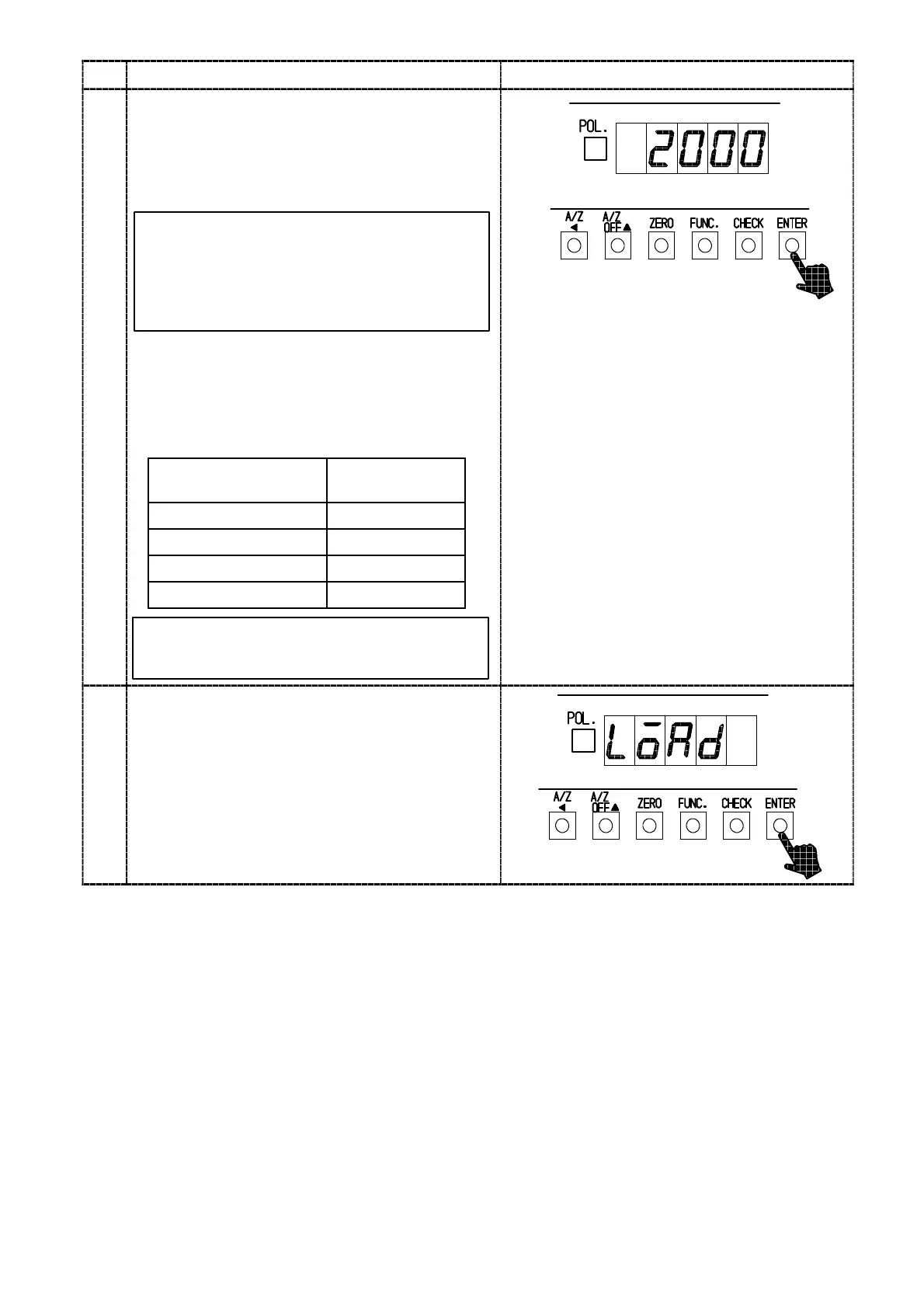
The load display will show “2000”, and the digit
of minimum display will lights on and off.
When the calibration has been already completed,
that maximum display value registered at that
time will be displayed.
5
By the setting of minimum scale, the digit
of minimum display that lights on and off
will be as follows:
The minimum scale 1,2,5 10
0
digit
The minimum scale 10 10
1
digit
Set the maximum display value with “A/Z A”,
“A/Z OFF Y” or “CHECK” keys.
Setting range for the maximum display value will
be (the minimum scale×100)〜99 990.
In order to make effective use of the
performance, set within the following ranges.
“A/Z A ” key :Set value carry key
“A/Z OFF Y” key :Set value Increment key
“CHECK” key :Set value Initialization key
Setting range for max.
display value
100〜10 000
200〜20 000
500〜50 000
1 000〜99 990
Minimum scale
1
2
5
10
By pressing the key continuously,
increment can be provided continuously.
6
Press the “ENTER” key.
The load display will show “LOAD”.



 To Next Page