34
Procedures
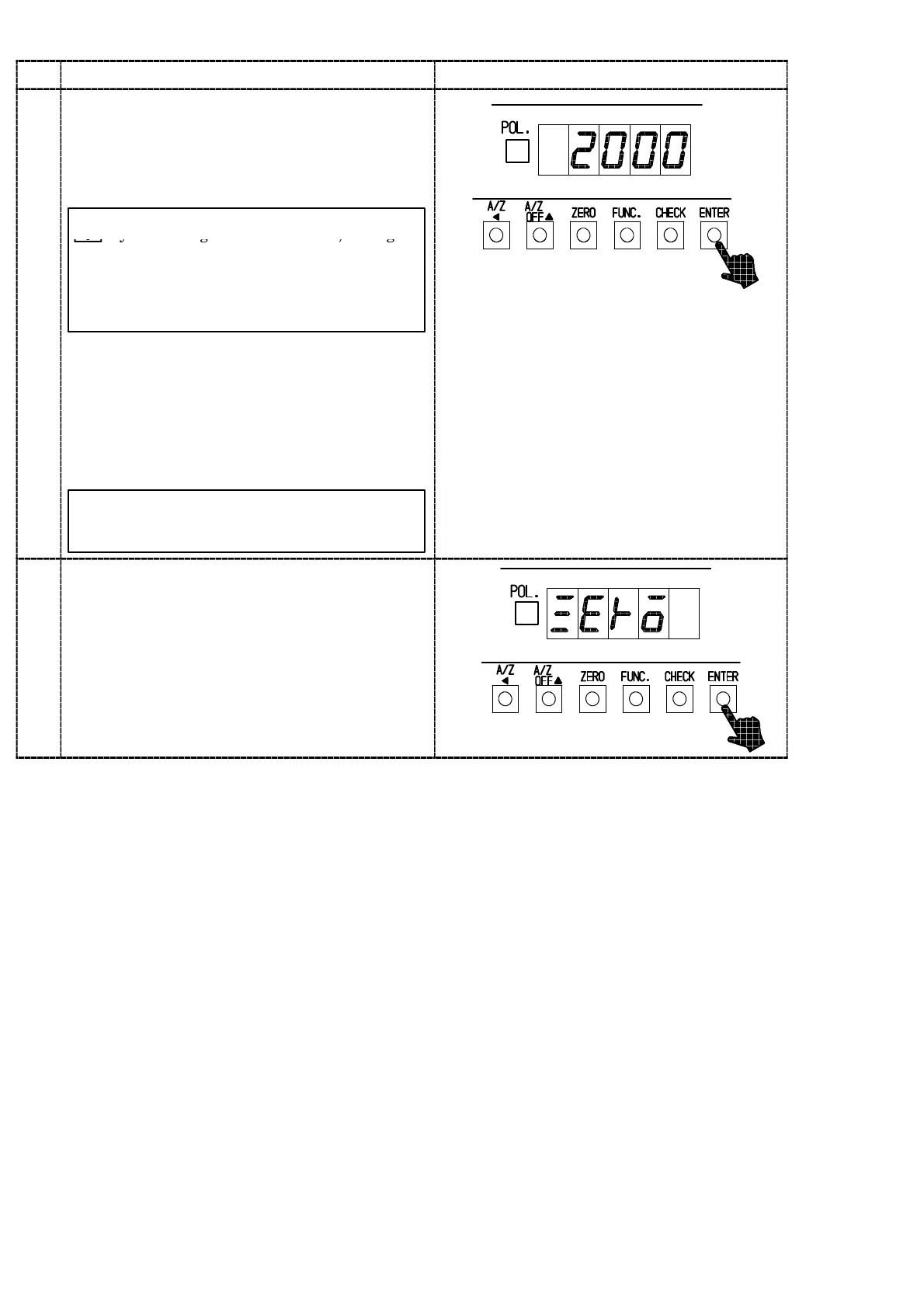
Press the “ENTER” key.
The load display will show “2000”, and the digit
of 10
0
will light on and off.
When the calibration has been already completed,
the output value of load cell registered at that
time applied actual load will be displayed.
By the setting of minimum scale, the digit
7
of minimum display that lights on and off
will be as follows:
The minimum scale 1,2,5 10
0
digit
The minimum scale 10 10
1
digit
Set the load value which is applied actually on
the load cell with the right keys.
The load value applied on the load cell should
”A/Z A ” key :Set value carry key
“A/Z OFF Y ” key :Set value Increment key
“CHECK” key :Set value Initialization key
By pressing the key continuously,
increment can be provided continuously.
be less than th
maximum display value se
in
step 5, and at the same time within the range
of (the minimum scale ×100)〜99 990 which
can be applied on the load cell as the
maximum load value.
8
Press the “ENTER” key.
The load display will show “ZERO”.
Now, set the initial load application.



 To Next Page