74
8. Function mode
Warning ● During the Function mode, the instrument suspends measurement.
In due course, even when input of strain gage applied transducer may
change, various kinds of outputs will not change, which may cause
destruction in equipment due to malfunction in peripheral
equipments.
● When the HOLD signal is input with the condition that the display or
BCD output is targeted to hold (F −50), the Function mode can’t be
entered. Before entering Function mode, be sure to cancel the input
of HOLD.
8−1. Setting method for Function mode
Procedures
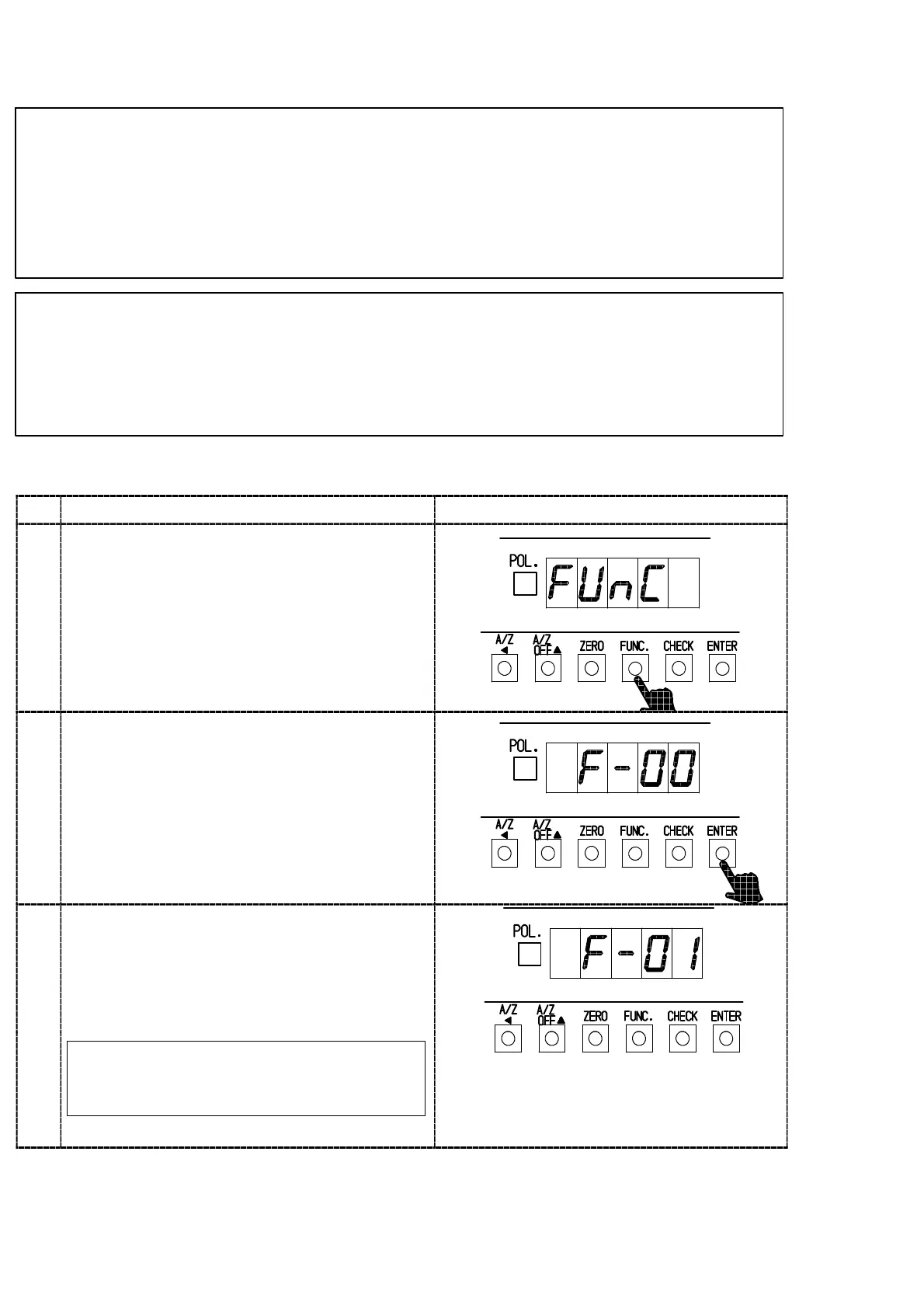
1
Press the “FUNC.” key for about one second.
The load display will show “FUNC”.
2
Press the “ENTER” key. Function mode can be
entered, then the load display will show “F−**”.
The last registered Function No. is shown at **.
Suspend the setting of Function mode, then press
the “FUNC” key when returning to the
Measurement mode is required.
3
Select the Function No. that has desired to set
with the right keys.
Suspend the setting of Function mode, then
Measurement mode can be re−entered by
pressing the “FUNC.” key.
By pressing the key continuously,
continuous increase will be provided.
“A/Z A ” key :Set value carry key
“A/Z OFF Y” key :Set value Increment key
“CHECK” key :Set value Initialization key



 To Next Page