Print or save - miniDSP Flex
https://docs.minidsp.com/product-manuals/flex/print_page.html
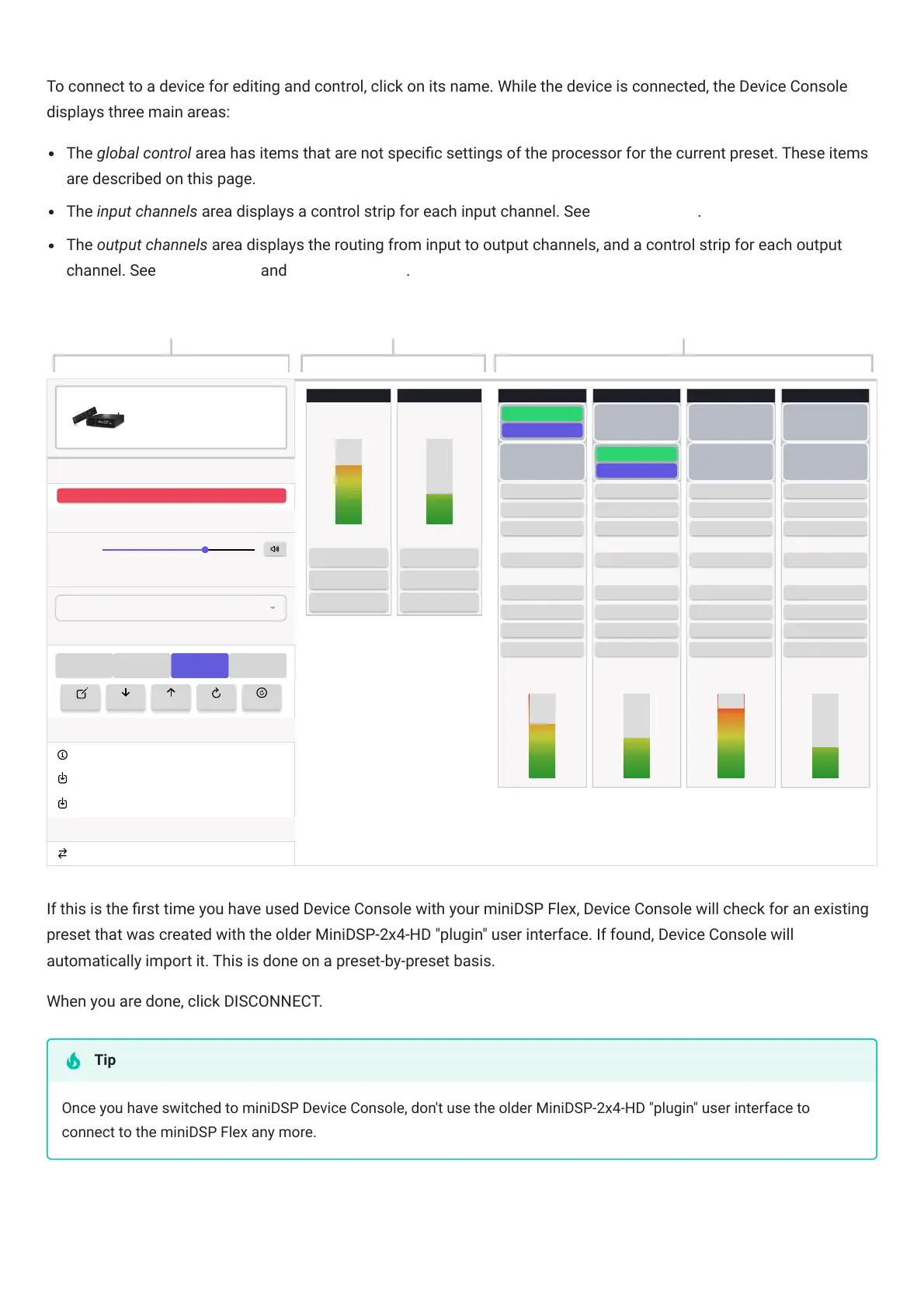
To connect to a device for editing and control, click on its name. While the device is connected, the Device Console
displays three main areas:
The global control area has items that are not specic settings of the processor for the current preset. These items
are described on this page.
The input channels area displays a control strip for each input channel. See Input channels.
The output channels area displays the routing from input to output channels, and a control strip for each output
channel. See Signal routing and Output channels.
Connection
Master Volume
Input Source
Presets
1 2
3 4
Firmware
Display Versions
Refresh DSP Firmware
Refresh XMOS Firmware
Model Conversion
Convert To Flex (DL)
DISCONNECT
-41.5 dB
TOSLINK
RENAME IMPORT EXPORT RESET RESET-ALL
Global control Input channels Output channels
Flex
Output 1
Input 2
-43.1
Gain (dB)
0
PEQ
0
PEQ
MUTEMUTE
Input 1
-14.0
Gain (dB)
0
PEQ
0
PEQ
MUTEMUTE
Output 2 Output 3 Output 4
RMS-Meter (dBFS)RMS-Meter (dBFS)
PEQ
CROSSOVER
-18.9
FIR
Delay (ms)
0
Gain (dB)
0
INVERT
MUTE
COMPRESSOR
RMS-Meter (dBFS)
PEQ
CROSSOVER
RMS-Meter
FIR
Delay (ms)
0
Gain (dB)
0
INVERT
MUTE
COMPRESSOR
(dBFS)
PEQ
CROSSOVER
RMS-Meter
FIR
Delay (ms)
0
Gain (dB)
0
INVERT
MUTE
COMPRESSOR
(dBFS)
PEQ
CROSSOVER
RMS-Meter
FIR
Delay (ms)
0
Gain (dB)
0
INVERT
MUTE
COMPRESSOR
(dBFS)
-42.9-3.5
-32.4
INPUT 1
0 DB
INPUT 1
0 DB
INPUT 1
0 DB
INPUT 1
0 DB
0 DB
INPUT 2
0 DB
INPUT 2
0 DB
INPUT 2
0 DB
INPUT 2
If this is the rst time you have used DeviceConsole with your miniDSPFlex, DeviceConsole will check for an existing
preset that was created with the older MiniDSP-2x4-HD "plugin" user interface. If found, DeviceConsole will
automatically import it. This is done on a preset-by-preset basis.
When you are done, click DISCONNECT.
Once you have switched to miniDSPDeviceConsole, don't use the older MiniDSP-2x4-HD "plugin" user interface to
connect to the miniDSPFlex any more.
Tip



 To Next Page