For macOS, navigate to:
XMOS Firmware ⟩ Firmware_Upgrade_Tools ⟩ Mac
Double-click on the miniDSP USB DFU.app program to run it.
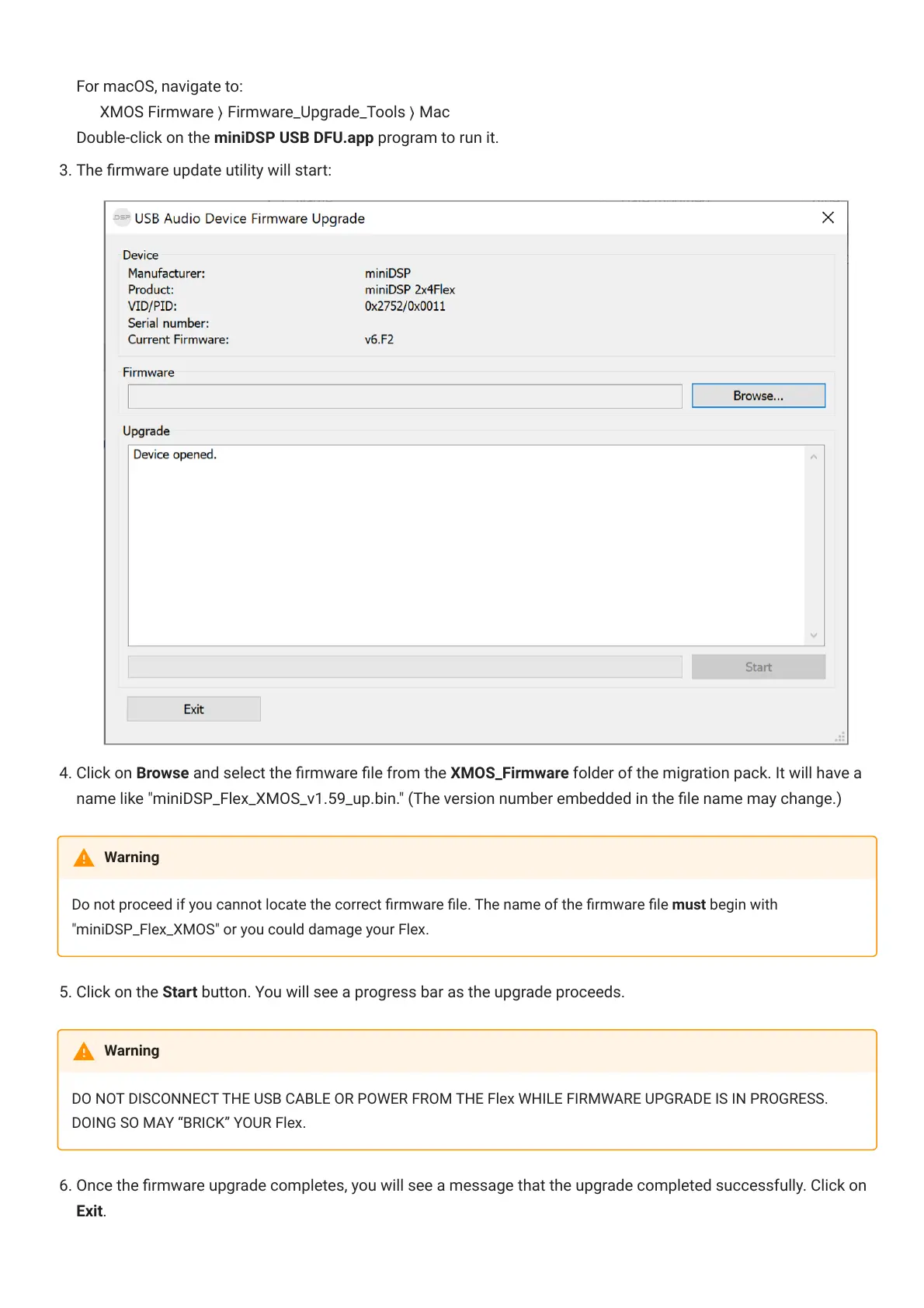
3. The rmware update utility will start:
4. Click on Browse and select the rmware le from the XMOS_Firmware folder of the migration pack. It will have a
name like "miniDSP_Flex_XMOS_v1.59_up.bin." (The version number embedded in the le name may change.)
Do not proceed if you cannot locate the correct rmware le. The name of the rmware le must begin with
"miniDSP_Flex_XMOS" or you could damage your Flex.
5. Click on the Start button. You will see a progress bar as the upgrade proceeds.
DO NOT DISCONNECT THE USB CABLE OR POWER FROM THE Flex WHILE FIRMWARE UPGRADE IS IN PROGRESS.
DOING SO MAY “BRICK” YOUR Flex.
. Once the rmware upgrade completes, you will see a message that the upgrade completed successfully. Click on
Exit.
Warning
Warning



 To Next Page