•
•
•
•
•
•
Getting started
MiR200™ User Guide, Robot interface 2.0, 11/2018 v.1.2 16
4.4 Charging the robot
The robot arrives with a charged battery and can drive for up to three hours before recharging is
required.
Follow these steps to charge the robot using the enclosed charging cable:
Step Action
1
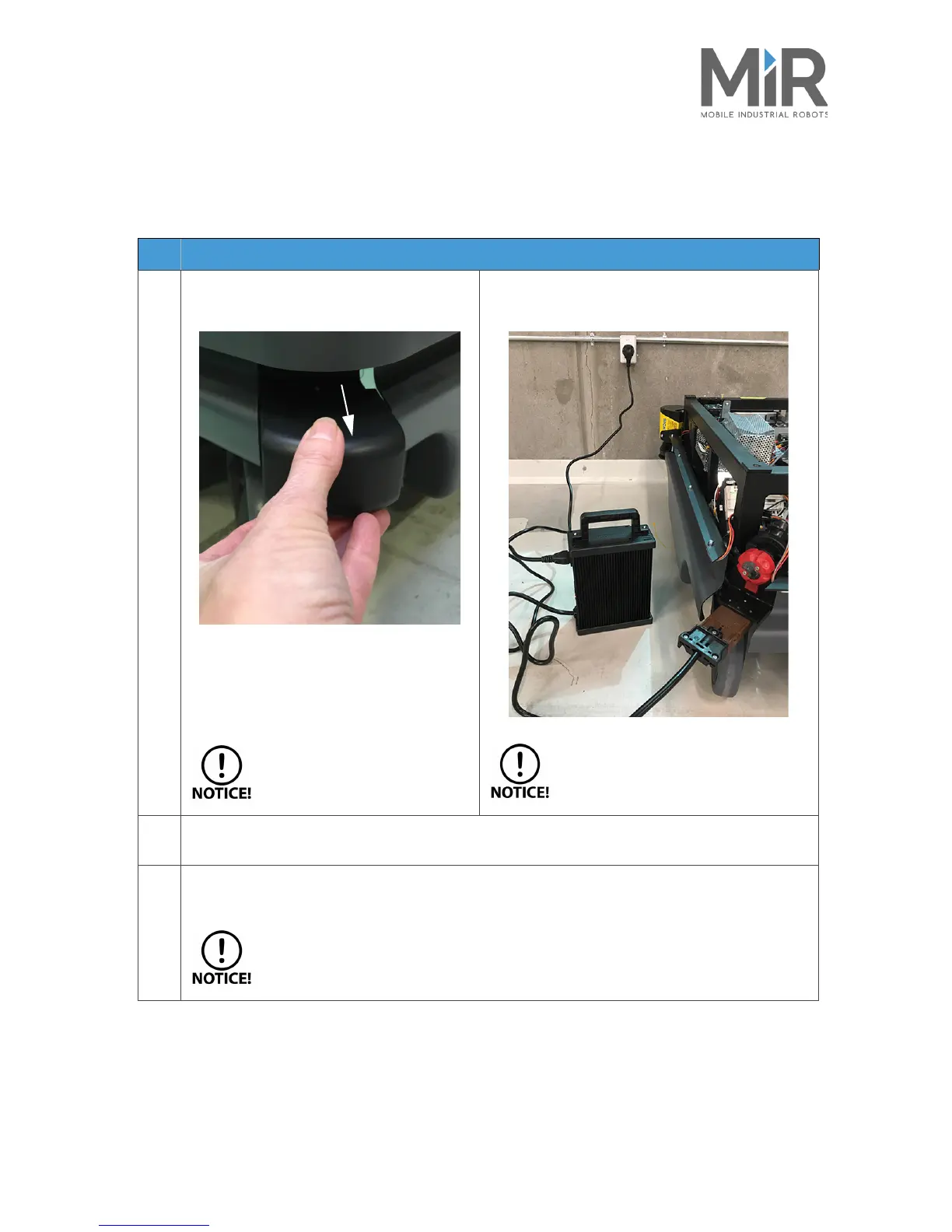
Remove the rear corner by pulling it towards
you. You may have to apply a bit of force the
first couple of times.
To avoid fast discharging, it is
recommended to turn off the
robot while charging.
Then attach the charger to the robot’s charging
socket and to a power outlet. Turn on the rocker
switch on the robot to begin charging.
Use only the original charging cable.
2
After a maximum of four and a half hours, the robot is fully charged. The robot emits a green light
when the battery is full.
3
Turn off the rocker switch and disconnect the charging cable from the robot. Slide the corner cover
back on.
The robot detects both cable and activated charging-button and will go into
emergency stop in both cases.


 To Next Page