7 Maintenance
7.1 Overview
The following maintenance schedules give an overview of regular cleaning and parts replacement
procedures.
The stated intervals are indicative and depend on the operating environment and frequency
of usage of the robot.
7.1.1 Regular checks and maintenance tasks
Weekly
Once a week carry out the following maintenance tasks:
Parts Maintenance task
Robot cover and sides Clean the robot on the outside with a damp cloth.
Do not use compressed air.
Laser scanners Clean the optics covers of the scanners for optimum
performance. Avoid aggressive or abrasive cleaning agents.
Static charges cause dust particles to be attracted
to the optics cover. You can diminish this effect by
using the anti-static plastic cleaner (SICK part no.
5600006) and the SICK lens cloth (part no.
4003353). See the manufacturer’s own documentation.
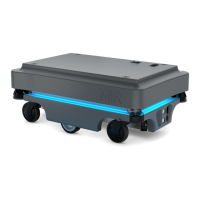
Caster wheels (the four corner
wheels)
Remove dirt with a damp cloth, and make sure nothing is
entangled in the wheels.
Drive wheels (the two middle
wheels)
Remove dirt with a damp cloth, and make sure nothing is
entangled in the wheels
LED light band Check if the LED light band is intact. Does the light show all the
way around the robot.


 To Next Page