en-US
|
32
|
User Manual
|
MD-500
1699503426 | REV A | 05.2021
© Mitchell International
Display Type Button Denitions
Use English/Standard Units
Use English/Standard Units
Selecting English/Standard Units will switch from Metric
Units to English/Standard Units.
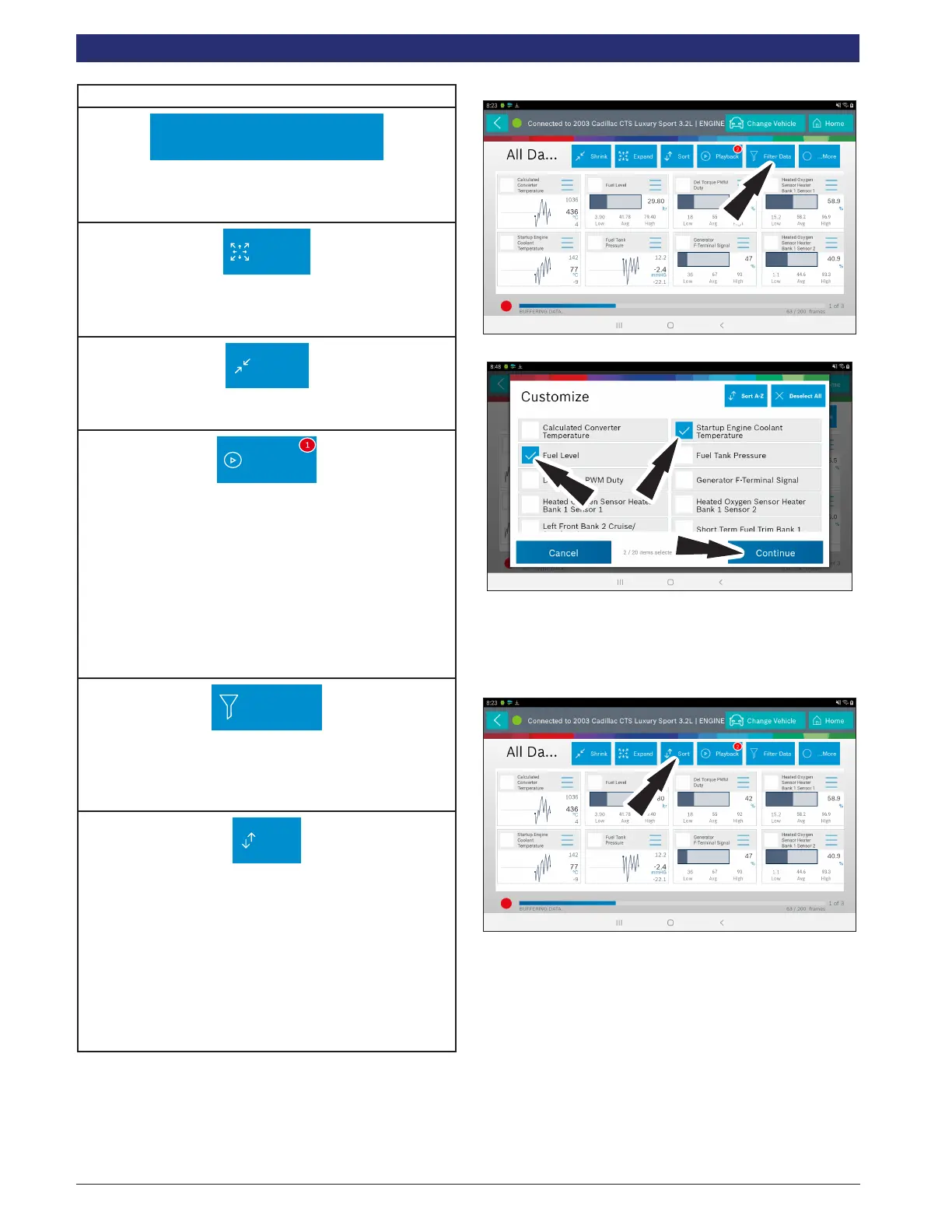
Expand
Expand button
To view the data in the enlarge view, press the Expand
button.
Shrink
Shrink Function
To zoom out press the Shrink button.
Playback
Playback:
• Select Playback to view previously recorded data
streams.
• Recordings are listed from newest to oldest. When
the folder is full, the newest recording pushes the
oldest one out of the list. Currently, there is no way
to manually delete recordings.
• To view recordings, select the Recordings button
near the top of the display.
• Select the desired recording.
Filter Data
Filter Data:
1. Choose only the data you want to view by checking
the box in front of each desired data item.
2. Select the Sort button.
Sort
Sort Function:
• Select Sort to sort data items.
• Data may be sorted alphabetically, by graph, or by
selection (checkbox checked).
• Sorting data items will reset the timeline frame
counter, so sort these items before recording data.
If sorting data while recording the recording will
have a period of time where there is no data avail-
able.
Select Function
1. Select the Filter Data.
2. Choose only the data you want to view by checking the
box in front of each desired data item.
3. Select apply.
Sort Function
1. Select Sort to sort data items.



 To Next Page