USER GUIDE
Mitel 5634 VoWi-Fi Handset
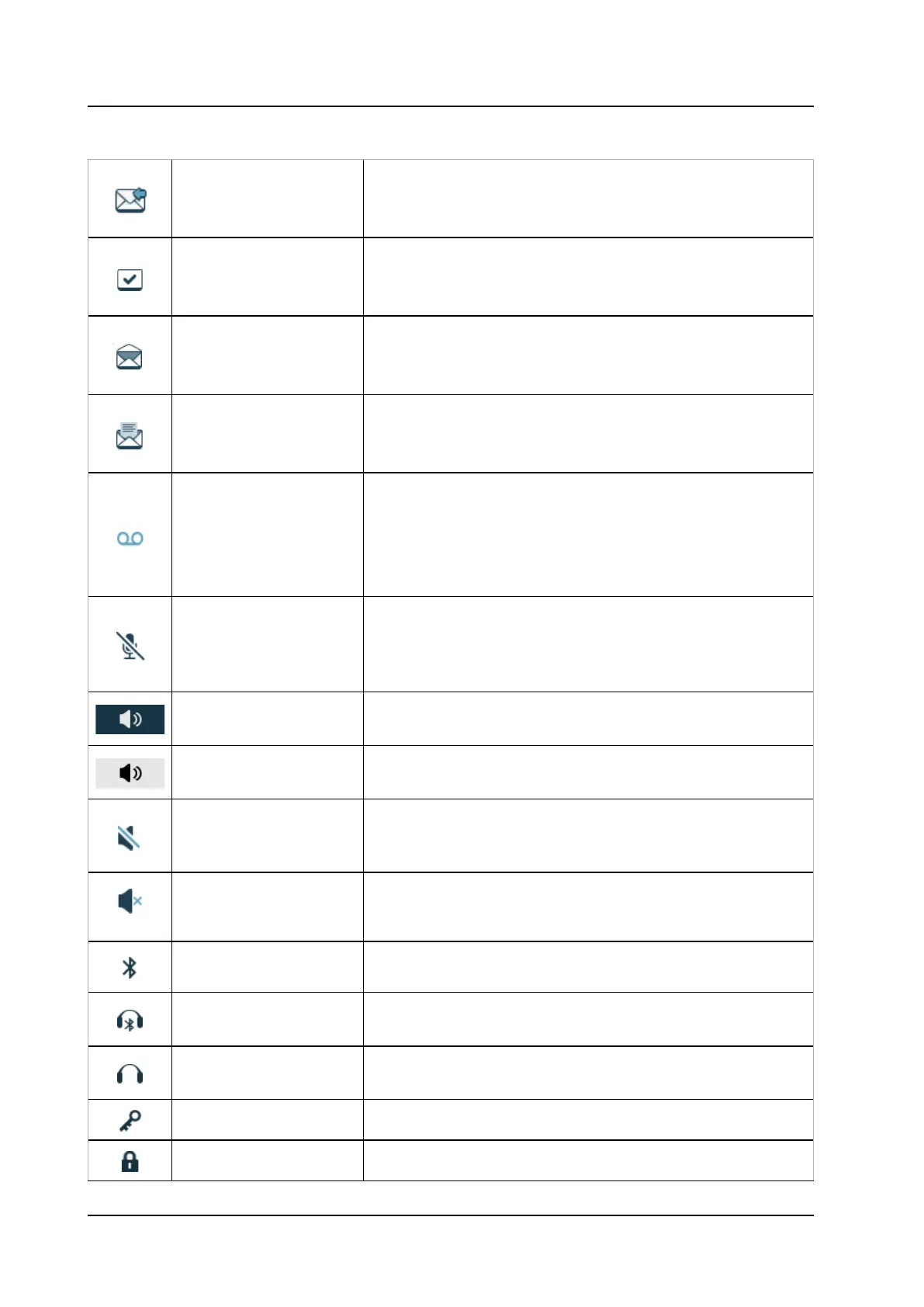
Table 2 Status and system icons description (continued)
Message with request for
answer
Indicates that you have received a message that requires the
response from you. The icon appears in the Inbox.
NOTE: Applicable to 5634 Services and 5634 Alarm only.
Sent message
Indicates that a text message has been sent. The icon appears
in the list of the Sent messages.
NOTE: Applicable to 5634 Services and 5634 Alarm only.
Read message
Indicates that a text message has been read. The icon appears
in the Inbox.
NOTE: Applicable to 5634 Services and 5634 Alarm only.
Unsent message
Indicates that a message has not been sent. The icon appears
in the list of Unsent messages.
NOTE: Applicable to 5634 Services and 5634 Alarm only.
Voicemail message
Indicates that you gave received a new voicemail message. The
icon appears in the Status bar.
NOTE: The icon stays in the Status bar until the voicemail has
been listened to.
NOTE: Voicemail access is system-dependent feature.
Microphone off
Indicates that the microphone is silent. The icon appears during
the ongoing call in the Header bar.
NOTE: During a PTT call, the microphone is inactive when the
Loudspeaker on
Indicates that the loudspeaker is turned on. The icon appears in
the Soft key bar during a call.
Loudspeaker off
Indicates that the
loudspeaker is turned off. The icon appears in
the Soft key bar during a call.
Sound off
Indicates that the ring signals have been muted. The
icon appears in the Status bar when the Sound off key
or Mute button is pressed and hold.
Silent volume
Indicates that the ring signal has been muted. The icon
appears in the Status bar when the ring volume is set to
Bluetooth
Indicates that Bluetooth is enabled. The icon appears in the
Bluetooth headset
Indicates that a Bluetooth headset is connected to the handset.
The icon appears in the Header bar.
Headset
Indicates that a corded headset is connected to the handset.
The icon appears in the Header bar.
Key lock Indicates a locked keypad. The icon appears in the Status bar.
Phone lock Indicates a locked handset. The icon appears in the Status bar.



 To Next Page