LAN
--------------- P26.25
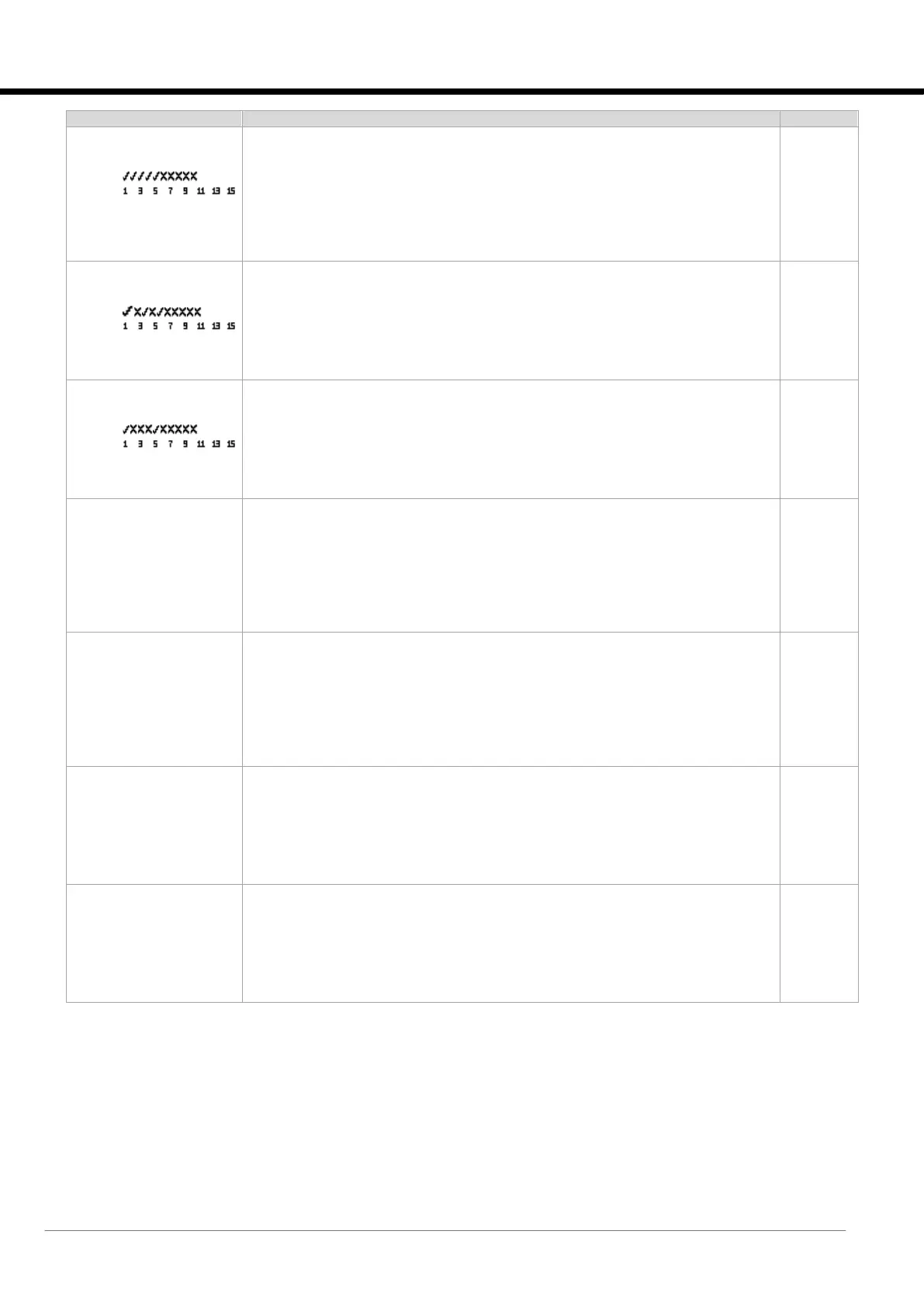
Unit group enabling:
-----
Units:
Param. Value: 000031
Parameter for setting the network units that will be taken into consideration by LAN
logic.
(bit N: Unit with N address controller).
Visible only if LAN is enabled.
LAN
--------------- P26.26
Unit master priority:
----
Units:
Param. Value: 00021
Parameter for setting priority boards (Priority).
(bit N: Unit with N address controller).
Visible only if LAN is enabled.
LAN
--------------- P26.27
Unit master forcing:
-----
Units:
Param. Value: 00017
Parameter for setting forced Priority units.
(bit N: Unit with N address controller).
Visible only if LAN is enabled.
LAN
--------------- P26.28
Fan Distribution Load
LAN ret. Temp.: Dis.
Parameter for setting the type of temperature calculation for the Fan Distribution
Load function.
[Disabled | Medium | Maximum | Minimum].
Visible only on chilled water units with EC fans and LAN enabled.
LAN
--------------- P26.29
Active Pressure Load
regulation mode: Mean
--------------- P26.30
Active Pressure Load
control mode: Control
Parameter for setting the type of pressure calculation for the Active Pressure Load
function
[Average | Minimum | Maximum].
Parameter for setting the type of adjustment for the Active Pressure Load function
[Control | Limit].
Visible if Active Pressure Load function is enabled.
LAN
--------------- P26.31
LAN unit rotation freq
uency: Disable
--------------- P26.32
Rotate at day:
Monday
Parameter for setting the type of rotation.
[Disabled | Daily | Weekly | Monthly | Hourly].
Visible only if LAN is enabled.
Parameter for setting the day of the week on which the rotation is to take place.
Visible only if weekly or monthly rotation is enabled.
LAN
--------------- P26.33
Rotate at hour:
00
--------------- P26.34
Rotate at minute:
00
Parameter for setting the time at which rotation is to take place.
Parameter for setting the minute at which rotation is to take place.
Visible only if daily, weekly or monthly rotation is enabled.






 To Next Page