Down Port Controller Mounting Instructions Cha
ter Two: Installation
28
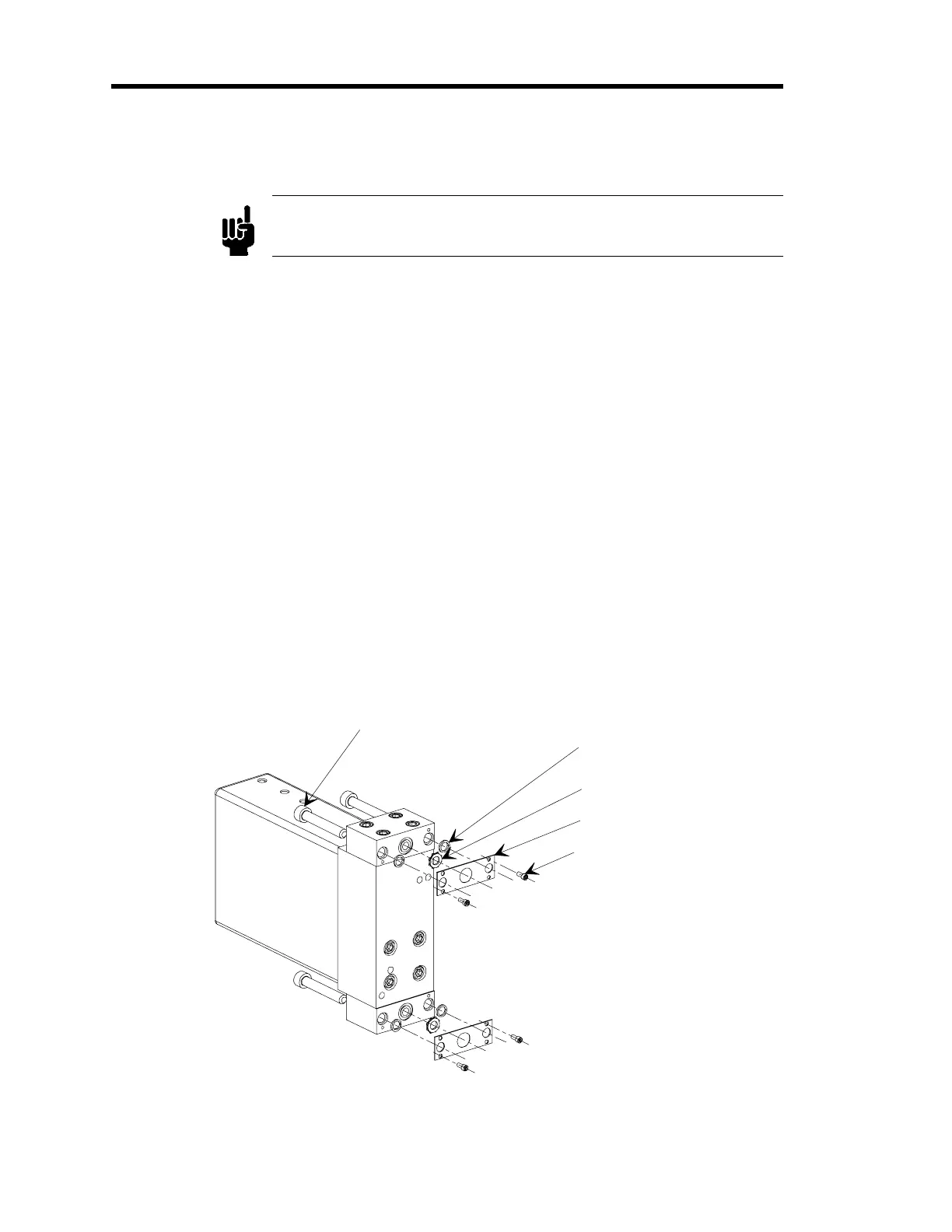
How To Connect the Z-Seal (SEMI 2878.2) Fittings
Note
A Seal Kit, containing screws, keepers, and Z-seal gaskets, is available
from Unit Instruments (part number 750-001-A0522).
Pre-assemble the Z-Seal End Fitting
1.
Remove the protective packaging from the controller.
2.
Hold the Z-seal gasket and remove the protective packaging.
3.
Assemble the Z-seal end fitting.
Unit Instruments has a complete kit that contains all the hardware necessary for one
fitting: Seal Kit, UII Mass Flow Flange (part number 750-001-A0522). You need two
kits per controller, one for each fitting.
Pre-assemble the seals and keeper
1. Remove the protective packaging from the controller.
2. Position the controller bottom-side up (so the sealing surface is facing up) on a bench top
or fasten it in a vise.
3. Insert one plastic split ring into each counter bore on the bottom face of the fitting.
10-32 x 1.25 Mountin
Screw (1 of 4)
Plastic Split Rin
Z-Seal Gasket
MFC Fittin
Keeper
1-72 x 3/16 Socket
Head Cap Screw (1 of 2)
Figure 12: Exploded View of the Z-Seal Components



 To Next Page