13
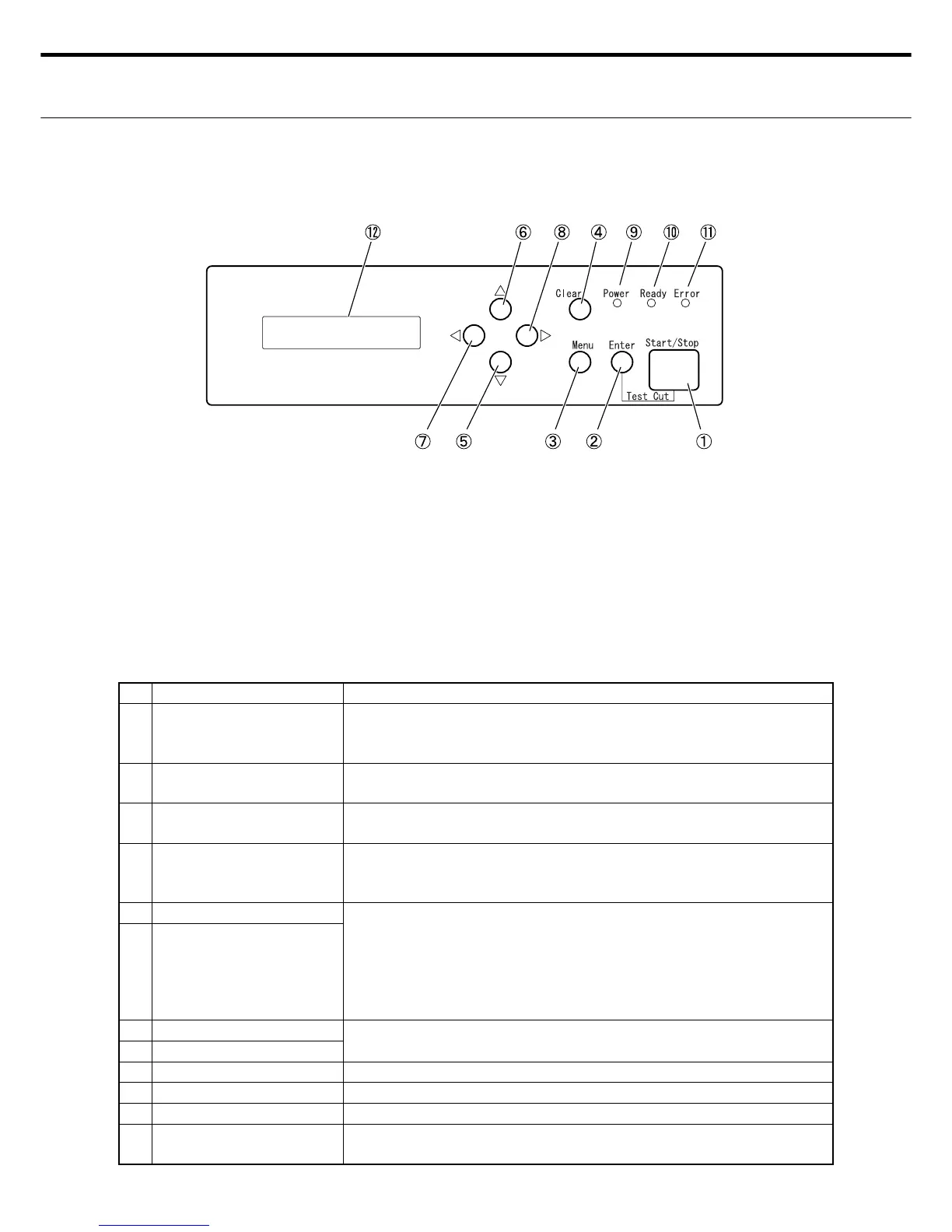
No. NAME FUNCTION DESCRIPTION
Ԙ START/STOP switch Cutting starts when this switch is pressed while in standby mode.
Pressing this switch during cutting will pause the cutting operation
after the paper for the on-going cutting task is used.
ԙ ENTER switch Use this switch to enter changes to setting in the format (setting) en-
try mode.
Ԛ MENU switch Changes to either STANDBY mode or Setting Entry Mode
each time this switch is pressed.
ԛ CLEAR switch Pressing this switch while cutting operation is paused, returns opera-
tion to standby mode.
Changes made to settings are invalid in format (setting) entry mode.
Ԝ DOWN switch Pressing this switch in standby mode shifts the operation to setting
display mode.
Pressing this switch in setting display mode returns operation to
standby.
Menu selection and number input can be used in format (setting) en-
try mode.
ԝ UP switch
Ԟ LEFT switch Use to move the cursor in format (setting) entry mode.
ԟ RIGHT switch
Ԡ POWER LED lamp This lamp lights up (green) while power is being supplied.
ԡ READY LED lamp This lamp lights up (green) when cutting operation is enabled.
Ԣ ERROR LED lamp This lamp lights up (red) when some type of error occurs.
ԣ LCD (20 digits x 2 lines) Shows the status of each mode. Displays the error No. and message
when an error occurs.
4. CONTROL PANEL NAMES & DESCRIPTIONS
ع Control panel part names
Ԙ START/STOP switch
ԙ ENTER switch
Ԛ MENU switch
ԛ CLEAR switch
Ԝ DOWN switch
ԝ UP switch
Ԟ LEFT switch
ԟ RIGHT switch
Ԡ POWER LED lamp
ԡ READY LED lamp
Ԣ ERROR LED lamp
ԣ LCD (20 digits x 2 lines)
ع Control panel part names



 To Next Page