18
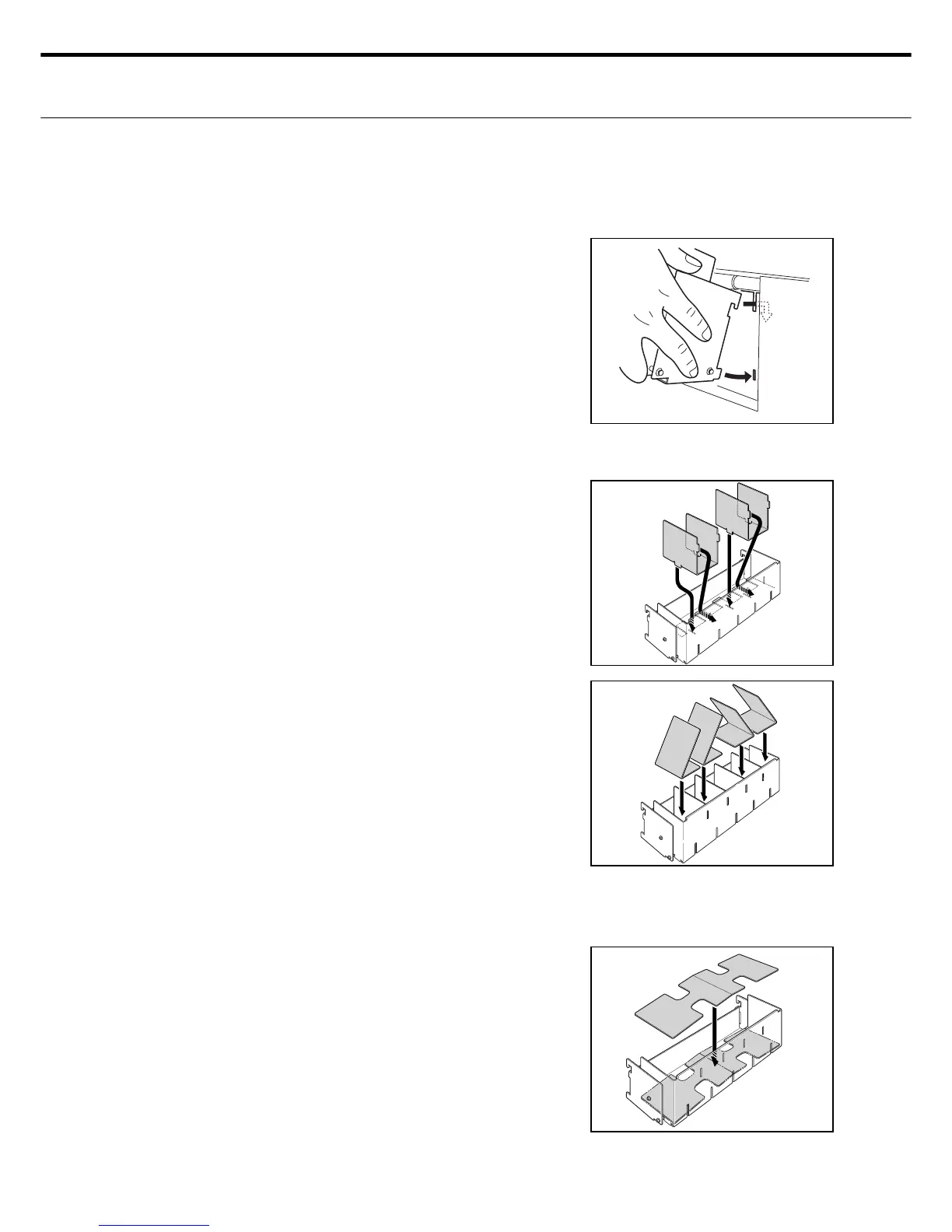
ع How to replace the eject tray
Remove or install the eject tray as shown next to match the cutting job.
Insert the upper hooks on the eject tray into
the insertion slot and then press the lower
prongs on the tray downward as shown.
Eject tray for standard items is shown at
right.
Install the same as the optional tray.
1.
To remove the tray, pull the prongs on the low-
er part of the eject tray towards you and then
pull outwards to free the upper hooks..
2.
ع How to install the business card divider
Insert the hooks on the business card divider
into the 2 slots on the back side and 2 slots on
the bottom of the standard eject tray.
1.
ع How to install the business card guide plates
Install the business card dividers after reading
the information above.
1.
Set the business card guide plates between
the dividers as shown.
Set the guide plates facing right between 2
dividers (outer side) as shown.
Set the guide plates facing left between 2 di-
viders (outer side) as shown.
2.
ع How to install the postcard guide plate
Place the postcard guide plate on the bottom
of the standard eject tray as shown.
Set protruding side of postcard guide facing
upward as shown.
1.



 To Next Page