20
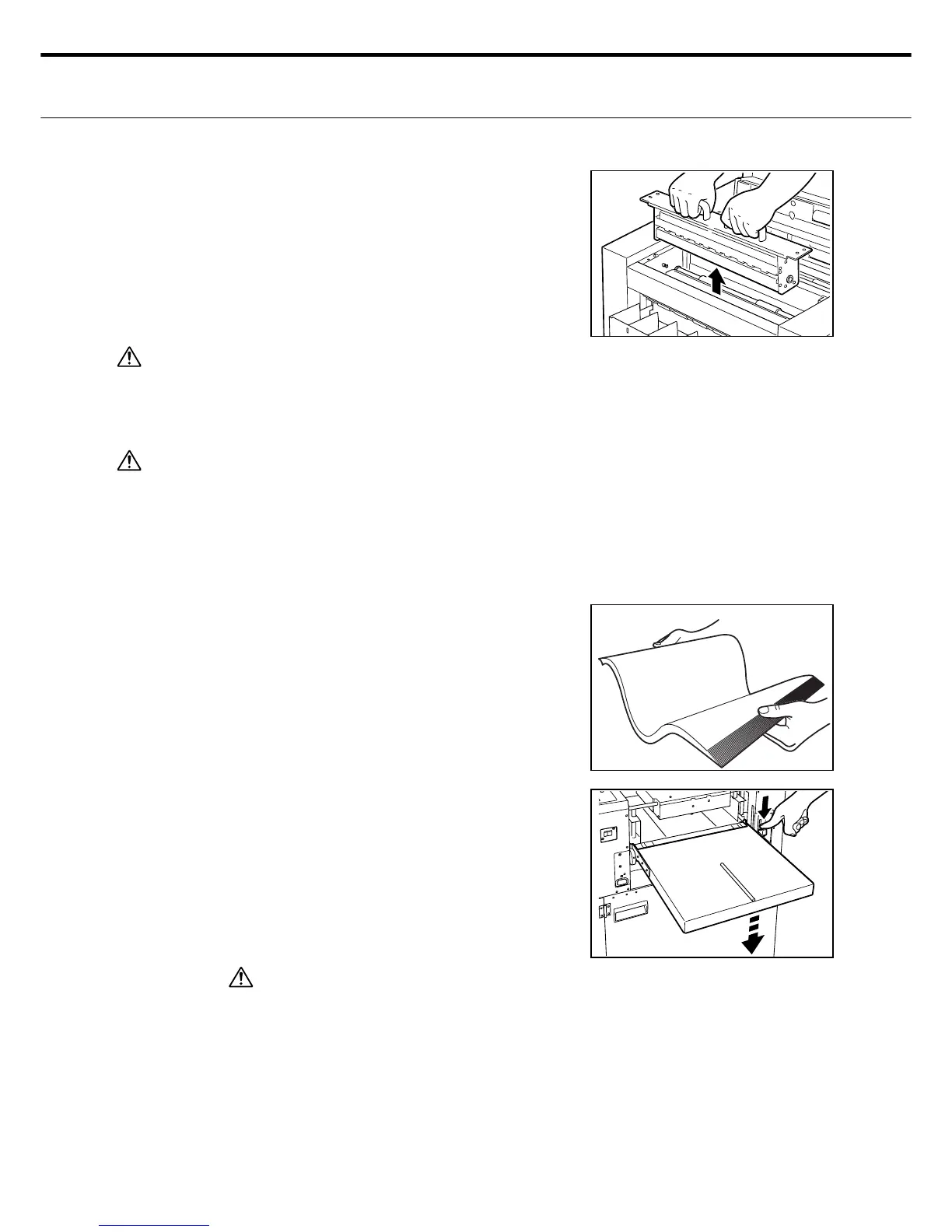
Grip the rotary blade unit with both hands as
shown and slowly raise it upwards.
4.
Caution
When storing the rotary blade unit, make sure the storage location is free of sand, dust, grit and
moisture that might attach to the unit. These particles can cause cutting performance to deterio-
rate and shorten the service life of the rotary blade unit.
Warning
Always turn the power to OFF (O side) when replacing the rotary blade unit.
ع How to set the paper
Riffl e the cutting paper. This is especially im-
portant to do on thick paper.
Using paper with heavy electrostatic charg-
es or extremely slippery paper or specially
treated paper may sometimes cause paper
blockages or feed errors or cutting mis-
takes. Make sure the correct paper is pre-
pared before starting work.
Remove the feed tray rear clamp.
Depress the (paper) feed tray release bar and
lower the feed tray.
• Lowering the feed tray as far as it will go al-
lows loading 500 sheets with a thickness of
0.12mm (fi ne paper 788x1091mm:90kg) up
to 60mm thickness can be used.
Caution
To set paper in the paper feed tray, always
depress the feed tray release bar to lower
the tray. Also, when adding paper to the
feed tray also be sure to lower the tray. If
you add paper without lowering the feed
tray, then the paper feed might not work nor-
mally and the main unit might be damaged.
1.
2.
3.



 To Next Page