21
4.
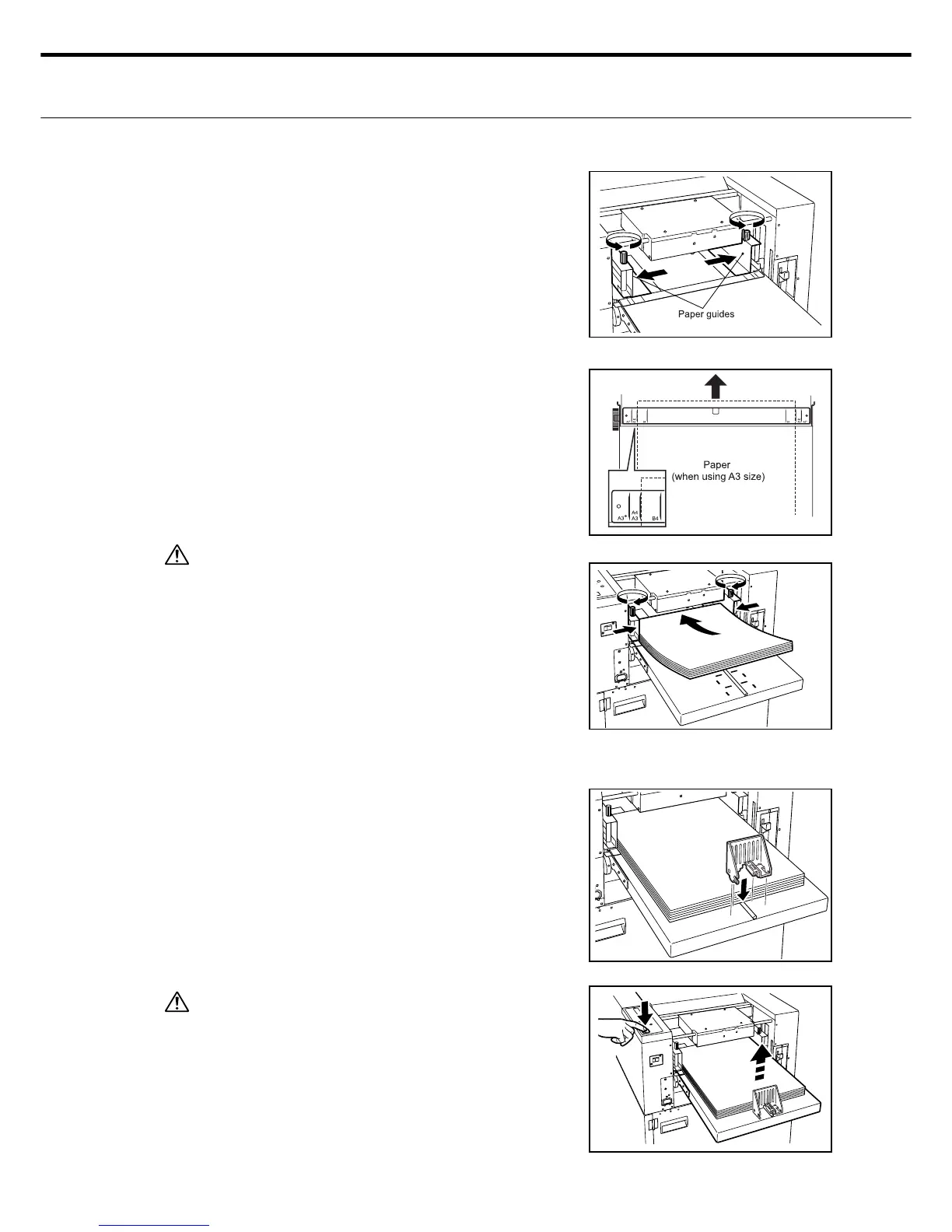
Loosen the right and left paper guide clamp
screws and move them outwards.
Set the paper in the machine center as shown
while watching the Paper set position adjust
scale. Align the paper guides on both sides
with the width of the paper and then tighten
the paper guide clamp screws.
5.
Caution
• Cutting defects and paper jams may occur if the
paper guides are not exactly lined up with the pa-
per.
Also, if the guides are pushed to tight against the
paper then paper feed problems may occur.
• The amount of paper you load should be below
the upper limit label attached to the rear sheet
guide.
6.
Install the feed tray rear clamp so it matches
the paper size.
[Reference] Pressing the Start/Stop switch makes the feed
tray automatically rise to the paper feed position
and starts the cutting.
Caution
Do not try to forcefully press or hold down the paper
feed tray while it is rising. This could cause equip-
ment breakdowns.



 To Next Page