50
3. CUT MARKS (CUTTING REFERENCE POSITIONS)
ع
Cut mark specifi cations
This machine can detect the cut start position (cutting reference position) on the paper by one
of 2 methods. One method is the "(paper) Edge" and the other is the "Mark". Compared to
detecting the edge of the paper as the cutting position reference, higher accuracy cutting can be
obtained by printing cut marks in advance based on the following specifi cations. By using these
printed cut marks as cutting position reference, errors due to edge position deviations occurring
due to using paper of different types and weights (thickness) can be absorbed.
○ Mark specifi cation table
ITEM SPECIFICATIONS
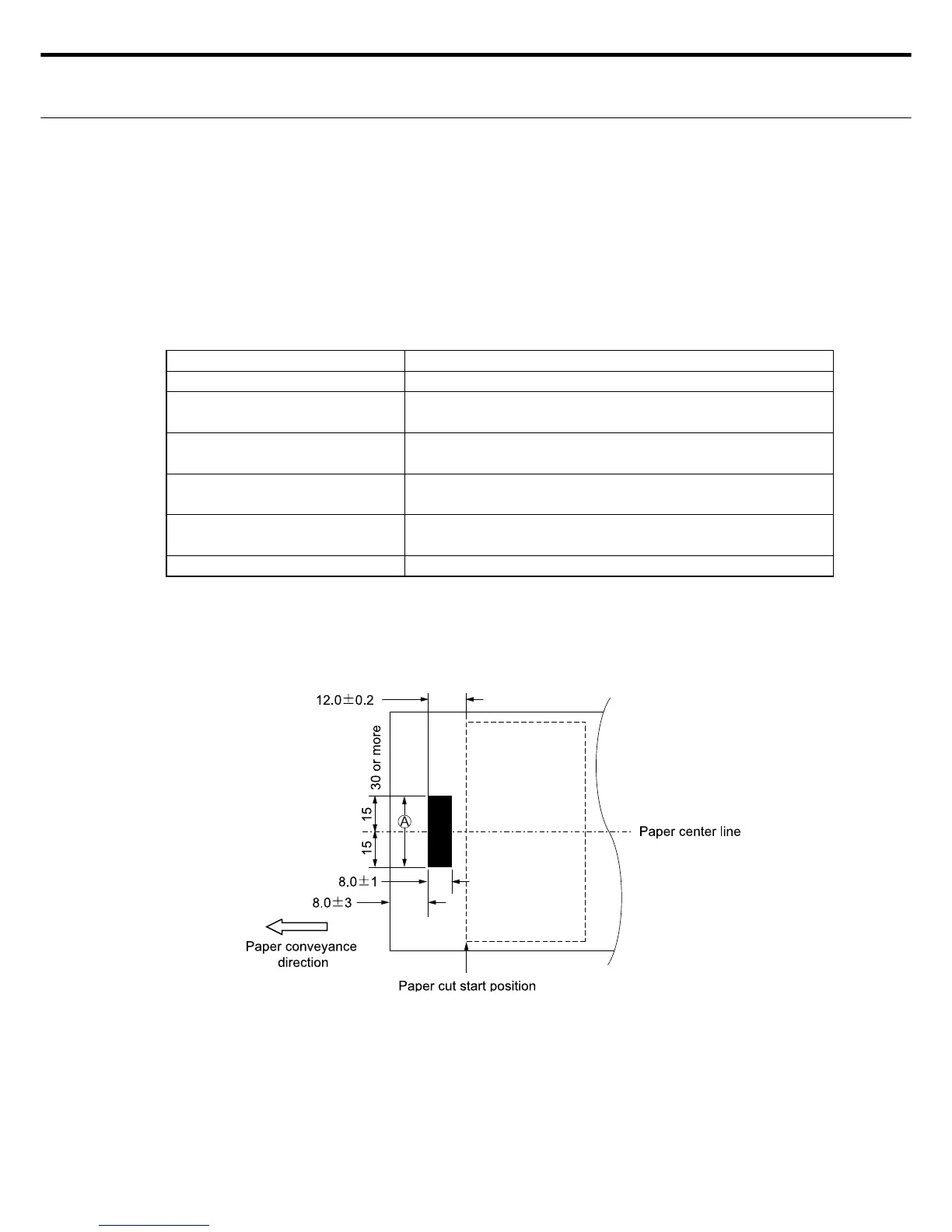
Cut mark printing position See lower fi gure
Distance from edge of cut mark
to cut start position
12.0 ± 0.2mm
Cut mark size Conveyance direction 8.0 ± 1.0mm,
Width direction : 30mm or more (from center of paper)
Cut mark contrast Contrast of 1.30 or more (mark base contrast scale OD
value)
Edge margin contrast Contrast of 0.10 or more (mark base contrast scale OD
value)
Paper set direction Set the mark side facing up and set in machine
Note : If the cut reference position is set to "Mark" but you are using paper without a mark,
and the paper doesn’t meet the above specifi cations, then the message, "E11" (mark
no-detection error) is displayed. If this happens, use paper printed with the correct
mark or set the cut reference position to "Edge".
○ Cut mark print position
Note1 : Use paper having no printing or dirt (grime or smears) on the side above the cut marks (sec-
tion (A) in above fi gure). Even in cases where "Edge (of paper)" was selected as the cut start
position of the paper, you should not use paper having any printing or dirt (smears , etc.) in a
range up to 5mm from the edge of the paper center.
Printing and dirt on the paper will mistakenly trigger the sensors in the machine and disable
the cutting.
If cutting paper having printing on it within 5mm from the edge of the paper center section,
then use with this printed side facing downwards.
Note2 : Cutting mark positions can be offset to within ±1.0mmSee P.38 Setting the mark position
offset.



 To Next Page