30
ع
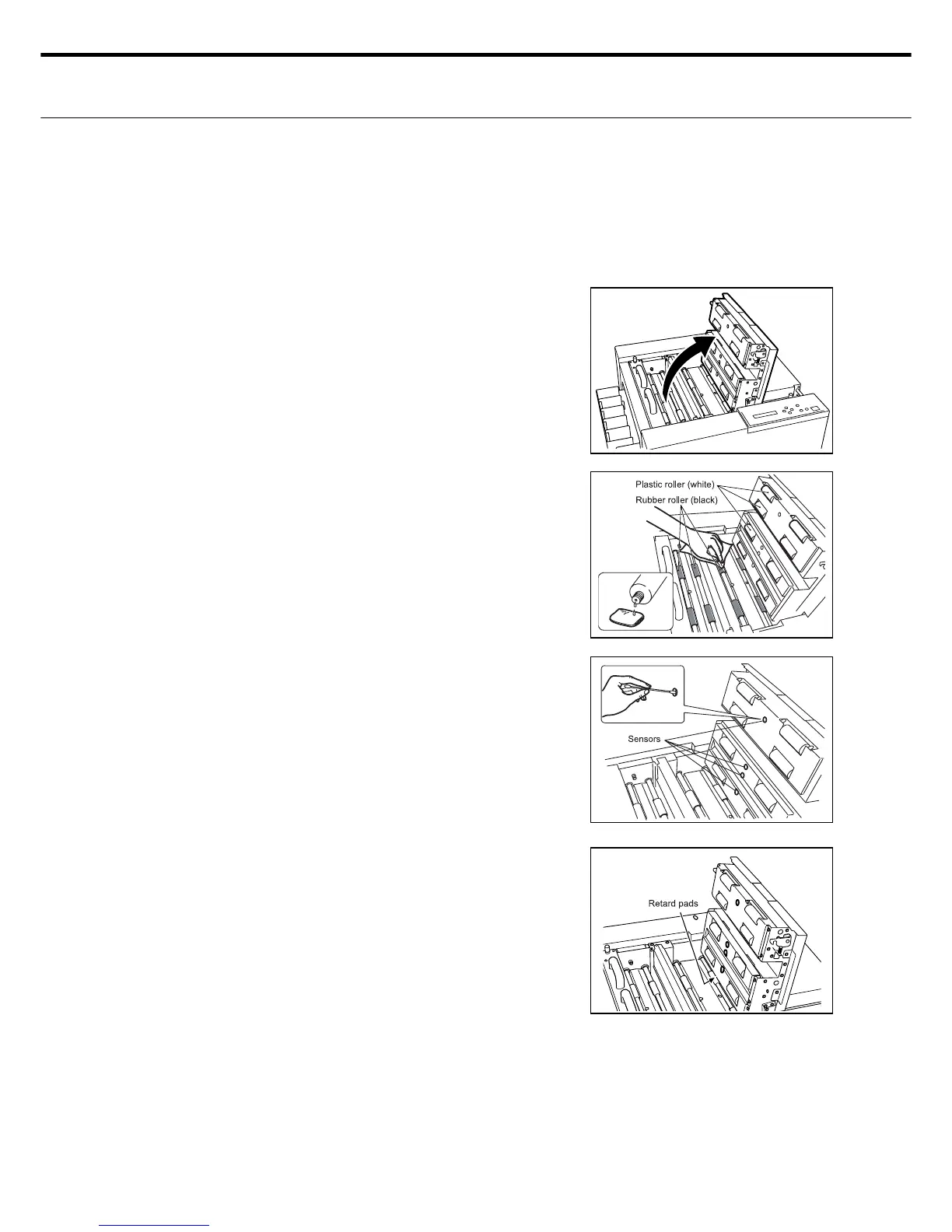
Cleaning the “Paper conveyor retard pads - Paper feed roller - Sensors”
in the paper conveyor
Always turn the power switch off when cleaning these components.
■ Cleaning the paper feed roller (Clean once every 1,000 sheets)
Raise the top cover release lever and open
the top cover.
Soak the rubber roller (black) and plastic roller
(white) on top cover side, and upper/lower
eject rollers behind the rotary blade in a rag
dipped in anhydrous alcohol.
1.
2.
ع
Cleaning the outside of the machine
After wiping the paper feed tray and outer case with a wrung out rag that was dipped in water,
proceed to dry those parts.
■ How to clean the sensors (clean once a week)
Wipe away dirt from the lens surface of the top cover
sensors as shown in the drawing gently with an item
such as a cotton swab.
Note : The sensitivity of the sensor will diminish if
paper residue attaches to the lens surface and
may trigger faulty paper jam detection.
■ How to clean the retard pads (Clean once every
500 sheets)
The retard pads can be cleaned by passing 2 sheets of
fi ne white paper over them.
Retard pads are important components because they
prevent the paper from overlapping on one another
during paper feed. If paper residue gets on these
pads the paper feed function will deteriorate badly.
Clean the retard pads once every 500 sheets (have
passed through them).



 To Next Page