Manual# I27028 7-8 Rev. 2 – 11/22/2017
LED Color Normal Behavior
Error
Solid Red
Flashing Red
Defective hardware
PLC error
Run / Stop
Solid Yellow
Solid Green
Alternating Green
& Yellow
PLC in Run mode (not program mode)
PLC in Stop mode
PLC is in Startup mode
Maintenance
(Maint)
Yellow
Flashes whenever a memory card is inserted. The
CPU then changes to STOP mode and one of the
following functions needs to be performed to initiate the
evaluation of the memory card:
• Change the CPU to RUN mode
• Perform a memory reset (MRES)
• – Power-cycle the CPU
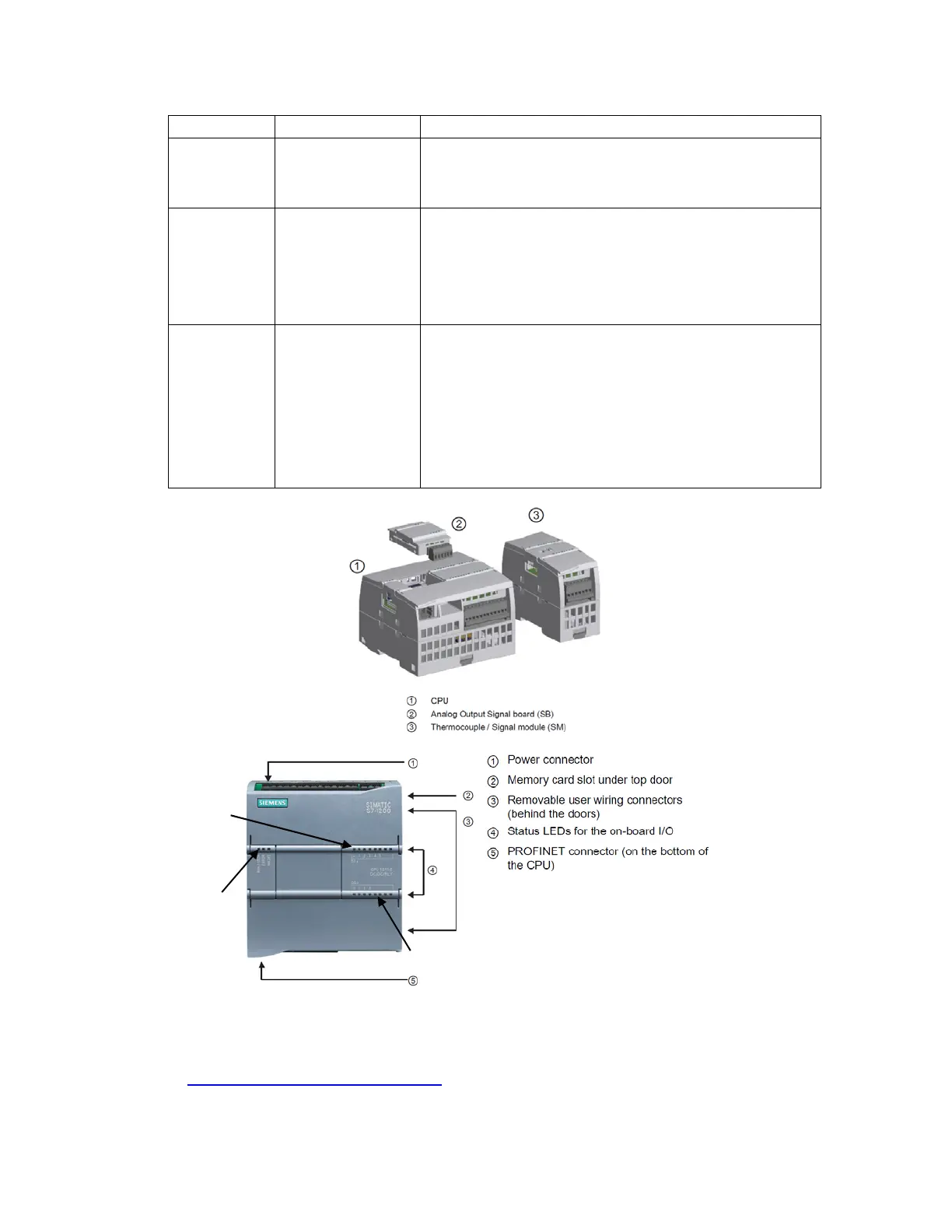
Figure 7-2
PROGRAMMABLE LOGIC CONTROLLER (PLC)
For more information, see the manual supplied by Siemens. This is available online:
http://www.automation.siemens.com/
The front panel of the PLC also includes LEDs which show the status of each of the
inputs and outputs. These LEDs may be helpful in troubleshooting. For example, to
check a switch on the machine, operate the switch and watch the PLC. See if the LED
Output LEDs
Input LEDs
Run / Stop
Error
Maint


 To Next Page
 Loading...