6-6 BenchMike Pro 2025/2050 & Z-Mike Pro 4025/4050 Instruction Handbook: Remote Setup
The lower four bits of the Status Update Characters in binary format correspond to the four groups listed above.
The following table shows the PURL commands associated with these conditions.
6.2.4.2 Status Update Characters and Commands
Command to
Request the
Latched Status*
Command to Request
the Non-Latched
Status**
Return Data <DATA>
The Returned Data varies based on the command issued. This segment of the response contains the requested
numeric value, such as the laser gauge’s scan rate or the baud rate of the selected port.
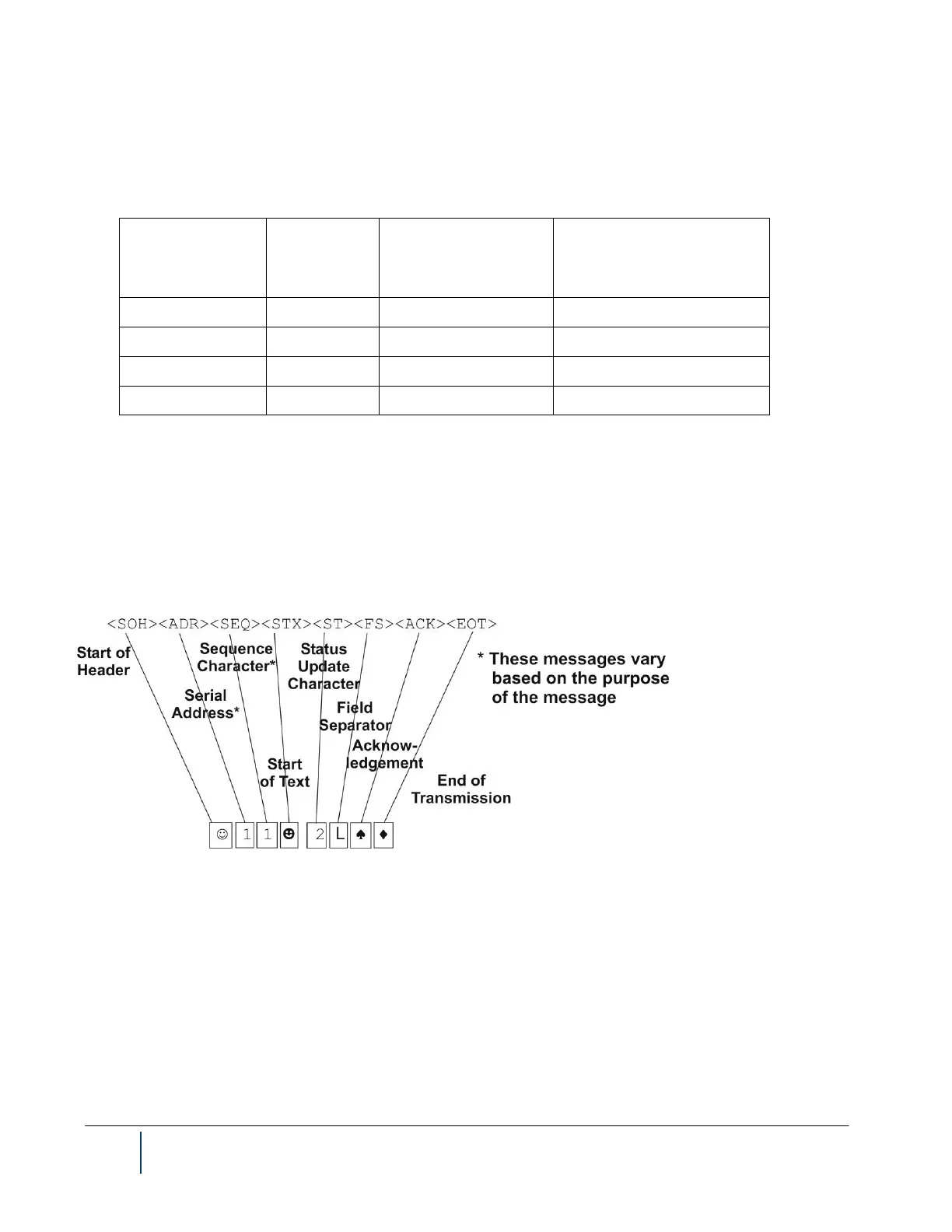
Here is the format of a message from the BenchMike Pro to the host device, with a sample message, when the
message has been understood but there is no data to return:
Acknowledgement <ACK> ♠
The Acknowledgement indicates the receipt of a good command. When the Acknowledgement is returned by the
BenchMike Pro, the command has been properly received and consider valid.



 To Next Page