INSTALLATION GUIDE
4. PRESENTATION OF THE APPLIANCES
4.10 The NG1000-A appliance
The NG1000-A appliance
The NG1000-A appliance has the following characteristics:
Throughput of 4,500 Mbits/s.
1,000,000 concurrent connections.
8 Gigabit interfaces on the front panel and 2 Gigabit ports behind = 10 Gigabit interfaces
50,000 new sessions per second.
On front panel, any of the following extension modules below can be added:
- 4 Gigabit interfaces
- 6 Gigabit interfaces
- 2 fiber Gigabit interfaces
- 4 fiber Gigabit interfaces
- 2 x 10 GB fiber Gigabit interfaces
The NG1000-A can hold up to 16 interfaces (front and rear panels).
4.10.1 Front panel
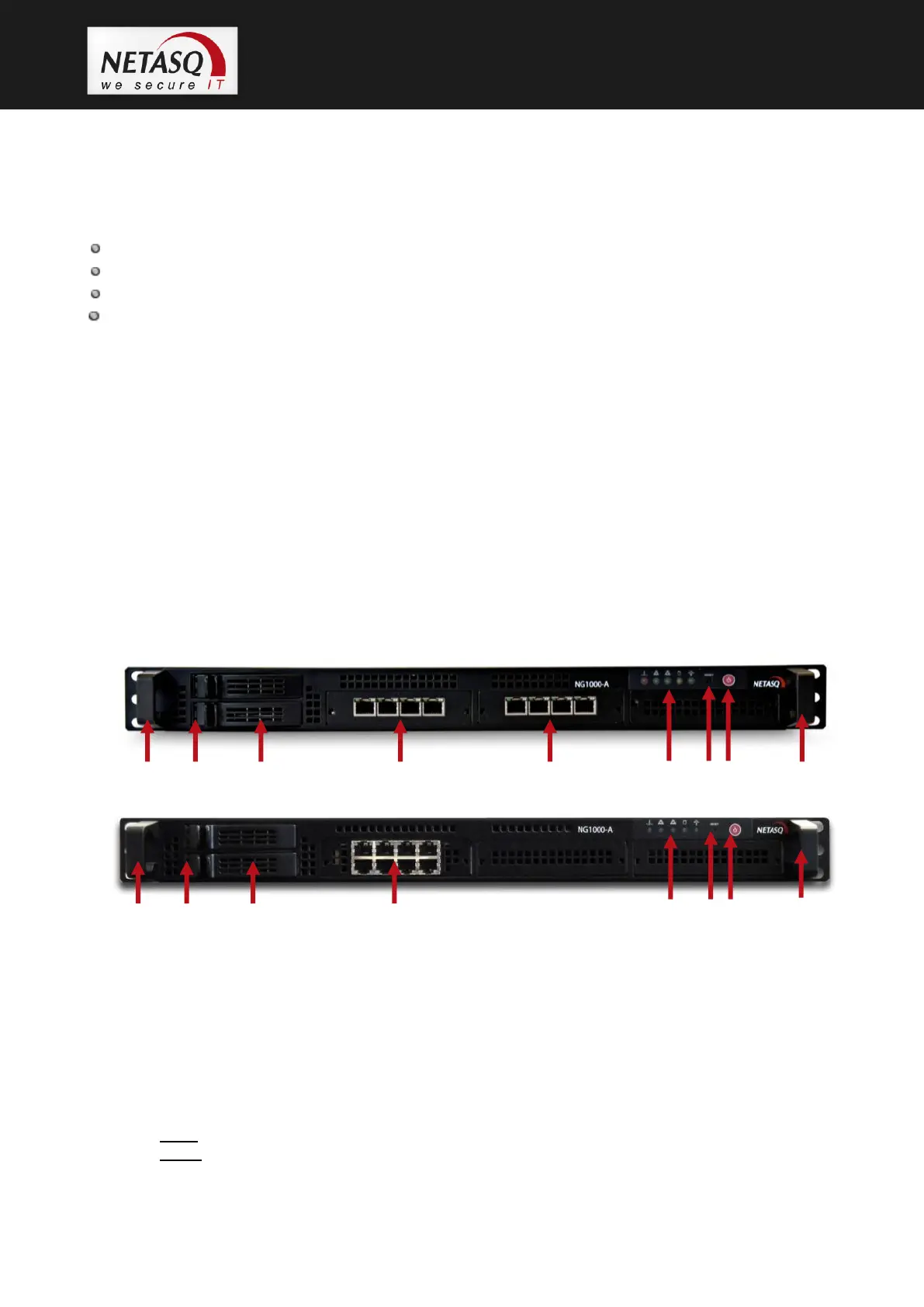
Depending on the production batch, interfaces on NG1000-A appliances may have one of the
following layouts:
Layout n°1:
Layout n°2:
1. Brackets on both ends of the firewall (handles)
2. LEDs in the hard disk racks indicate disk access (blue, lower LED) and disk installation (yellow,
upper LED)
3. 1 hard disk as the standard configuration and another as an option (for RAID)
4. 8 gigabit interfaces in the front panel as the standard configuration. As an option, 1*4 or 1*6 copper
or optic fiber modules.
5. LEDs (from left to right): the 1
st
indicates that the appliance is overheating. When the 2
nd
or 3
rd
LED
blinks, this indicates network activity on the management ports located at the back of the firewall.
The 4
th
LED indicates disk activity (similar to the blue LED on the disk but without indicating the
active disk). Lastly, the 5
th
LED, the power indicator, shows whether the firewall is on.
6. Reset button: resets the firewall electrically.
7. Power button: button for shutting down or turning on the firewall.



 To Next Page