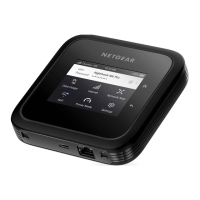
The Nighthawk M7 Pro supports BE5800 tri-band WiFi 7 with dual-band concurrent
radio operation and multi-link operation (MLO) for dynamic switching between any two
of the three WiFi bands:
•
2.4 GHz radio: 40 MHz channel width, speeds up to 688 Mbps
•
5 GHz radio: 160 MHz channel width, speeds up to 2882 Mbps
•
6 GHz radio: 320 MHz channel width, speeds up to 5764 Mbps
NOTE: 6 GHz WiFi is restricted to indoor use only. The power adapter must be
plugged in to activate the 6 GHz band.
The Nighthawk M7 Pro also provides one 2.5G Multi-Gig RJ45 Ethernet port, one USB
3.2 Type-C port with 10 Gbps tethering support, and two TS-9 external antenna ports.
This chapter contains the following sections:
• Nighthawk M7 hardware overview
• Install or replace a SIM card
• Set up for travel or fixed use
• Power on your hotspot and finish setup
• Power off or restart your mobile hotspot
• Manage your mobile hotspot with NETGEAR Insight Pro
For more information about the topics covered in this manual, visit the support website
at netgear.com/support.
9













 To Next Page