HX4E/MX8A Series Voice Gateway User Manual
New Rock Technologies, Inc. 63
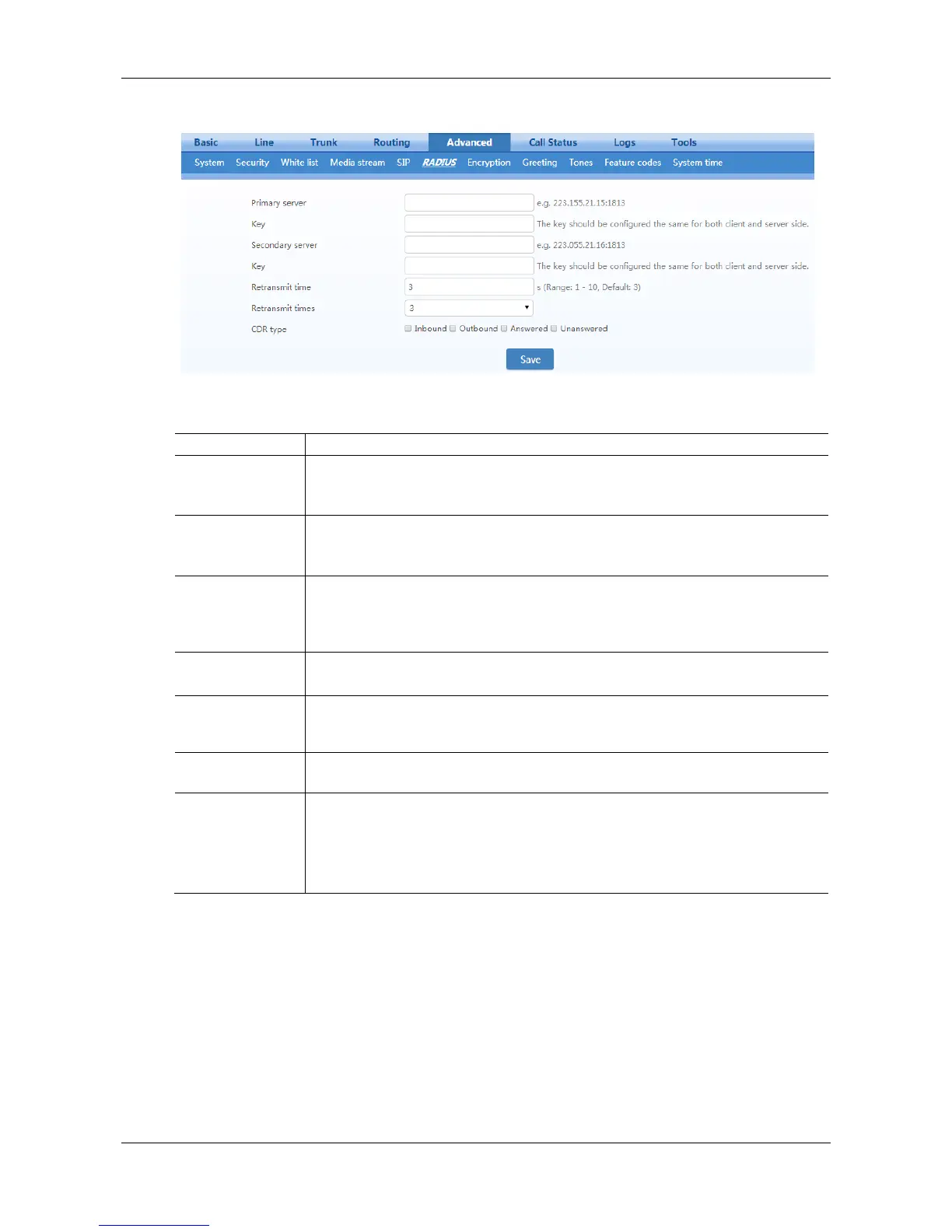
Figure 2-35 RADIUS Configuration Interface
Table 2-28 RADIUS Configuration Parameter
Set IP address and port number of preferred Radius server.
Note: if the port number is not configured yet, please use Radius default port number
of 1813.
Set the share key to be used for encrypted communications between Radius client and
server.
Note: The share key should be configured the same for both client and server side.
Set the IP address and port number of standby Radius server. When the fault appears
in communications between gateway and preferred Radius server, the gateway will
automatically activate standby Radius server.
Note: In case of no configuration of port number, use default port number of 1813.
The share key for communications between Radius client and standby Radius server.
Note: The key should be configured the same for both client and server side
Set the amount of overtime on response after transmission of Radius message, the
default is 3 seconds. The retransmission will be performed If no response is given
after the timeout.
Set the times of retransmission of Radius message when no response is received
default is 3 times.
Outbound: set whether to send RADIUS charge message for outbound calls;
Inbound: set whether to send RADIUS charge message for inbound calls;
Answered: set whether to send RADIUS charge message when calls are connected;
Unanswered: set whether to send RADIUS charge message for unanswered calls.
2.7.9 Encryption
After login, click the label of Advanced > Encryption to open this interface.



 To Next Page