OM Series IP Telephony System Administrator Manual
www.newrocktech.com 3-1
3 Settings of Extensions
3.1 Making Outbound Calls
The device provides two dialing schemes to meet users’ dial behavior:
Making outbound call with prefix: when making an outbound call the user dials an extra digit to select
the trunk followed by the destination number;
Making outbound call without prefix: when making an outbound call the user dials directly the
destination number.
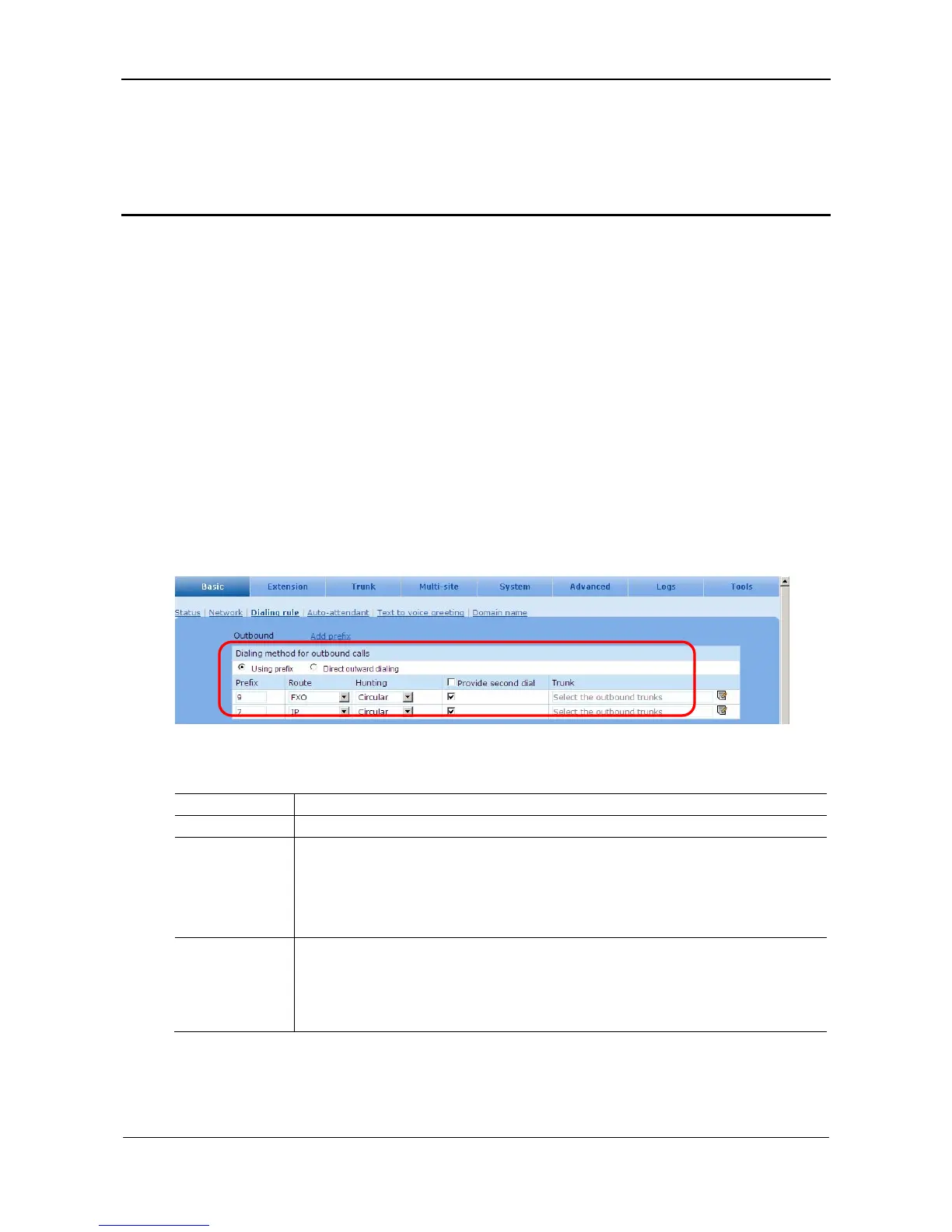
The first scheme is the factory default, and the default prefixes are shown in Fig. 3-1. The dial scheme
and related settings can be changed.
Go to the Basic > Dialing rule page. See Figure 3-1.
Figure 3-1 Outbound calls setting interface
Table 3-1 Dial scheme parameters
Item Description
Prefix Choose a Prefix for a specific route;
Route
The device can provides different routes of outbound call for user to select
FXO: the Line port is selected to make the call to PSTN
IP: the SIP trunk is selected to make the call to PSTN
Route table: the route defined by routing table is used to make the call to PSTN
Hunting
If there is more than one analog trunk (Line), the line selection is made according to the
following schemes.
Sequential: the first available line on the list is selected starting from the first one
Circular: the first available line on the list is selected beginning from the one left off last time



 To Next Page