Administrator Manual OM Series IP Telephony System
4-2 www.newrocktech.com
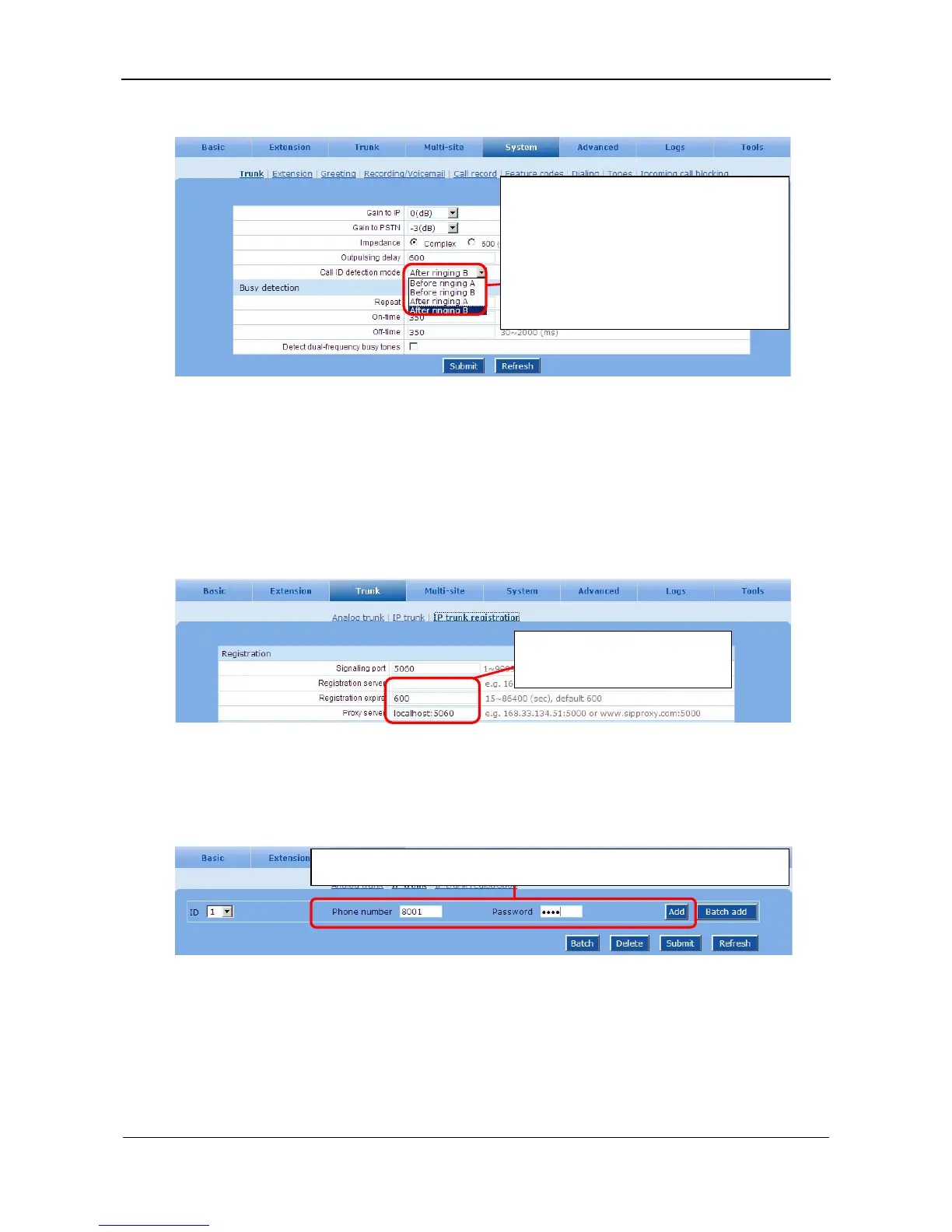
Figure 4-3 CID detect setting interface 2
4.3 SIP Trunk Registration to an ITSP
Step1 Configure ISTP server related settings
Go to the Trunk > IP trunk registration page. See Figure 4-4.
Figure 4-4 IP trunk registration setting interface
Step2 Enter username and password
Go to the Trunk > IP trunk page. See Figure 4-5.
Figure 4-5 IP trunk setting interface
Step3 Verify the registration status
After configuration, go to the Logs
>
Resource page to check the status of registration.
The central office sends caller ID either
before or after ringing. The caller ID detection
should be configured accordingly.
Note: when the device fails to detect the caller
ID, different mode listed here should be tried
out.
Input information required by the
service provider.
Enter phone number and password assigned by the service, and click Add.



 To Next Page