Administrator Manual OM Series IP Telephony System
3-6 www.newrocktech.com
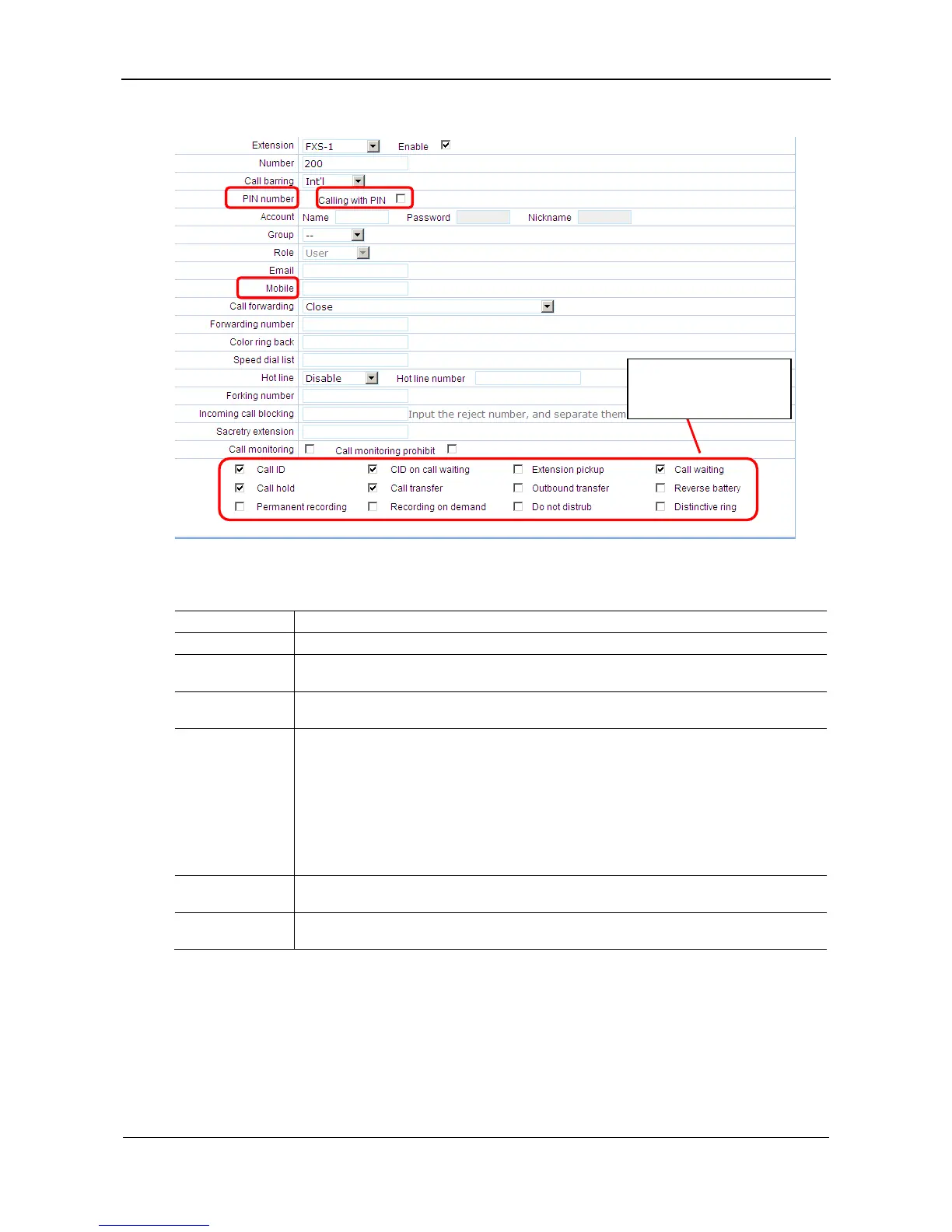
Figure 3-9 Extension’s feature setting interface
Table 3-3 Extension feature related parameters
Item Description
PIN number Using *33 & *99 to allow users to access the device with an external phone.
Calling with PIN
Select it to enable the PIN on the extension. When the user needs to make outbound calls, the PIN
should be entered before the calling number.
Mobile
Instead of PIN number a mobile phone number of the user can be used for auto authentication of
*33 and *99 for external access.
Call forwarding
Select one of the settings of call forwarding feature:
Disable
Forwarding all calls to another phone
Forwarding unanswered calls to another phone
Forwarding all calls to voicemail
Forwarding unanswered calls to voicemail
Forwarding
number
Enter the destination number of forwarding calls. Depending on the outbound dial scheme a
prefix may be required, separated from the phone number with comma.
Forking number
The forking function allows the device to terminate a call simultaneously to the extension and
another terminal. Enter the phone number of the terminal to enable the feature.
3.9 Secretary Assistant
A secretary’s extension can be bundled with his or her manager’s extension so that a call to the manager
will be redirected to the secretary and further transferred to the manager’s extension by the secretary.
Enable features of each
extension.



 To Next Page