Administrator Manual OM Series IP Telephony System
3-4 www.newrocktech.com
3.5 Fax
If you have fax machines to connect to the device, please follow the steps below.
Connecting a fax machine to the device
The fax machine is connected to a Phone port on the device.
Making a fax call
Pick up the phone on the fax machine and enter the receiving party’s number or enter the prefix and
followed by the receiving party’s number, according to the dial scheme.
Fax related settings
To avoid the auto attendant, it is suggested to configure the extension as DID. That is, to bundle the line
designated to the fax with the extension which connects to the fax machine.
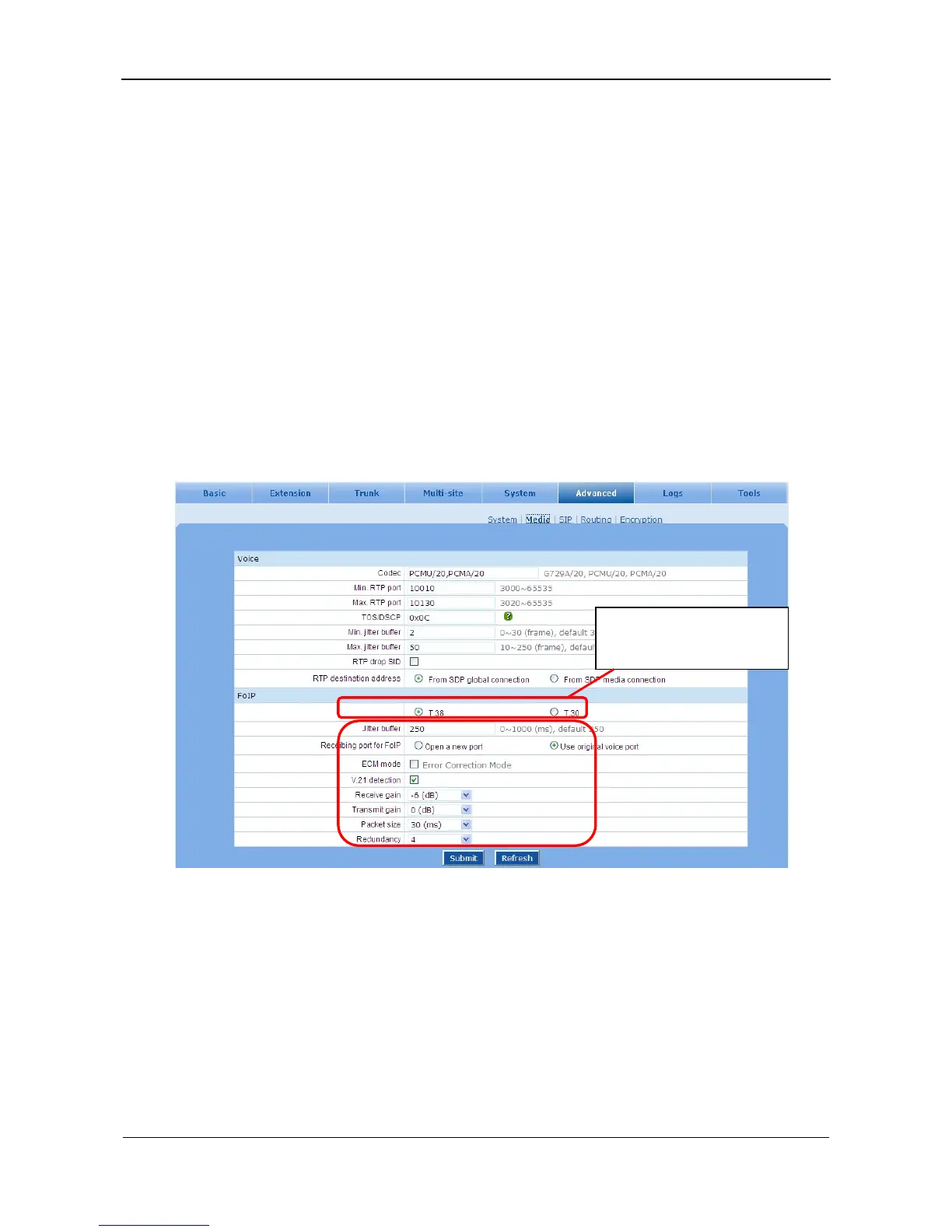
Go to the Advanced > Media page to enable FoIP via IP trunk. See Figure 3-6.
Figure 3-6 FAX setting interface
3.6 Soft Attendant Console
Soft attendant console provides the status of extensions and trunks, and the operators use it to transfer a
call by just making a click on the console. The soft attendant console can be assigned to the extensions as
an Operator.
Go to the Extension > Analog ext. page to assign the role of the extensions.
Select the fax mode offered
by service provider.



 To Next Page