48
7
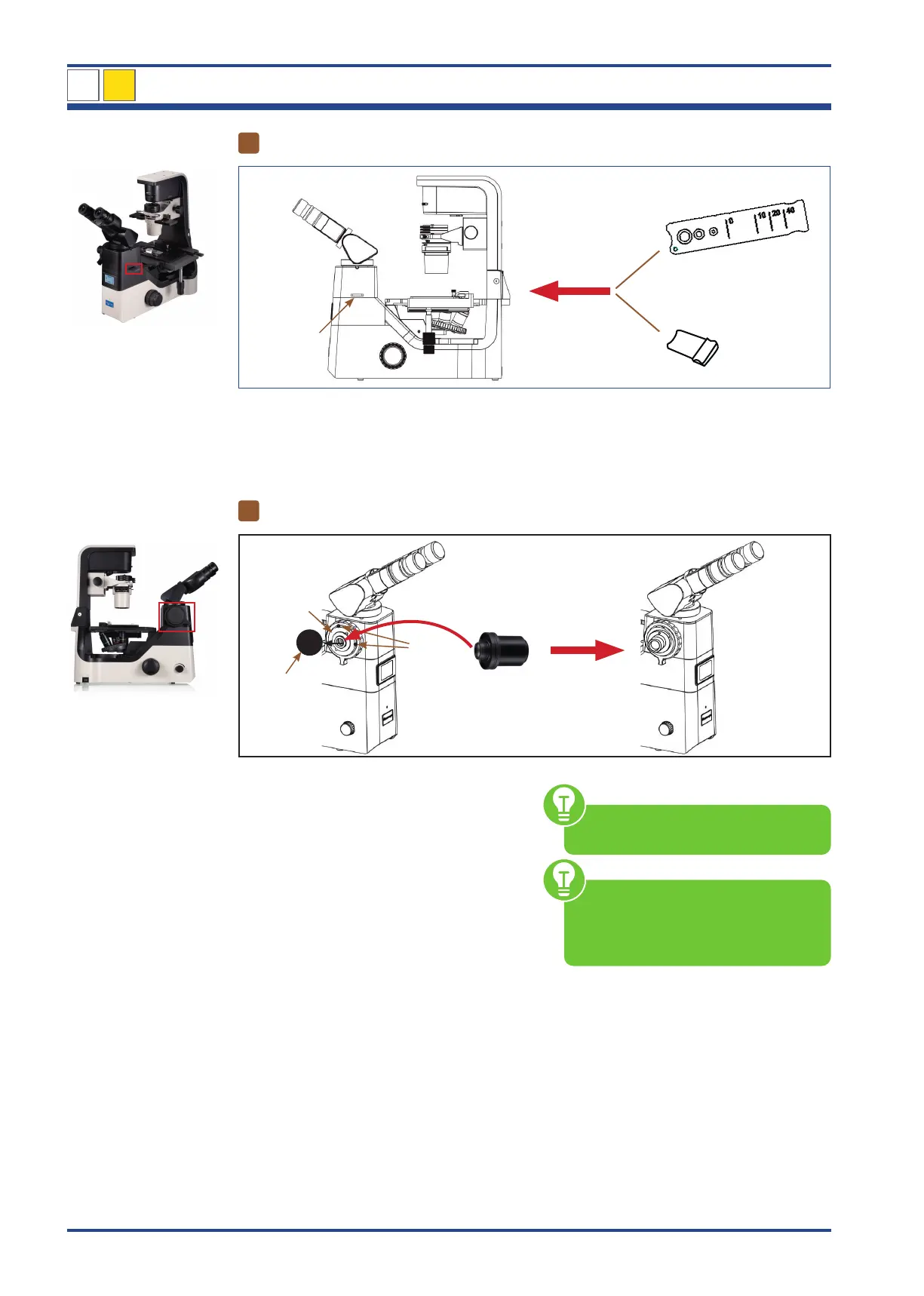
OPTIONAL: Inserting the placeholder/emboss contrast slider
I
Placeholder
Emboss contrast slider
Illustration 38: NIB630 - Inserting the placeholder/emboss contrast slider.
If not yet preinstalled, insert the placeholder
or the emboss contrast slider into the appro-
priate slider slot (I) on the microscope.
8
OPTIONAL: Using the 1x C-mount photo adapter
I
II
II
1x C-mount
III
Illustration 39: NIB630 - Using the 1x C-mount photo adapter.
Remove the black protective cap (I) from the
photo adapter holder (II) by unscrewing the
two set screws (III) with a suitable hexagonal
screwdriver.
Place the 1x C-mount adapter in the port of
the photo adapter holder.
Fix both elements by tightening the set
screws.
1x C-mount adapter is included in
delivery.
When installing the camera, please
always make sure that you hold it
firmly in place to protect it from dam-
age due to dropping.
NIB630
4



 To Next Page