47
5
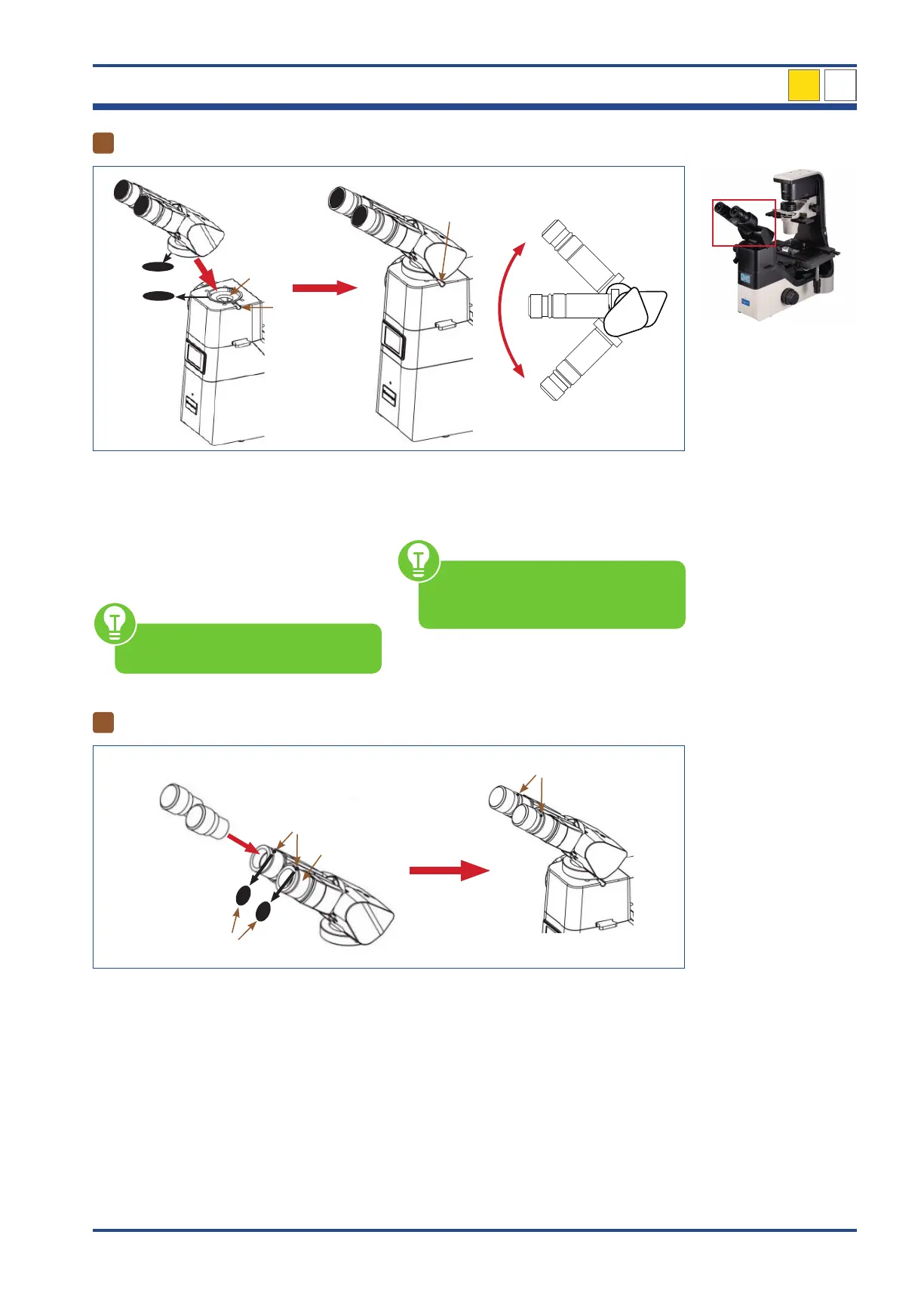
Attaching the ergo tilting binocular viewing head
II
III
I
I
IV
Adjusting the angle
Illustration 36: NIB630 - Attaching the ergo tilting binocular viewing head.
Loosen the viewing head holding screw (I)
and remove the black protective cap (II) from
the port for the binocular viewing head (III).
Remove the black protective cap (II) from
the tube lens (at the bottom of the binocular
viewing head).
Make sure not to touch any optical
lenses.
Place the ergo tilting binocular viewing head
(IV) onto the microscope body so that the
eyepieces are in front.
The angle of the binocular viewing
head can be adjusted according to
the posture and build of the user.
6
Inserting the eyepieces
III
IV
I
II
I
Illustration 37: NIB630 - Inserting the eyepieces.
Loosen the small set screws (I) on the eye-
piece sleeves (II) using the smallest hexag-
onal screwdrivers provided. Remove the
black protective caps (III) from the eyepiece
sleeves.
Press the eyepieces (IV) into the eyepiece
sleeves.
Fix the eyepieces with the help of the small
set screws.
NIB630
4



 To Next Page