I can’t disable Parental Controls
Did you enter the correct PIN?
Enter the correct PIN (page 62).
Did you enter the correct answer to your secret question?
Enter the correct answer to your secret question (page 62).
If you have not registered an email address…
An enquiry number will be displayed. Please contact Nintendo Customer Support
by phone or email (pages 90 – 91) with the enquiry number and the date currently
set on the Nintendo 2DS system. You will be given a master key.
If you have forgotten your secret question answer
If you have forgotten your PIN
or secret question answer…
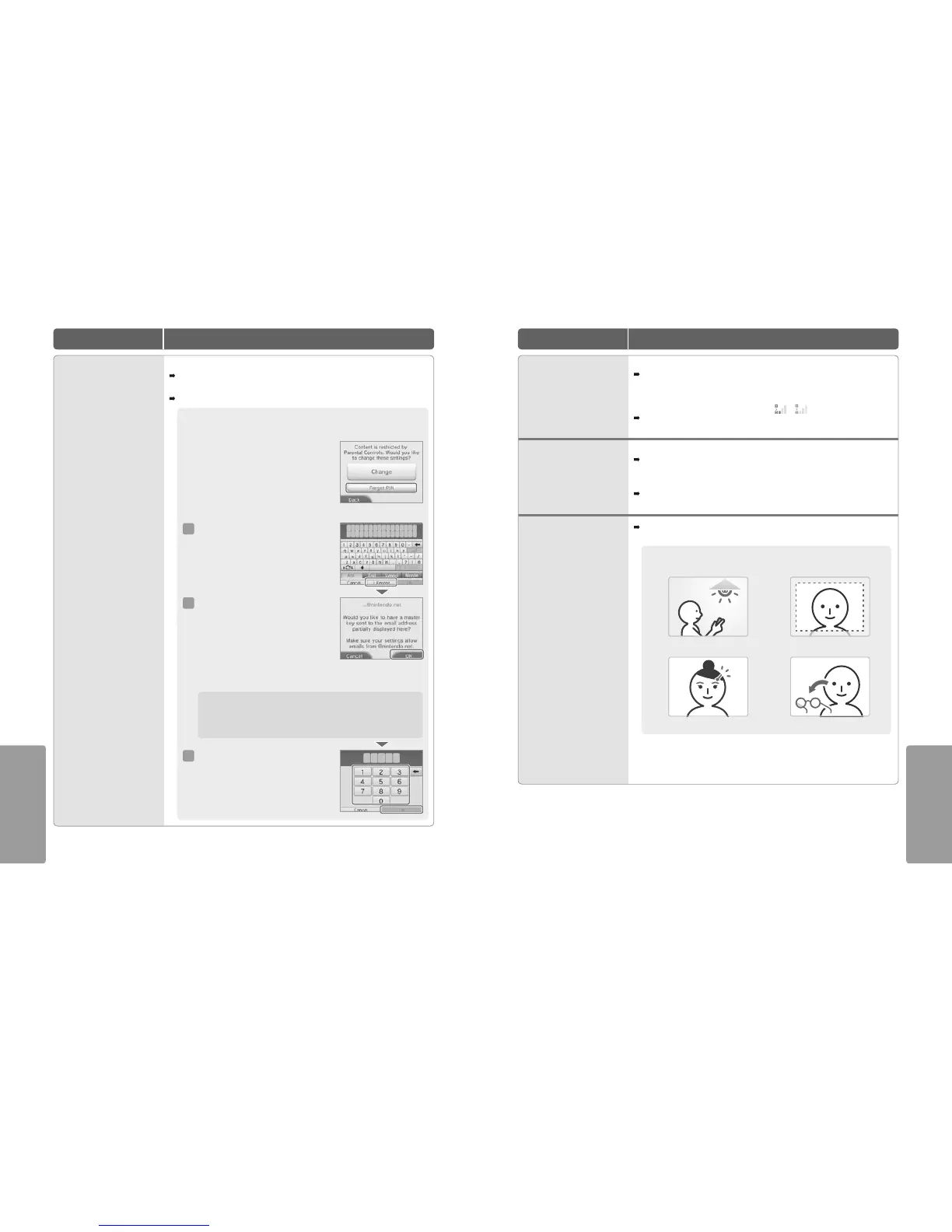
If you have forgotten your PIN
Touch FORGOT PIN on the rst screen that appears after
touching PARENTAL CONTROLS in System Settings, or
touch I FORGOT on the PIN entry screen. Enter the answer
to your secret question.
1
2
3
Touch I FORGOT on the secret answer entry screen.
If you have registered an email address, touch
OK on the screen for obtaining a master key.
A master key will then be sent to the registered
email address.
Note:
•
An internet connection is required to receive
a master key.
•
If you are blocking emails using a spam lter or domain ltering, ensure that your email
account can accept emails from the “@nintendo.net” domain.
Touch OK on the previous screen, then enter the
master key.
Note: Once you’ve entered the master key, your email
address will be deleted from the system. Please register
your email address again after setting a new PIN.
I am having diculty using wireless
communications (communications
are interrupted and the game cannot
be played smoothly)
•
Is wireless communication enabled?
To enable wireless communication, touch the icon in the upper-left corner of the Touch Screen
while on the HOME Menu to open the HOME Menu Settings. Touch ON under Wireless
Communication.
•
Is one of the following signal strength icons or shown on screen?
Signal strength appears to be poor. Move closer to the other player(s), and remove obstructions
between the systems.
Photos taken by the camera have
strange colours
•
Have you changed the colour settings in Nintendo 3DS Camera?
Check the camera mode and / or Manual Settings in Nintendo 3DS Camera (page 32).
•
Photo results can dier depending on your surroundings, particularly if taking pictures
in dimly-lit areas where the screen is lled with similarly-coloured objects.
Try to take a picture of something else. If the colours are still strange, contact the Nintendo
Customer Support (pages 90 – 91).
Nintendo 3DS Camera repeatedly
asks for a photo of my face, but does
not respond
This occurs when your face cannot be recognised properly. Please take note of the following
factors which may aect facial recognition.
Move to a well-lit area
Move hair to fully reveal your face
Face the camera straight on
Remove your glasses
Facial recognition hints
To improve the chances of your face being recognised, follow the advice below.
Other factors, such as hairstyle, the colour, shape and volume of facial hair, and jewellery, also
aect successful facial recognition.
Note: Even taking the aforementioned factors into account, individual features and certain environments
can make accurate recognition dicult.



 To Next Page