5-20
Okuma America Corporation
CONSTRCONSTR
CONSTRCONSTR
CONSTR
UCTIONUCTION
UCTIONUCTION
UCTION
Rev. 8-21-01
The following is information on how to troubleshoot a fiber optic cable.
The first step in checking a fiber optic cable is to do the light check. Simply put a light source
around one end of the fiber optic cable. If a light source is seen at the other end of the cabl
the cable is good. There will be some cases where the light source is seen but one of the tip
might be damaged causing an alarm. To check the tip of a fiber optic cable, a low cost slid
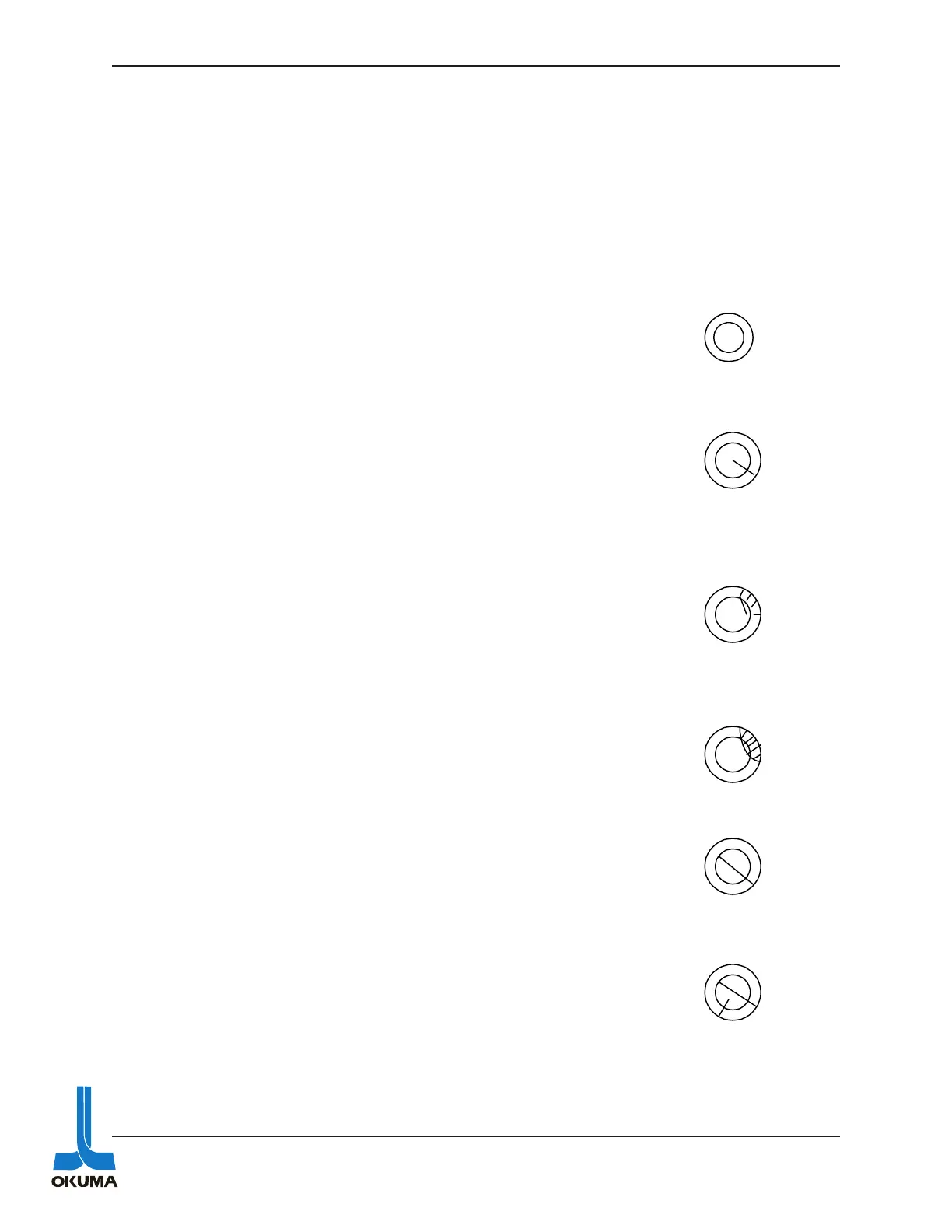
microscope can be used. The following are examples of tips that are either good or bad.
PASS
Perfect
The outside edge is
clean cut and a line that
is less than 2/3 of the
circumferenceof the
fiber itself.
A piece of the outside
edge is broken but is
less than 1/5 of the
circumference of the
fiber.
FAIL
A piece of the outside
edge is broken whick is
more than 1/5 of the
circumference of the
fiber.
The outside edge is
clean cut but a line that
is more than 2/3 of the
circumference of the
fiber itself.



 To Next Page