7-4
Status/Job Cancel > Checking Job History
Sending the Log History
You can send the log history by E-mail. You can either send it manually as needed or have it sent automatically
whenever a set number of jobs is reached.
Send History (page 8-5)
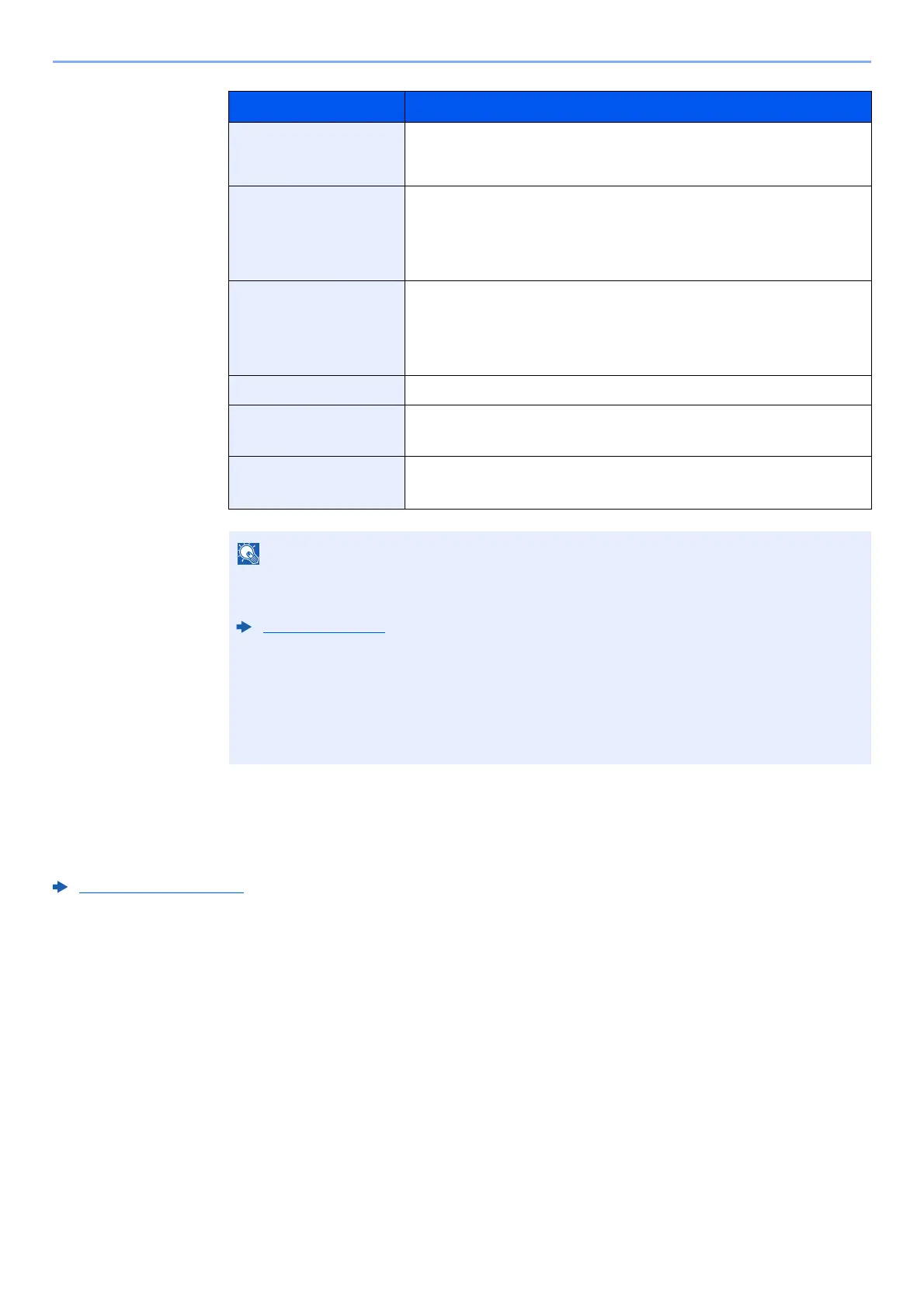
Item Description
Job Name When the job name in Job Name is displayed in a short form, select
[Detail] to see the complete job name. Select the [OK] key to return to the
previous screen.
Result Result of job
[OK]: The job has been comple
ted.
[Error]: An error has occurred.
[Cancel]: The job has been canceled.
Job Type [Printer]: Printer job
[Report]: Report/List
[USB]: Data from USB dr
ive
[Box]: Job from Document Box
Accepted Time Accepted time of job
User Name User Name for the executed job
If user login administration is disabled, [----] appears.
Printed Pages • Number of pages printed
• Number of copies printed / Total number of copies to be prin
ted
If the login user name entry screen appears during operations, log in by referring to the
following:
Login (page 2-13)
The factory default login user name and login password are set as shown below.
Login User Name: PG L2645: 4500 PG L2650: 5000
PG L2655: 5500
Login Password: PG L2645: 4500 PG L2650: 5000
PG L2655: 5500













 To Next Page