OMEM710 Hardware Manual 2v11
14
Omex have the values for the sensors sold by Omex. If you want to calibrate your own sensor then
either find the voltage output information (total scale, and offset) from the manufacturer, or follow
this procedure;
Select a suitable start point for Load Scalar to suit your sensor e.g. for a nominally 2bar sensor,
enter 2
Note the current value for MAP as Load
Change the pressure at the sensor by a known amount using a vacuum pump
Ignoring the absolute value, adjust Load Scalar until the correct change in value is shown by
MAP as Load to suit that pressure change e.g. if you have reduced the pressure by 50kPa,
then adjust Load Scalar until MAP as Load shows 50kPa less than it did before the pressure
change was made
Remove the pressure change and try the above again. As this is an iterative procedure you may
need to do it several times before the correct change is shown on the ECU
Remove any pressure changes from the sensor and adjust Load offset until MAP as Load shows
the current barometric air pressure.
5.3 MAF Sensor
Contact Omex if you would like to use MAF as the load sensor.
5.4 Coolant Temperature Sensor
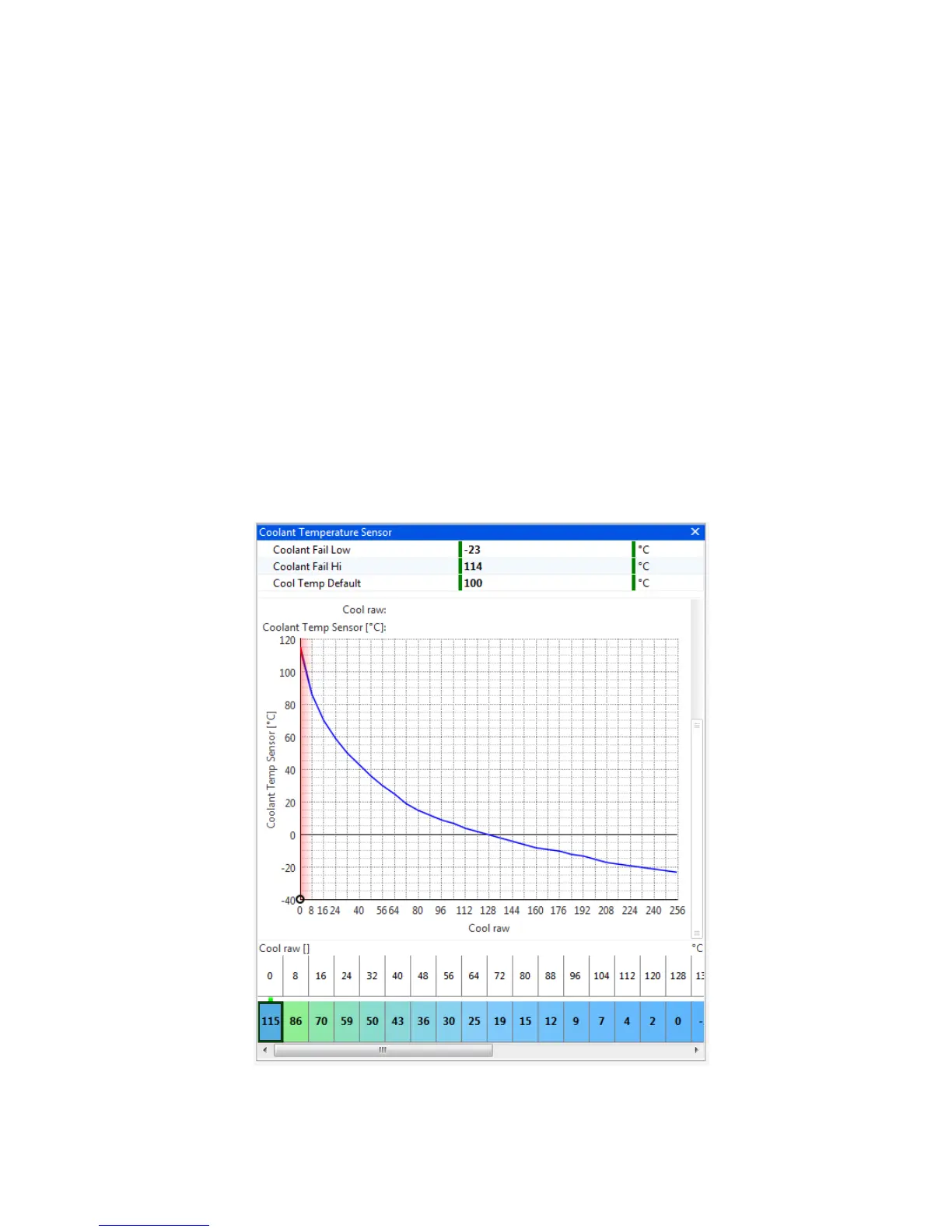
The coolant temperature sensor used by the Omex ECU is a resistive sensor. The raw output of this
sensor is calibrated in the ECU to give the information in a more usable form,
o
C. Sensors are
calibrated in the Coolant Temp Sensor table. The values for many sensors are known but you may


 To Next Page