OMEM710 Hardware Manual 2v11
63
Do not use the password features unless you have a particular requirement for it. If you
password-protect an ECU and lose the password, Omex CANNOT retrieve the calibration for
you. THERE IS NO ‘MASTER’ PASSWORD.
The ECU has security features that allow calibrations to be password protected. All Omex
calibrations are sent with the password cleared to allow all users access to the ECU. If you are using
security, clear the password at the beginning of a mapping session and set at the end. If setting a
password, keep notes of it and make sure that you have a copy of the last calibration in the ECU.
Setting a password
When connect to an ECU, a password may be set. To set a password;
Connect to the ECU
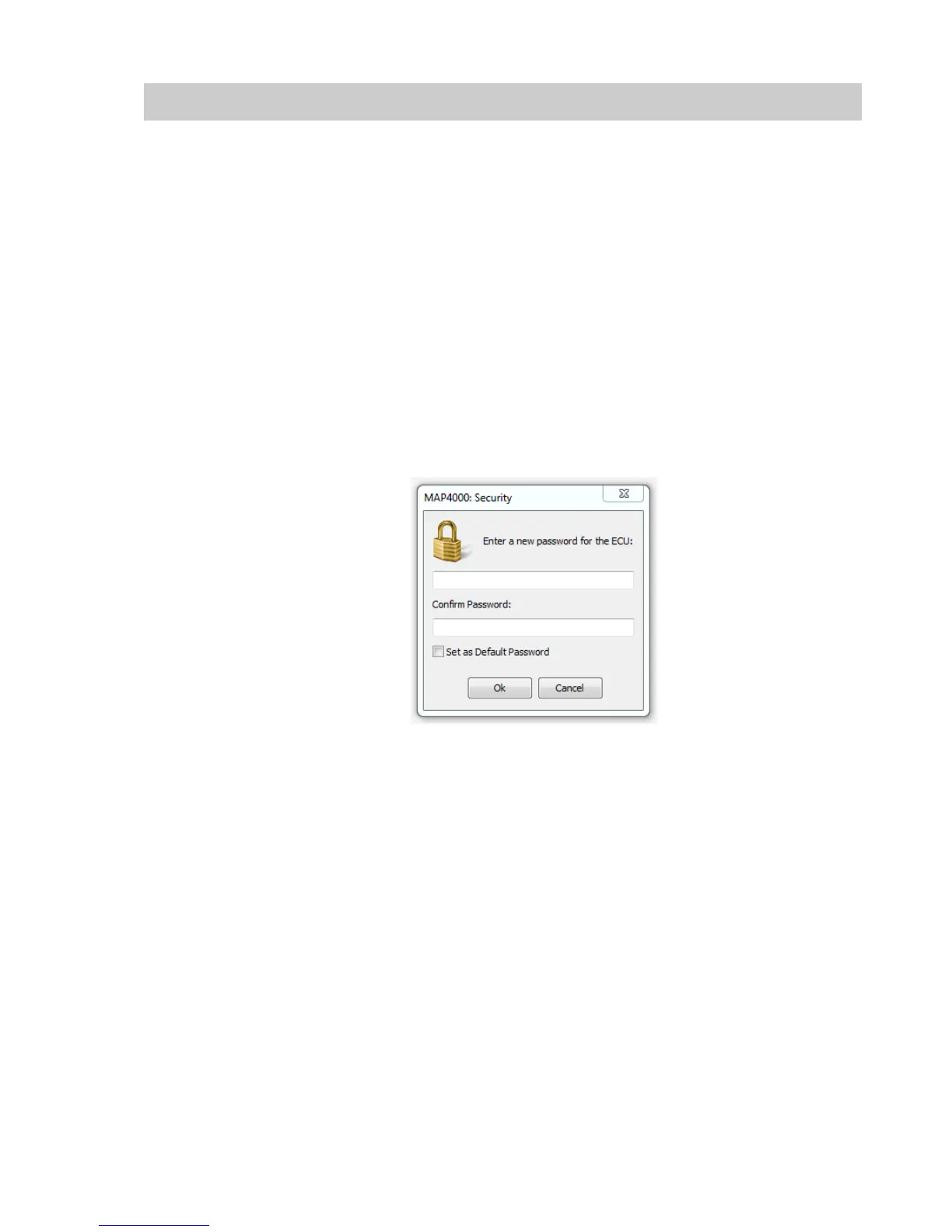
Select ECU | Security | Set Password...
A dialog box appears prompting for a password. The password may be any alphanumeric 6
character password.
Ensure that ‘Set as Default Password’ is NOT checked.
Enter a password and click OK.
Clearing a password
Once connected to a password protected ECU, the password may be cleared. Clearing the
password removes the security such that any PC can connect to this ECU.
To clear the password;
Connect to the ECU
Select ECU | Security | Clear Password...
Clearing a protected ECU
If using an ECU where the password is unknown it is possible to use the ECU. The information in
the ECU will be lost so the original calibration will never be accessed, and the ECU will instead be
filled with random numbers.
ECU | Connect
A dialog box appears prompting for a password.


 To Next Page