OMEM710 Hardware Manual 2v11
61
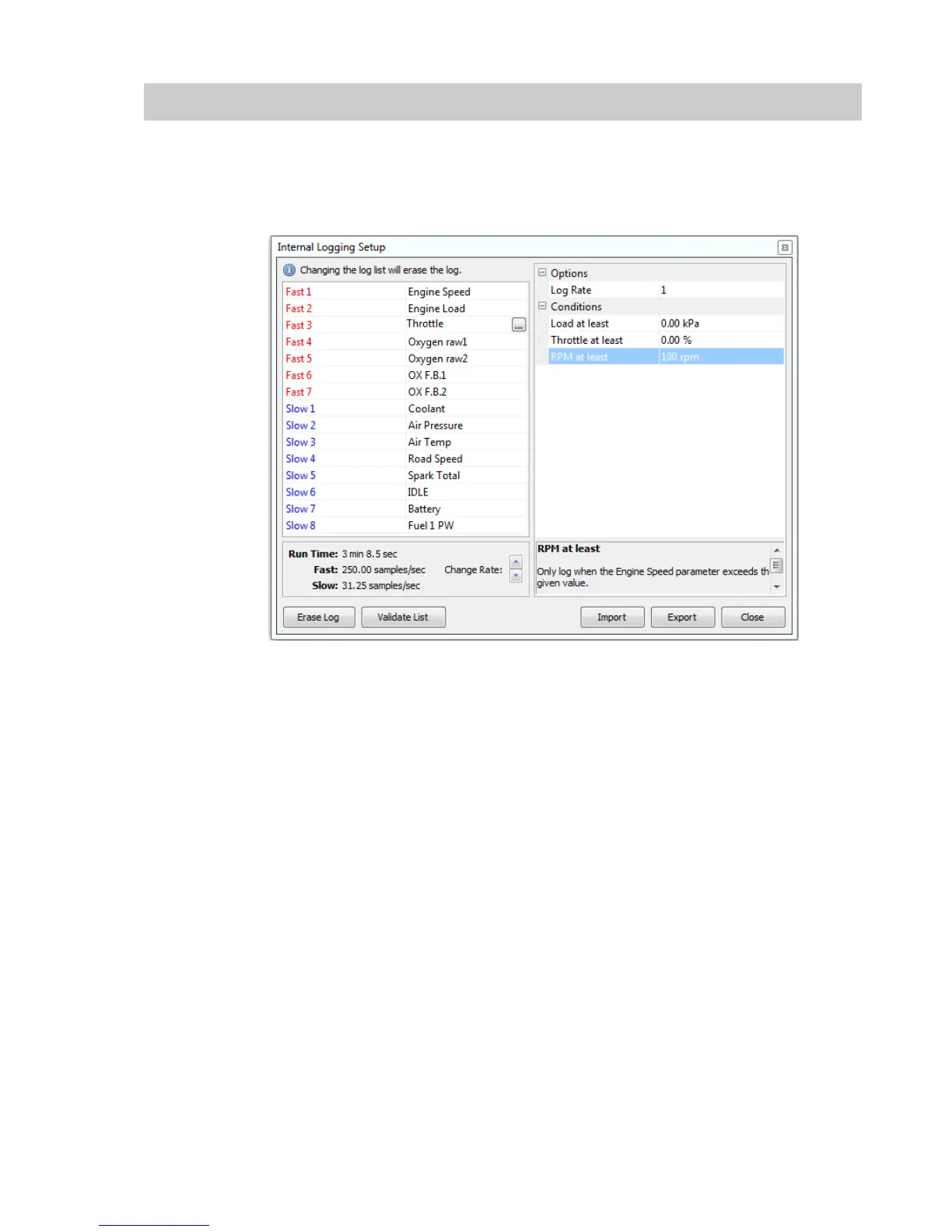
The internal data logging memory is 512k and varies in time duration dependant upon the logging
sample rate. There are 7 fast channels featuring recording rates of up to 250 times per second, and
8 slow channels, the log rate is displayed for the fast and slow channels separately, as well as the
time duration that the log rate will allow.
Logging can be triggered to start and stop dependent on engine conditions;
Load at least
The engine load must exceed this value to activate logging.
Throttle at least
The throttle position must exceed this value to activate logging.
RPM at least
The engine rpm must exceed this value to activate logging.
Rate
This function allows the user to change the rate at which the selected channels are recorded. The
total logging time based on the number and rate of parameters logged will also be displayed here.
Saving the Datalog
When a log is completed go to Logging | Download Internal Log. You will then be prompted for a
file name and location.
You will then be prompted for notes to be entered. Enter any specific information that pertains to the
datalog. ie added 5% fuel, etc. After the information has been entered, click on the close icon “x”
box. All notes are then saved with the log file for later viewing using the DATA2000 software.


 To Next Page