MF 64
Author: Donato Gavino Murru donato.gavino.murru@omgitaly.com Pag. 159 a 179
Common Adjustments
This chapter is valid for any kind of work requesting upward or downward modes.
Use the adjustment position according to the index direction for centering the tool.
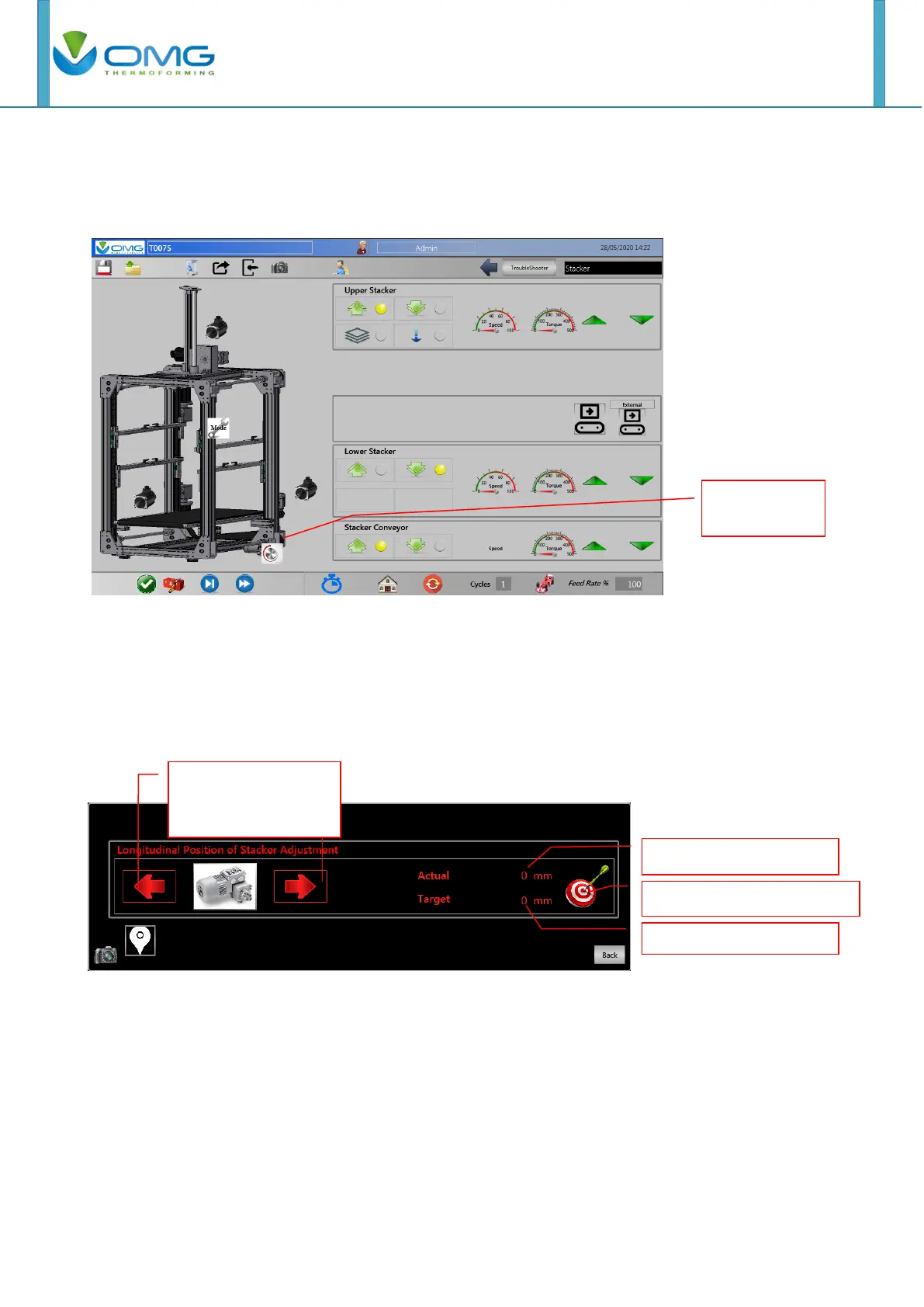
In Stacker page, push in the position of stacker adjustment from layout.
The Position set is the value that the operator can set to adjust the working position with automatic
button. When it is pushed, the stacker moves on position set without operator pushing on “arrows”
button continually.
When recalling a stored job in the machine memory, (see the chapter of file mould management),
the position set is the value stored in the file, and with the “Automatic button”, it will reach the set
point without manual centering.
Note: Set the position value and push the target symbol to reach set point without using arrow
buttons.
Note: Encoder increasing length is in the same direction than the index film travelling in automatic
cycle.
Note: At OMG, the internal convention regarding the direction of index movement is that the values
will increase with the forward direction of the index.
Note: For OMG internal convention, the value increasing of actual positioning is the same as the
index direction.
Stacker position for
button adjustment.



 To Next Page