Number of “closed-open” cycles – 5
If the vehicle is inside the geofence, the output will be enabled and disabled 5 times.
Output enabling/disabling (5 times each) will be repeated until the vehicle exits the
geofence.
Example 2. The following values are set:
State – “Being outside geofence”, “GPS available”
Number of “closed-open” cycles – “Continuous”
If the vehicle is outside the geofence and the GPS module data are valid, the output
will be enabled, until the moment of entering the geofence or GPS data absence.
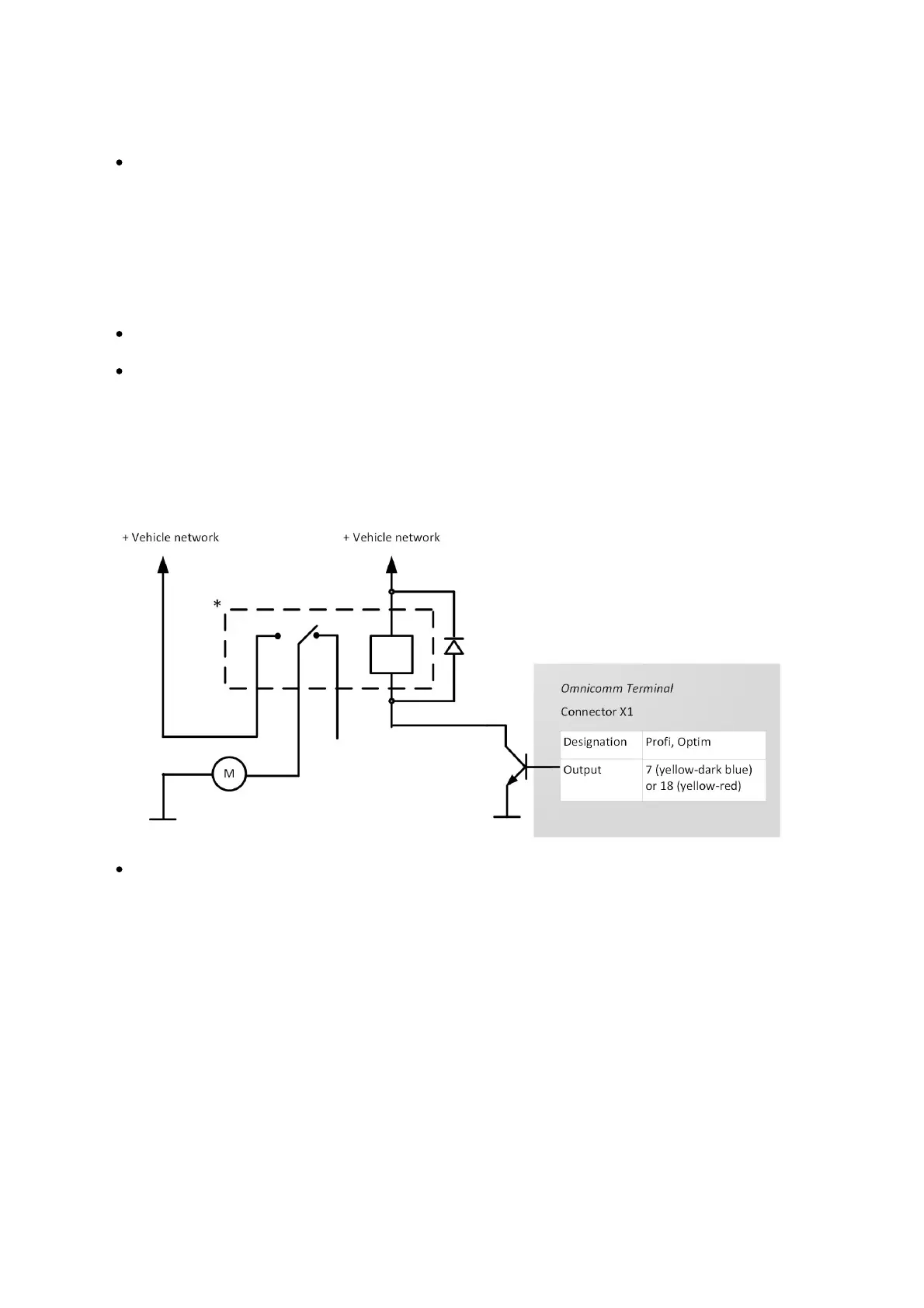
Connect auxiliary equipment to controlled outputs of Omnicomm Optim terminals
according to the diagram:
Relay with operation voltage suitable for the voltage of this vehicle network (12 or
24 VDC)
You can also control digital output by SMS commands: *SETDOUT param#,
*GETDOUT#, *CLRDOUT param#
Geofences Setting
In the terminals, geofence setting is provided to enable the controlled outputs.
In the “Settings” tab select the “Geofences” section from the list.



 To Next Page