In the field “Revolutions per minute” enter the value of RPM, in the field “Factor” enter
the value of conversion factor to calculate the motor hours value.
The conversion factors are determined based on the operating conditions of the
vehicle.
Maximum number of rows – 5.
Engine hours are displayed on the LLD indicator as hour values with a fractional part
(1.50 means 1 hour 30 minutes) in the format HH.XX in the range of up to 100 hours
and HHH.X in the range of 100.0 to 999.9 engine hours. If the number of engine hours
is more than 1000, the last three significant figures are displayed and one symbol
after the decimal point.
Motor hours are fully recorded in the terminal and sent to the CS on a continuous
accrual basis.
Tachograph
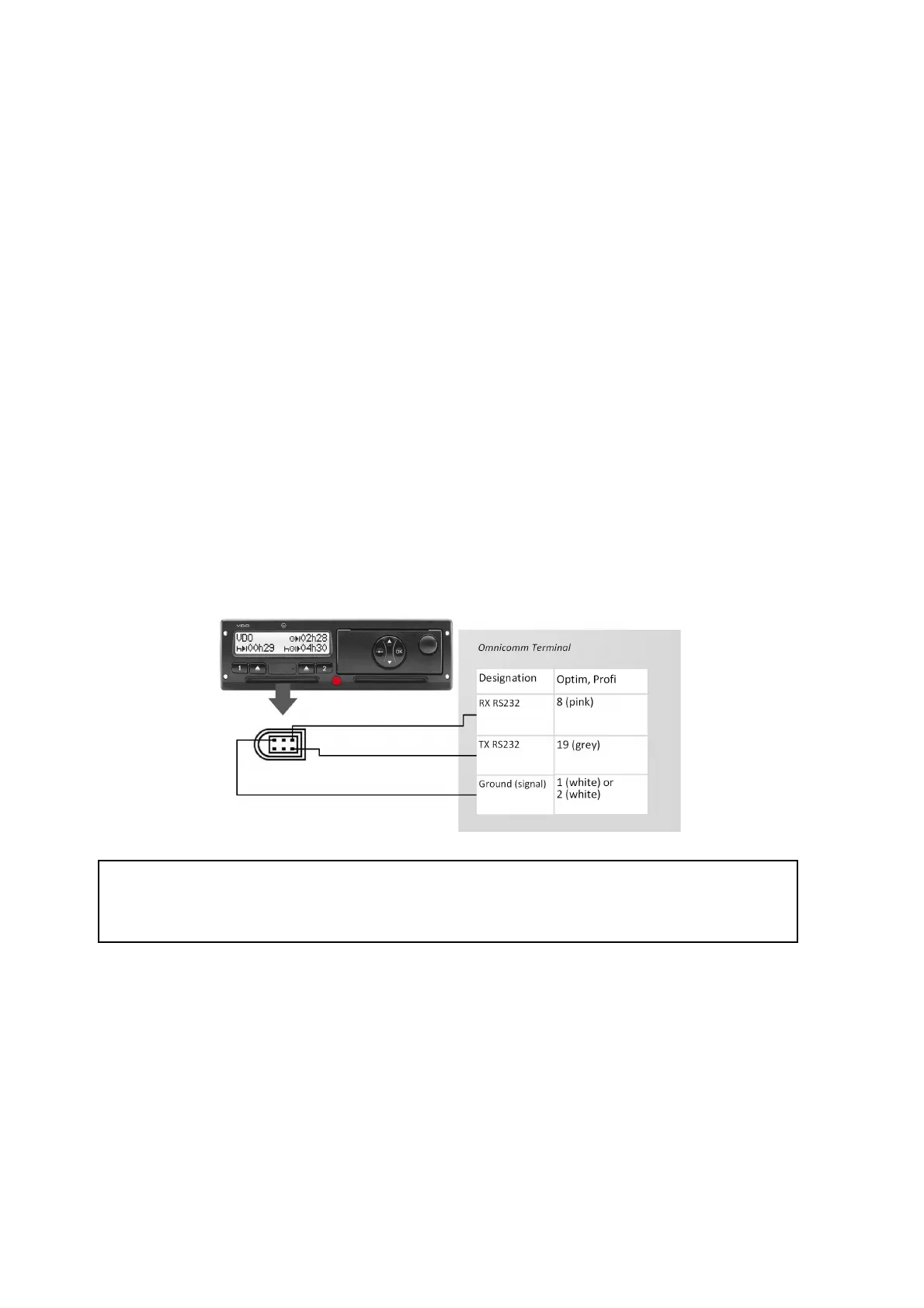
Connect the Continental tachograph to the Optim terminal via RS-232 and RS-485
according to the diagram:
Power connections of the terminal and the tachograph must be made similarly: either
both before, or both after the vehicle battery disconnect switch.
If needed, it is recommended to use the RS-232 to RS-485 converter.
To read the DDD files from the Continental tachograph, in the program configure the
RS-232 or RS-485 interface of the terminal.
Universal Inputs
Universal inputs are intended for connecting the auxiliary equipment with pulse,
direct-current, analog or frequency output and its operation monitoring.



 To Next Page