-20-
System operation check
Gate bar
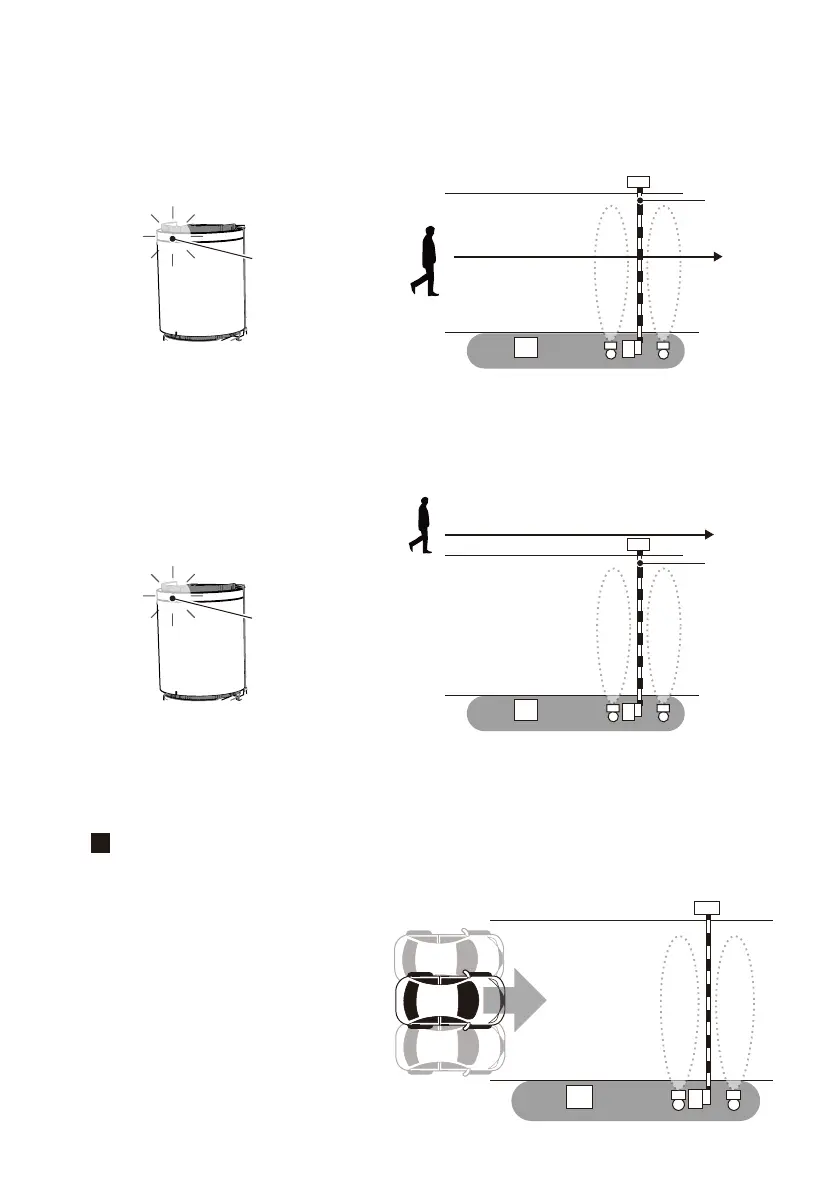
[1] Check inside the detection area
Stand at the center of the vehicle lane (position [1] in the figure below) and walk in the direction
of vehicle access. The position where the operation indicator changes from blinking green to
blinking red (detection status) is the edge of the detection area. (In normal operation mode, the
detection area may be a little bit longer. )
If the detection area is not as expected, adjust the space incorrect installation direction and/or
the detection range again.
[
1
]
[2] Check outside the detection area
Stand at the edge of the vehicle lane (position [2] in the figure below), walk along the border
and verify that it stayed in non-detection status. (Operation indicator blinks in blue.)
If the operation indicator blinks in a color other than blue (detection status), adjust the
sensor’ s installation direction and/or detection range, and restart from [1].
[
2
]
Gate bar
Continues to blink in blue
Blinking red
After verifying the detection area, use a vehicle to check the entire operation of the parking space devices.
For the operation check, verify proper operation with a vehicle parked on the left side, center, and right side of
the lane.
Left of the road
Center of the road
Right of the road
3



 To Next Page