-35-
Troubleshooting
9
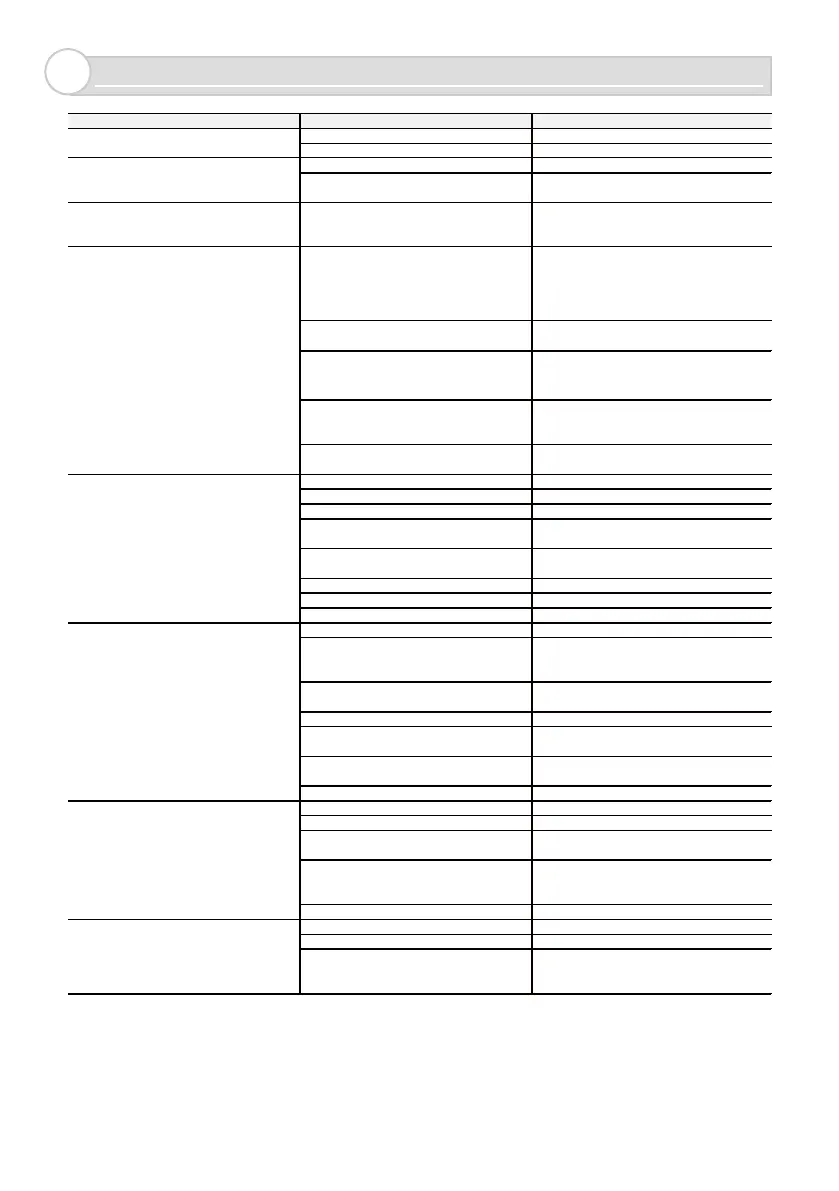
Power may not be supplied. Connect to a 12 to 24VAC/DC power supply.
The supply voltage may not be correct. Connect to a 12 to 24VAC/DC power supply.
The relay output wiring is incorrect. Wire the relay output correctly.
Output contact type is incorrect.
Select the correct output contact type for the
system device.
The operation indicator blinks in red and
yellow alternately during calibration
There is som e movem ent while the
calibration in progress.
Remove the pedestrian or object (e.g. flag,
banner, weeds) from the detection area and
perform calibration again.
A person or an object in the detection area
is detected.
The ground in the detection area is uneven,
such as grating. Step back people or
remove objects in the detection area. If the
object cannot be removed, shorten the
The height of the unit is too low and the
ground is being detected.
Install the sensor so that the bottom of the
main unit is 500mm(5in.) above the ground.
The ground is detected because the pole
on which the sensor is installed or the
ground is tilted.
If the pole is tilted against the ground, the
sensor may not operate properly. Please
install the sensor on a pole standing up
The angle of the sensor (detection area)
is not correct.
Adjus t the sensor’s angle so that it is not
affected by nearby vehicles, walls (fences),
There is slide gate or swing gate in the
detection area.
Adjus t the sensor's angle (detection area)
15 degree away from the gate.
Power may not be supplied. Connect to a 12 to 24VAC/DC power supply.
The supply voltage may not be correct. Connect to a 12 to 24VAC/DC power supply.
Calibration is not properly perform ed. Perform calibration correctly.
The angle of the sensor (detection area) is
not correct.
Adjus t the sensor’s angle (detection area)
to face the correct angle.
The sensor may be affected by the
background.
Perform calibration again.
The detection range may be too short. Increase the detection range.
Main or Clos e range sens itivity is too low. Increas e Main or Close range sensitivity.
Relay response time is too long. Shorter Relay response time.
Fine tuning pres ence is too high. Reduce Fine tuning presence.
There is a pedes trian, bicycle, large
package, tall weeds, etc. in the detection
Remove these objects from the detection
area. If they cannot be removed, reduce the
There is an object attached to the sensor
surface such as chewing gum.
Remove the object.
Calibration is not properly perform ed. Perform calibration properly.
The angle of the sensor (detection area) is
not correct.
Adjus t the sensor’s angle (detection area)
to face the correct angle.
Installation location and settings of
the sensor are incorrect.
Select the “Application” according to the
installation location, and adjust the
Hold timer is too long. Set Hold timer shorter.
Fine tuning pres ence may be too low. Increase Fine tuning presence.
The detection range may be too short. Increase the detection range.
The angle of the sensor (detection area) is
not correct.
Adjus t the sensor (detection area) angle for
correct detection.
Installation location and settings of
the sensor are incorrect.
Select the “Application” and “Angle”
according to the ins tallation location, and
Hold timer is too short. Increase Hold timer.
Main or Clos e range sens itivity is too high. Reduce Main or Clos e range sensitivity.
Relay response time is too short. Set Relay respons e time longer.
More than one pedestrian pas sing.
The sensor may detect a crowd. Take
measures to from entering the from
The operation indicator blinks in red and
blue alternately during calibration (high
reflection error).
The sensor does not revert back to non-
detection status when a vehicle leaves the
detection area, or takes long to change
status.
A vehicle was detected, but it changed to
non-detection.
A vehicle entering the detection area is
occasionally not detected or never
detected.
The sensor detects a pedestrian ent
ering
the detection area.
Operation indicator does not turn On.
Sensor detection is not correctly conveyed
to a system device.



 To Next Page