-5-
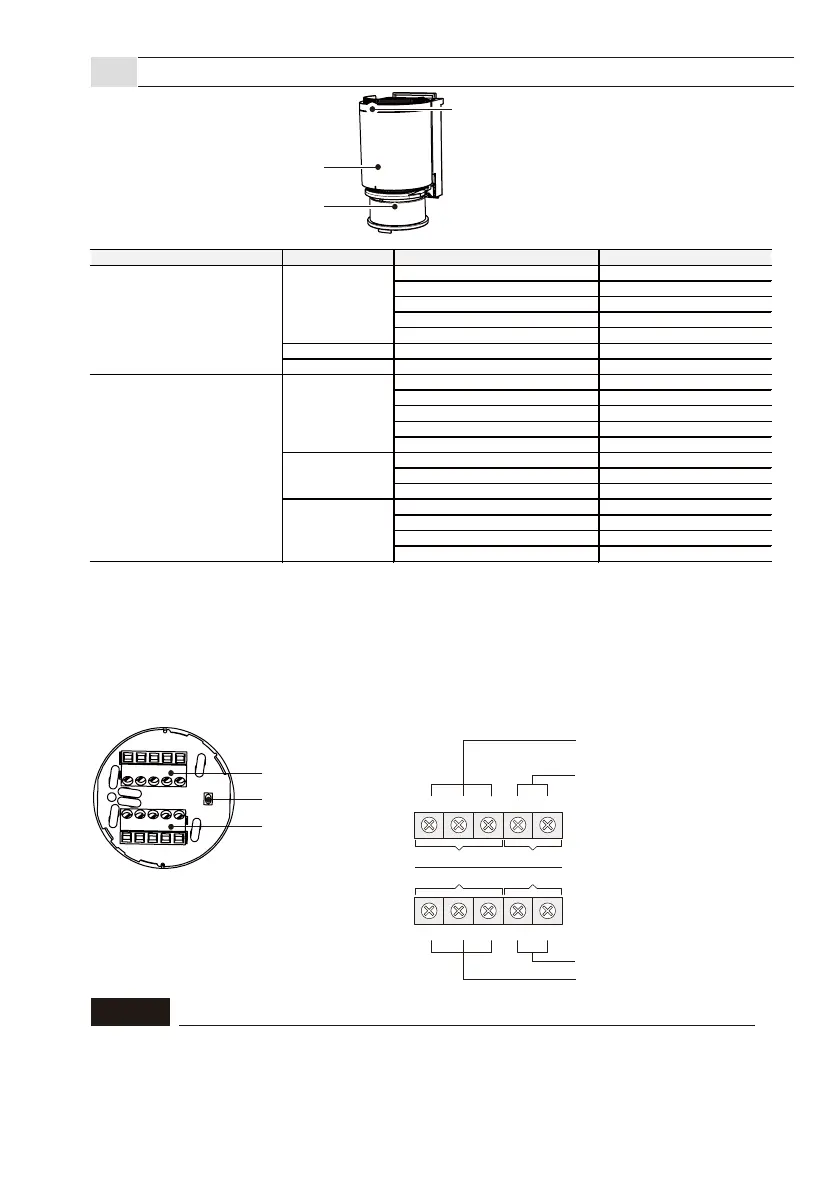
●Operation indicator
●Terminal block
Applicable wire
Solid wire: 0.5-1.2mm(0.02-0.05in) (AWG 30-16)
Stranded wire: 0.3-2.0sq (AWG 22-14)
3-3
Sensor unit (Common for all models)
Sensor unit
Factory reset button
Terminal block 1
Terminal block 2
Operation indicator can be selected to On / Off.
(
Refer P30 8-4-1 “Operation Indicator” )
Terminal block
Connect the power cable to the “Power supply” terminals, and relay output cables to the output terminals.
Pay careful attention to output differences, and select output 1 or 2 according to the application.
*1
︓
Press and hold the reset button for 5 to 10 seconds for the factory reset.
*2
︓
The operation indicator flashing blue for 30 seconds, it will automatically return to the normal operation mode.
*3
︓
Calibration has not been performed.
*4
︓
After blinking for 10 seconds, it returns to the status of Normal operation. Calibration is completed.
*3, 4 : Refer P18 "7-3 Calibration" to fix this issue.
*5 : The operation indicator is always On, even if “Indicator” in App is set to "Off".
Non-voltage mechanical relay output
30VDC 1A or less
(resistance load)
Non-voltage solid state relay output
30VDC 0.3A or less
(resistance load)
︓
Terminal block
2
︓
Terminal block
1
Power supply 12 to 24VAC/DC
Contact input
Output 1 Power
Output 2
Input
N.C. +ーN.O. COM
N.O. GNDINN.C. COM
Sensor reset
All settings including password and calibration value can be returned to the factory default.
If you relocate the sensor, please reset the sensor. Press and hold the factory reset button for 5
to 10 seconds to return for the factory reset. When the reset is completed, the operation
indicator lights up in blue for 2 seconds. It is also possible to reset it by selecting the menu item
"Reset to factory default settings" in the app.
NOTE
Operation mode Operation status Status Operation indicator
Standby Solid Green
Standby Enviromental notification Solid Purple
Pre-detection Solid Yellow
Detection Solid Red
Calibration uncompleted Solid Blue
Start up Start up Solid Blue (two sec)
Factory reset Complete
Standby Blinking Green(Slow)
Standby Enviromental notification Blinking Purple(Slow)
Pre-detection Blinking Yellow(Slow)
Detection Blinking Red(Slow)
Calibration uncompleted Blinking Blue(Slow)
Standby
Pre-detection Blinking Yellow
Detection Blinking Red
In process Blinking Blue & Green
Unstable error
Blinking Red & Yellow(Fast)
*3
High reflection error
Blinking Red & Blue(Fast)
*3
Area check
Calibration
Smartphone App connected mode
Standard operation mode
Standard operation
Standard operation



 To Next Page