-25-
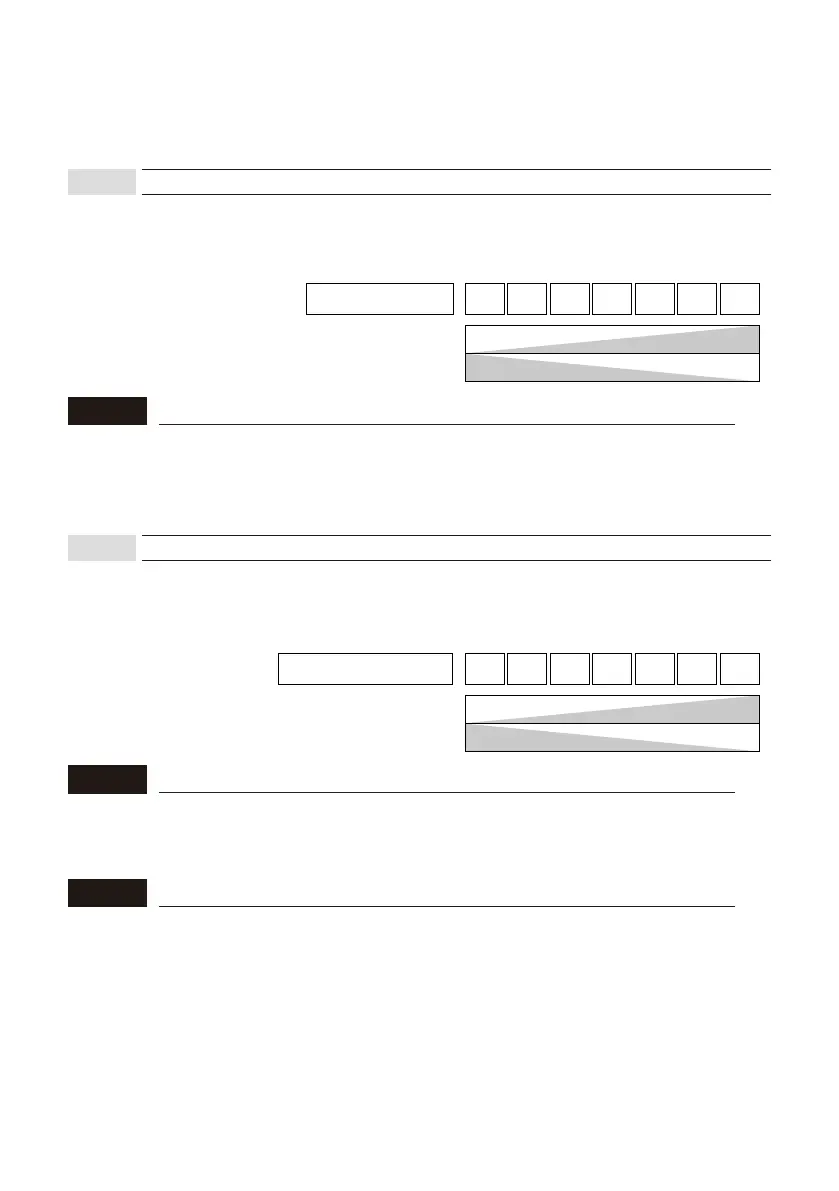
This parameter adjusts the sensitivity of detection when a vehicle enters the detection area.
The detection and the false detection avoidance capability have the relationship shown in the
figure below.
The following setting items should be configured if the sensor does not operate as expected
during a system operation check or if an error occurs. These do not need to be set for normal
installation. Change the settings as required using the App.
Main Sensitivity
LOW
Vehicle detection
capability
False detection
avoidance capability
HIGH
HIGH
LOW
1
2 3 4 5 6 7
This may need to be changed if:
• This needs to be increased : Sometimes a vehicle is not detected.
Detection response is too slow.
• This needs to be decreased : Pedestrians are detected.
NOTE
This parameter adjusts the sensitivity to switch to the non-detection status when a vehicle
leaves the space, leaving the space empty.
The presence detection and the tailgating avoidance capability have the relationship shown in
the figure below.
Fine tuning presence
LOW
Presence detection
capability
Tailgating avoidance
capability
HIGH
HIGH
LOW
1
2 3 4 5 6 7
This may need to be changed if:
• This needs to be increased : Even though there is a vehicle, it is not kept detected.
• This needs to be decreased : Even though the vehicle is left, it is still detected.
taigating may occurs.
NOTE
Tailgating
This term refers to unauthorized entry following a vehicle that has entered prpperly. When two
vehicles come closer in a row and the sensor could not determine the gap in between, it
detectes as one vehicle. This is a situation for tailgating.
NOTE
8-3-1
Main sensitivity
8-3-2
Fine tuning presence



 To Next Page