_______________________________________________________________________________________
ORVED S.P.A Rev.01 – 09/2019 – cod. 1500735-00EN – User Manual for
IDEA
vacuum packing machines
Pag. 10 a 76
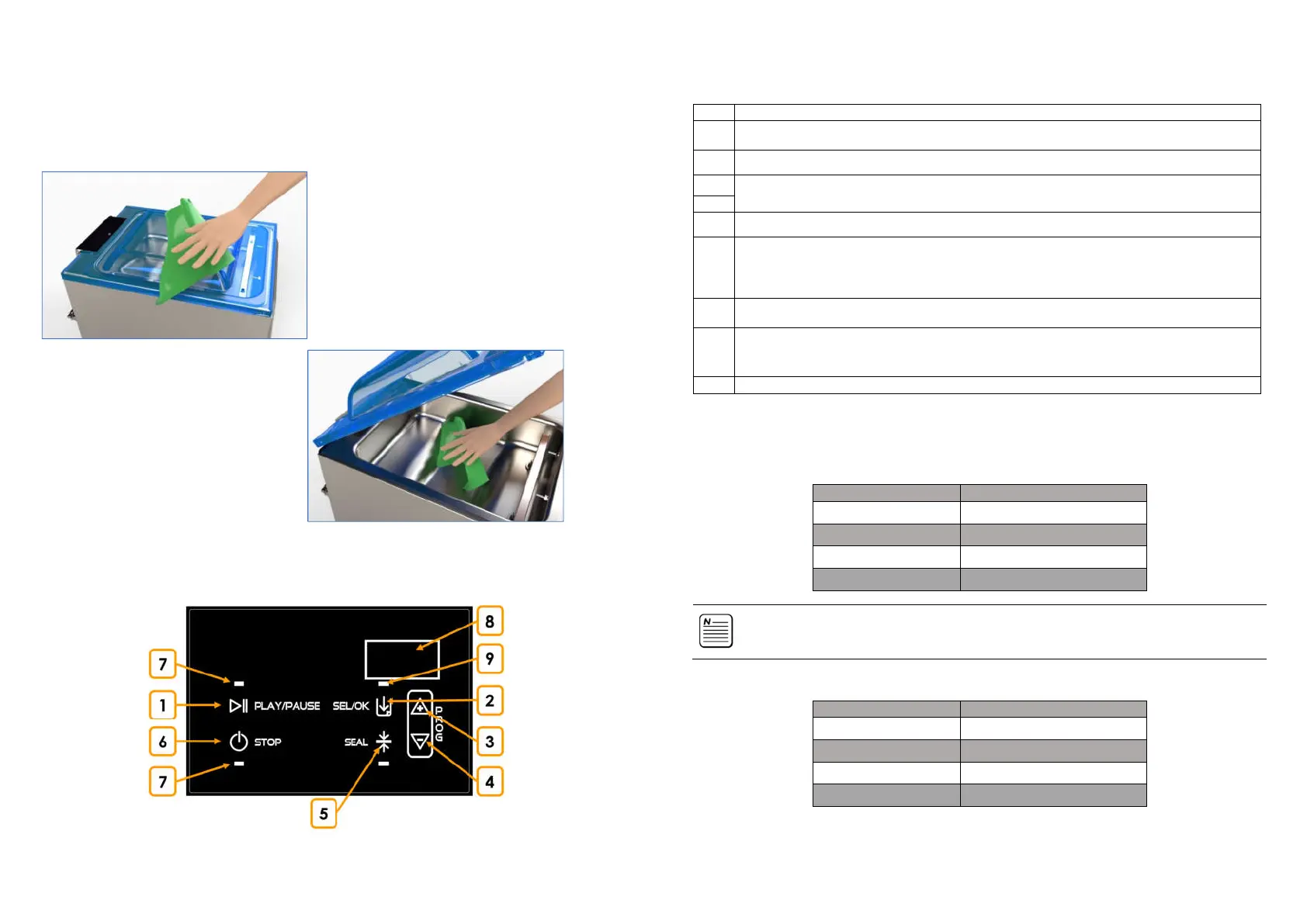
5 BEFORE USING THE VACUUM PACKING MACHINE
• Before using the machine, the vacuum chamber and lid must be cleaned using a clean, soft cloth soaked
in potable water.
• It is recommended not to use aggressive detergents, stainless steel scrubbers, scrapers or abrasive, acidic
or aggressive substances, which may permanently damage the internal surfaces of the vacuum
chamber.
6 Command panel: Idea 30 – idea 40 – idea 31 – idea 41
_______________________________________________________________________________________
ORVED S.P.A Rev.01 – 09/2019 – cod. 1500735-00EN – User Manual for
IDEA
vacuum packing machines
Pag. 11 a 76
N° DESCRIPTION
1
Pressed contemporarily with STOP for 4”, displays the number of vacuum cycles operated
Pressed contemporarily with STOP at turning on, allows to activate or deactivate the acoustic signal
2
Allows to set the vacuum level, the additional vacuum, Gas (only on IDEA31 - IDEA41)
If pressed after reaching the 90% of vacuum, it allows to anticipate the GAS injection
3
Scroll down the programs
Change the parameters values
Pressed contemporarily for 4”, allow the saved program reset, restoring the factory values.
5
Allows to set the sealing time
Pressed during the vacuum cycle, allows to anticipate the sealing
6
stand-by/on and on/stand-by (pressed for 5”)
Pressed contemporarily with PLAY/PAUSE for 4” displays the number of vacuum cycles operated
Pressed contemporarily with PLAY/PAUSE at turning on, allows to activate or deactivate the acoustic
signal
Interrupts the current vacuum cycle
7
Displays the current function
8
Displays the active program
Displays the active function and the set value
Displays any alarm
Displays the vacuum cycles operated before the oil change
If ON, indicates that the GAS function is active
6.1 Functions and warnings
6.1.1 Maximum admissible values
VACUUM 10% – 99%
ADDITIONAL VACUUM 1 – 60 sec
SEALING 0,1 – 6,0 sec
GAS (
IDEA31 - IDEA41)
1 – 90%
CAUTION!
It is necessary to carry out preliminary tests, to identify the optimal percentage of GAS to be
injected, for every single product to be packed.
6.1.2 Factory configuration
FUNCTION VALORE
VACUUM 99
ADDITIONAL VACUUM 5 sec
SEALING 2,5 sec
GAS (
IDEA31 - IDEA41)
OFF
6.1.3 Activate / deactivate the acoustic signal
(
per
idea 30 – 40
-
Idea 31 – 41)



 To Next Page